
A passive enclosure may be enough for ABS or ASA, while an actively heated chamber offers more control for large, warp-prone parts or repeatable production. The difference in active heated chamber vs passive enclosure printing is how warmth is created: a passive enclosure retains heat from the printer, while an active system uses a dedicated heater and temperature control.
An enclosed printer does not automatically create the right conditions for every material. A passive enclosure’s temperature can vary with the heated bed, room conditions, ventilation and print duration, and may warm unevenly. Active heating provides more deliberate control, but is not necessary for every filament or print.
This guide compares open, passive and actively heated setups, then matches chamber conditions to common materials such as PLA, PETG, TPU, ABS, ASA, nylon and polycarbonate. It also offers a practical way to choose based on material, part size and print goals.
Key Takeaways
- Choose a passive enclosure as a practical starting point for ordinary-size ABS and ASA parts; consider active heating when parts are large, thin-walled or prone to warping.
- Match chamber conditions to the filament: PLA, PETG and TPU usually need no active chamber heat, while nylon and polycarbonate demand closer attention to grade and part size.
- Remember that a warm chamber won’t dry nylon filament. Keep it dry during printing to address moisture-related issues.
- Compare open, passive and actively heated setups by temperature control and consistency, not just whether the printer has an enclosure.
- Use the decision guide to weigh your material, part dimensions and repeatability needs before choosing a chamber setup.
Heated chamber 3D printer vs passive enclosure: what’s the real difference?
A passive enclosure traps heat from the bed and print; an active chamber adds a heater and temperature control. This difference affects warping, layer adhesion and consistency with materials such as ABS and polycarbonate.
Chamber Temperature Effects
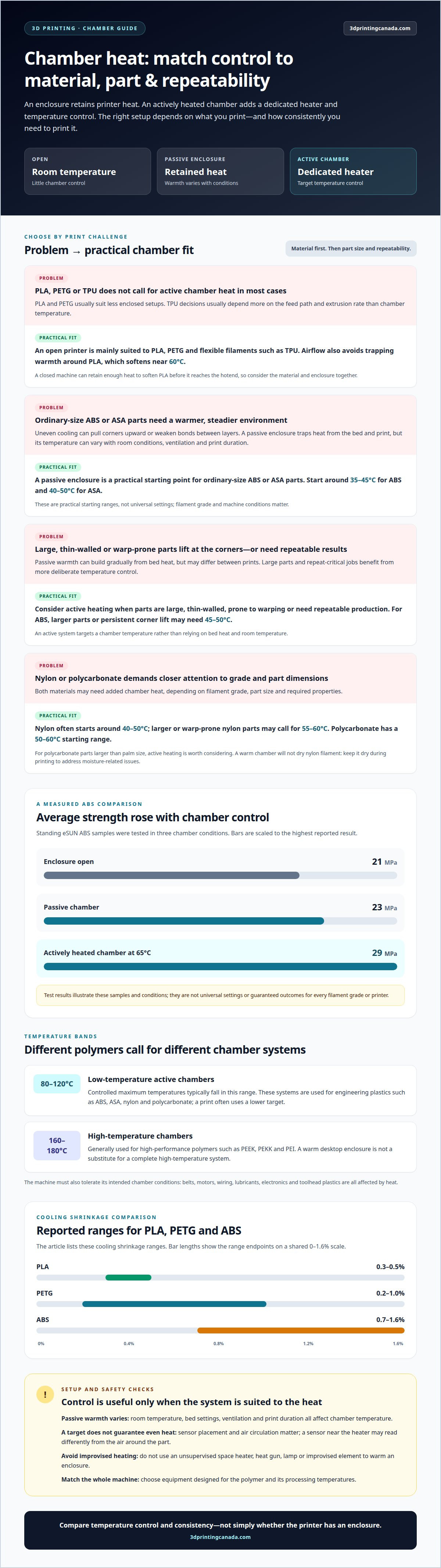
As extruded plastic cools, it shrinks; uneven cooling can pull corners upward or weaken bonds between layers. A warmer chamber reduces the temperature difference between fresh material and the surrounding air, helping limit those stresses. In tests with standing eSUN ABS samples, average strength was 21 MPa with the enclosure open, 23 MPa in a passive chamber and 29 MPa in an actively heated chamber at 65°C.
For ABS, start around 35-45°C chamber temperature; larger parts or persistent corner lift may need 45-50°C. ASA can start around 40-50°C, while nylon often starts around 40-50°C. These are practical starting ranges, not universal settings for every filament grade or machine.
Low-Temperature Active Chambers
Low-temperature active chambers control warmth for engineering plastics such as ABS, ASA, nylon and polycarbonate. Their controlled maximum temperatures typically fall between 80°C and 120°C, though a print often uses a lower target. For example, a 50-60°C starting range suits polycarbonate, while larger or warp-prone nylon parts may call for 55-60°C.
Unlike a passive enclosure, an active system can target a chamber temperature rather than relying on bed heat and room temperature. Match the setpoint to the filament and part, since material grades and dimensions affect how much chamber heat helps.
High-Temperature Chambers
High-temperature active chambers generally control temperatures between 160°C and 180°C for high-performance polymers such as PEEK, PEKK and PEI. They differ from low-temperature systems in both their operating range and the machine design required. A warm desktop enclosure alone is not a substitute for a complete high-temperature system.
Heat affects the whole machine, not just the printed part. Belts, motors, wiring, lubricants, electronics and toolhead plastics must tolerate the intended chamber conditions. Choose a system designed for the polymer and its processing temperatures.
Temperature Repeatability
A passive enclosure’s temperature varies with room temperature, bed settings, ventilation and print duration. Bed heat can gradually warm the air, but results may differ between prints. Active heating adds a heater and closed-loop control, making it easier to maintain a chosen target across repeat jobs.
Temperature control does not guarantee uniform heat. A sensor near the heater may read differently from the air around the part, so sensor placement and air circulation matter. Compare temperature consistency and control, not just a machine’s advertised maximum.
| Option | Temperature source | Control and best fit |
|---|---|---|
| Open printer | Room temperature | Little chamber control; suitable for less warp-prone prints. |
| Passive enclosure | Retained printer heat | Variable warmth; a starting point for ordinary-size ABS or ASA parts. |
| Active chamber | Dedicated heater | Setpoint control; useful for larger, warp-prone or repeat-critical work. |
In Canada, enclosure costs depend on whether you choose a passive build or a purpose-built active system, as well as its materials, heater and controls. Energy use depends on heater demand, warm-up time, insulation, print duration and your electricity rate.
For a safer passive upgrade, use components suited to the machine’s operating temperatures and account for heat-sensitive parts. Avoid using an unsupervised space heater, heat gun, lamp or improvised element to warm an enclosure. Choose a setup that fits the material, part size and need for consistent chamber temperature.
Material-specific chamber needs for PLA, PETG, TPU, ABS, ASA, nylon, and polycarbonate
Filament choice determines whether an open, passively enclosed or actively heated machine makes sense. Start with the material, then consider part size, internal geometry and the printer’s hotend and chamber limits.
Canadian buyers comparing printers with active heated chambers should focus on operating range and temperature control. Low-temperature systems typically allow controlled maximums of 80-120°C, while high-temperature chambers generally control 160-180°C; these categories suit different material requirements.
Material Suitability
ABS and ASA benefit from a warm, stable chamber when parts are large or prone to corner lift. Polycarbonate and nylon may also need added chamber heat, depending on filament grade, part size and required properties. For polycarbonate parts larger than palm size, active heating is worth considering.
PLA and PETG usually suit less enclosed setups. Their listed cooling shrinkage ranges are 0.3-0.5% for PLA and 0.2-1.0% for PETG, compared with 0.7-1.6% for ABS. TPU decisions usually depend more on feed path and extrusion rate than chamber temperature.
Open-Printer Material Suitability
Open printers are mainly suited to PLA, PETG and flexible filaments such as TPU. They allow airflow and avoid trapping warmth around PLA, which softens near 60°C. A closed machine can retain heat that softens PLA before it reaches the hotend, so material and enclosure choice should work together.
ABS, ASA, nylon and polycarbonate are more sensitive to cooling and warping. An open printer may work for small parts, while larger or flatter prints may need a more controlled chamber. Dry nylon filament and keep it dry during printing; chamber heat does not replace drying.
For ABS, ASA, nylon or polycarbonate, match the printer’s chamber capability to the exact filament grade and part. High-performance polymers such as PEEK, PEKK and PEI typically require a complete high-temperature machine system, not just a warm enclosure. If your setup cannot support the required conditions, choosing another material or production approach is more practical than improvised chamber heating.
Consider ventilation and filtration alongside chamber temperature when printing ABS, ASA and nylon. Filtration is not a universal substitute for ventilation, and aggressive exhaust can undermine the enclosure’s thermal environment. Aim to manage emissions without constantly drawing heat out of the chamber.
If temperature swings point to a hardware fault rather than a material mismatch, 3D printer repair services can address printer issues. For material and machine selection, compare the filament’s requirements with the chamber conditions the printer can control.
Passive enclosure versus actively heated chamber
Both setups reduce exposure to room-temperature air, but only one actively controls chamber heat. The practical difference in active heated chamber vs passive enclosure printing is how temperature responds to the bed, print duration and changing conditions.
Passive Enclosures
A passive enclosure surrounds the printer and retains heat from its bed, nozzle, motors and printed part. It has no dedicated chamber heater, so temperature rises and falls with bed settings, room temperature, ventilation and print duration. A passive enclosure typically reaches an uncontrolled 30-45°C, making its thermal conditions less predictable between prints.
Retained warmth can help with standard ABS or ASA parts, but it is not a setpoint. A long print may gradually warm the enclosure, while opening the door or changing room temperature can shift conditions. Results depend on the machine and its surroundings.
Actively Heated Chambers
An actively heated chamber uses a dedicated heater and closed-loop temperature control to target a chosen chamber temperature. A 100-300 W PTC ceramic heater is one identified heating option. Compared with passive heat retention, active heating gives the machine a way to respond when chamber temperature moves away from its target.
Temperature control still depends on chamber design. A sensor near the heater may read differently from the air around the part, and circulation affects uniformity. For repeat-critical work, sensor placement and airflow matter alongside the stated maximum temperature.
Consider cooling throughout the entire build, not just during the first layers. In a passive enclosure, the air may keep warming while the heated bed runs, so short and long prints can experience different conditions. Active control can reduce that variation, but cannot correct poor airflow or an unsuitable material profile.
Heat also affects machine components. Belts, motors, lubricants, cable chains, cameras, electronics and toolhead plastics are all exposed to warmth inside the chamber. Purpose-built heated-chamber machines account for these components; adding an improvised heater to a standard enclosure does not provide the same system-level design.
Choose based on the print goal. A passive enclosure suits jobs where retained bed heat is adequate and some temperature variation is acceptable. Active heating is more useful for large, thin-walled or repeat-critical parts that need controlled conditions. PEEK, PEKK and PEI typically require a complete high-temperature machine system rather than a warmed desktop enclosure.
When comparing active heated chamber vs passive enclosure printing, consider the required chamber conditions, the machine’s intended operating range, sensor placement and airflow. Do not judge by the advertised maximum alone: it does not show how quickly or evenly the chamber heats, or how well it maintains temperature during a print.
Passive heating from printer waste heat
A heated bed can warm an insulated enclosure without a separate chamber heater. In suitable conditions, bed heat may raise chamber air to 35-45°C. That warmth can help with some ABS or ASA prints, but the printer’s waste heat doesn’t create a controlled setpoint. Room temperature, bed settings, insulation and ventilation all affect the result.
Expect chamber temperature to build gradually. A long print gives the bed more time to warm the enclosure than a short job, so the air around the part can change during printing. A sensor helps track chamber temperature, but placement matters: a reading near the bed may differ from the air around the print.
PLA needs particular care in an enclosure. It softens near 60°C, and excessive internal heat can soften filament before it reaches the extruder. That heat creep can disrupt feeding and contribute to jams. A closed enclosure can also reduce part cooling, which matters for PLA profiles that rely on cooling to hold detail.
Ventilation can help manage excess heat during PLA printing, but it also changes chamber conditions. Opening a vent or door releases warm air and lets cooler room air in. This may help prevent heat buildup, but can make conditions less stable for a warp-prone ABS part. Choose ventilation for the filament and print rather than using one setting for every job.
Heat reaches the machine’s components too. Enclosure temperatures above 60°C may affect stepper motors and PTFE-lined hotends; belts and electronics also need to suit the chamber environment. Don’t assume a printer can tolerate a temperature just because the bed can reach it. Follow the machine’s intended limits, and avoid placing temperature-sensitive parts inside a warm enclosure.
For safety, do not heat an enclosure with an unsupervised space heater, heat gun, lamp or improvised heating element. Use a purpose-built chamber system designed for the printer’s components, since added heat can expose belts, wiring, electronics and toolhead plastics to unsuitable conditions.
Use passive waste heat when the material benefits from a warm enclosure and the temperature stays suitable throughout the print. With PLA, watch for softening and feeding problems. With ABS, consider whether bed heat creates enough chamber warmth for the part. Changing room conditions can make the same bed setting produce a different chamber temperature, so passive heating is less predictable than dedicated control.
Open, passively heated and actively heated chamber conditions
Think of chamber setups as a range: ambient room air, retained printer heat and controlled heating. The right choice depends on how the material responds to cooling and how consistently the part needs to print.
Open Chamber Conditions
An open printer exposes the part to room conditions, so air movement and temperature influence cooling. This simple setup suits PLA, PETG and flexible materials such as TPU. With higher-shrinkage plastics, changing temperatures around a large part can increase warping risk. Open printing may still work for small ABS or ASA parts, where less material and shorter cooling paths reduce the challenge.
Open setups release heat rather than trapping it around the machine. This can help prevent PLA from softening before it reaches the hotend, but offers little protection from drafts around a warp-prone print.
Passively Heated Chamber Conditions
A passive enclosure sits between open printing and active heating. It uses insulation and the printer’s own heat to create a warmer internal environment, but the temperature follows the bed, ambient conditions and print duration. In a well-insulated enclosure, bed heat can bring chamber air to 35-45°C without a separate heater.
This range of retained heat can work for standard-size ABS or ASA parts, but it is not a guaranteed target. A short ASA print, for example, may end before the enclosure warms evenly, while a longer job accumulates more heat. The same enclosure can behave differently under different print conditions.
Actively Heated Chamber Conditions
An active chamber adds dedicated heating and temperature control. Heated chambers typically hold 50-65°C, offering a defined environment that’s less dependent on bed heat alone. That added control can help with large, flat or repeat-critical parts, where uneven cooling across the plastic can drive warping or inconsistent layer bonding.
Active heat isn’t automatically better for every filament. PLA can soften near 60°C, while excess chamber heat can reduce cooling performance. Match the target to the material, and use a machine designed to manage the thermal exposure of its components.
The open-to-active spectrum is clearest in practice: choose ambient airflow for PLA, PETG or TPU; passive warmth for suitable ABS or ASA jobs; and controlled heating when part size or repeatability calls for it. ASA’s listed cooling shrinkage is 0.4-0.7%, while nylon 12’s is 0.7-2.0%, illustrating why material grade and geometry matter alongside chamber type.
For a repeatable workflow, compare the same material and part under different chamber conditions, then note corner lift, layer separation and dimensional fit. Keep the geometry and print profile consistent. If a warmer environment improves results, chamber conditions may be a factor; if defects persist, review the material profile and machine setup.
3D Printing Canada
3D Printing Canada helps you connect chamber requirements with practical 3D printing equipment and support. If temperature swings may come from a printer fault, its 3D Printer Repair Services address hardware issues that affect equipment performance. Bambu Lab Accessories can also support compatible printer setups, while the right chamber choice still depends on your material, part size and need for repeatable results.
Bring those factors into your decision: the filament you use, the parts you print and the chamber conditions your machine can maintain. That makes it easier to distinguish a material challenge from a potential equipment issue. If you’d like help with your 3D printing setup, contact 3D Printing Canada.
Make your next print setup work harder
Let your next project guide your equipment decision. Before changing printers or adding chamber hardware, define what a successful result needs to deliver: fit, finish, strength or dependable production across repeat jobs. Those priorities make active heated chamber versus passive enclosure printing a practical workflow decision, not just a feature checklist.
Leave room for your work to evolve. A setup that suits everyday prototypes may not fit a new material or larger design. Choose equipment and accessories for the prints you want to make, and consider repair support if printer performance is affecting consistency.
For help with your next step, contact 3D Printing Canada. Bring your material and project goals into the conversation, then keep building with confidence.
Frequently Asked Questions
Does an enclosure help with PLA?
An enclosure can shield a PLA print from drafts, but it can also trap heat the filament does not need. For rough overhangs on a PLA part, improve part cooling before adding chamber heat. If filament feeding becomes unreliable in a warm enclosure, open the door or increase ventilation to reduce heat around the filament path.
Quick decision table: what setup fits your use case?
Choose based on the material and part, not the enclosure style alone. Use this quick guide as a starting point, then match settings to your filament profile.
| Use case | Starting setup |
|---|---|
| PLA, PETG or TPU | Open printer |
| Ordinary-size ABS or ASA | Passive enclosure |
| Large, warp-prone engineering plastic parts | Active chamber |
What is the difference between an actively heated 3D printer chamber and a passive enclosure?
An active chamber uses a dedicated heater and temperature control; a passive enclosure retains warmth from the printer. For a short ABS print in a cool room, passive heat may build slowly. An active system can target a chamber temperature, which helps when successive jobs need similar conditions. Neither setup replaces the right material profile or the machine’s operating limits.
What chamber temperatures do common 3D printing materials require?
PLA, PETG and TPU usually don’t need active chamber heat. Practical starting chamber ranges are 35-45°C for ABS, 40-50°C for ASA, and 40-50°C for nylon. Polycarbonate can start around 50-60°C. Larger ASA parts may need 50-60°C; larger or warp-prone nylon parts may need 55-60°C. Filament grade and part geometry affect the target.
How does an active heated chamber affect warping, layer adhesion, and print strength?
Controlled chamber heat can slow uneven cooling, helping reduce corner lift and support stronger bonds between printed layers. For a large, thin-walled ABS part, steadier cooling can matter more than it does for a small test piece. Results still depend on the material, geometry, extrusion settings and machine. Chamber heat supports the printing process but does not address every cause of weak layers.
Which 3D printer materials benefit from an actively heated chamber versus a passive enclosure?
ABS and ASA can often use a passive enclosure for standard-size parts; active heating is more useful for larger or repeat-critical builds. Nylon and polycarbonate requirements vary with grade, dimensions and desired properties, so active heat may help with demanding parts. PLA, PETG and TPU generally do not need chamber heating. Nylon also needs dry filament, since chamber warmth does not replace drying.
What are the typical temperatures and operating limits of heated chambers in consumer 3D printers?
Heated chambers are commonly described as holding 50-65°C, while low-temperature active systems typically allow controlled maximums of 80-120°C. Those figures describe different things: a typical holding range versus a system’s maximum control range. A maximum rating alone doesn’t show how quickly or evenly the chamber heats, or whether it maintains temperature around the printed part throughout a job.
What are the energy use and operating costs of an actively heated 3D printer chamber?
A 100-300 W PTC ceramic heater is one chamber-heating option. Operating energy use and cost depend on heater demand, warm-up time, insulation, print duration and your electricity rate.