
How many metres of filament have you lost this week to a print that looked perfect until the final layer shifted? It is incredibly frustrating to watch a project stall while you hunt through conflicting forum threads for a fix that might not even work. You probably worry about accidentally frying an expensive mainboard or causing more damage while trying to help your machine. We understand that downtime isn't just annoying; it puts your entire creative schedule behind. Whether you are a hobbyist in your garage or a professional running a lab, you need your hardware to just work.
This guide will show you how to diagnose common printing failures and help you decide exactly when to leverage a professional 3D printer troubleshooting service to get your gear back in peak condition. You will gain a clear path to identifying hardware issues and optimizing your settings for better results. We are going to explore the best ways to clear stubborn clogs and provide expert advice on preventing future jams so you can spend more time printing and less time tinkering. Let's get your printer back to the high performance you expect.
Key Takeaways
- Learn to categorize print failures into mechanical, thermal, or software origins to simplify your home diagnostic process.
- Recognize the critical signs that it is time to hire a professional 3D printer troubleshooting service to prevent cascading damage to expensive components.
- Master specialized maintenance for high-speed machines like the Bambu Lab X1C, including how to clear complex AMS jams and sensor errors.
- Explore how remote video-call sessions offer a fast, cost-effective alternative to shipping your printer for technical repairs from anywhere in Canada.
- Understand the difference between basic part replacement and a professional deep-dive diagnostic to ensure your hardware remains in peak condition.
What is a professional 3D printer troubleshooting service?
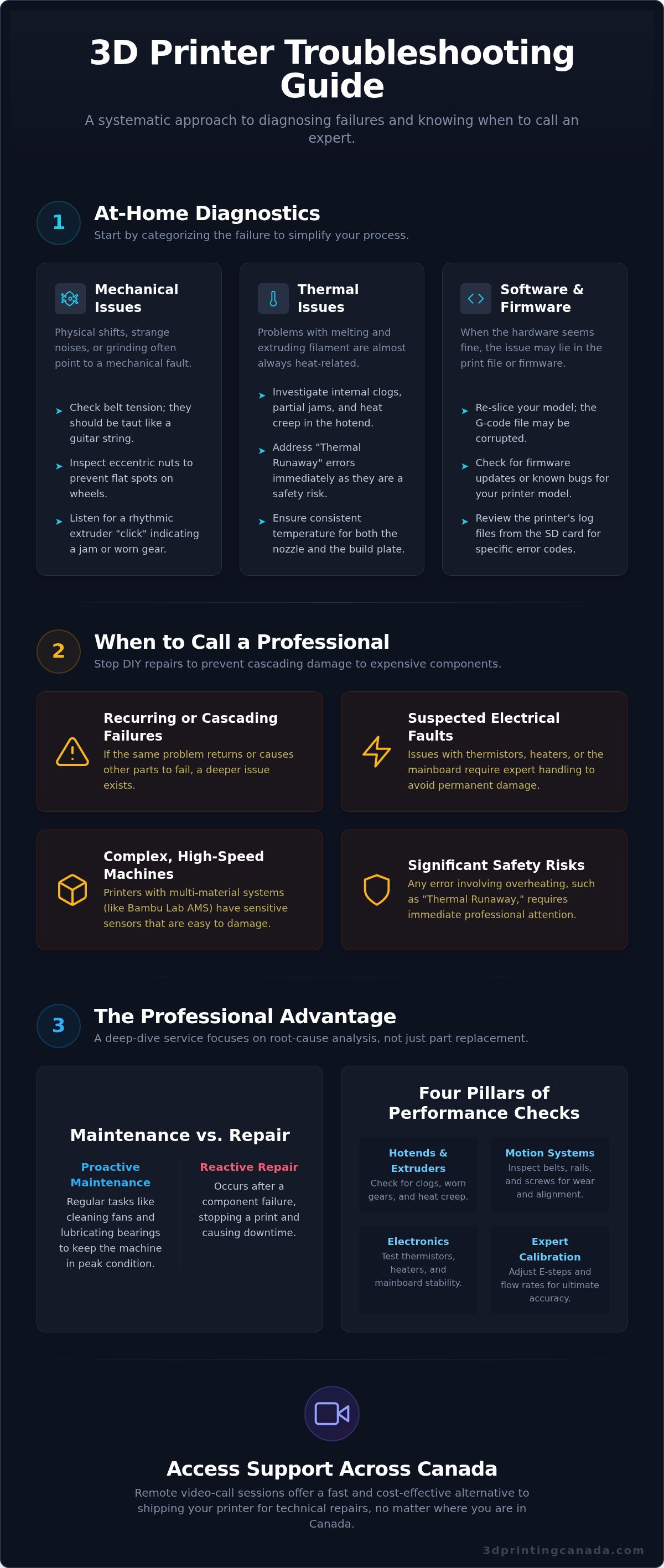
Think of a professional 3D printer troubleshooting service as a comprehensive health check for your hardware. While many users are comfortable swapping a nozzle, a professional service involves a multi-step diagnostic process that looks at both hardware and software. To truly appreciate why these systems fail, it helps to understand what 3D printing is; a delicate balance of thermal control, precise motion, and complex data processing. When one element falters, the entire system can collapse. A deep-dive technical service goes beyond simple part replacement by identifying the root cause of a failure, ensuring the same issue doesn't return a week later.
Professional technicians focus on the critical areas that drive performance:
- Hotends and Extruders: Checking for internal clogs, worn gears, or heat creep issues.
- Motion Systems: Inspecting belts, lead screws, and linear rails for alignment and physical wear.
- Electronics: Testing thermistors, heater cartridges, and mainboard stability for consistent power delivery.
- Expert Calibration: Adjusting E-steps and flow rates to ensure your printer performs with the accuracy required for mechanical parts.
The difference between maintenance and repair
Maintenance is proactive, involving regular tasks like cleaning fans or tensioning belts to keep the machine in peak condition. Repair is reactive, occurring only after a component failure stops a print in its tracks. During a 3D printer troubleshooting service, technicians often spot maintenance gaps that the user might have missed, such as dust buildup in the power supply or loose wiring connectors. Preventative maintenance for 3D printers focuses on regular bearing lubrication to ensure smooth motion and reduce the physical strain on stepper motors.
Why Canadian hobbyists and pros choose professional services
Modern hardware has become significantly more complex, especially with the rise of multi-material systems like the Bambu Lab AMS. These units involve intricate filament paths and sensitive sensors that require a steady hand to service without causing further damage. For Canadian small businesses, downtime is the most expensive part of any failure. Accessing a technician who stocks a full inventory of Bambu Lab accessories means you aren't waiting weeks for international shipping. You get back to your projects faster with optimized settings and hardware you can actually trust. Choosing an expert ensures your investment is protected and your production schedule stays on track.
How to diagnose common 3D printing failures at home
Before you reach out for a professional 3D printer troubleshooting service, you can often pinpoint the culprit yourself by looking at the physical evidence left on the build plate. We suggest a systematic "outside-in" approach. Start by ruling out the easiest variable: your material. Using high-quality filaments ensures that inconsistencies aren't caused by diameter fluctuations or moisture. If the material is solid, categorize the failure as mechanical, thermal, or software-based. Mechanical issues usually show up as physical shifts, while thermal issues cause extrusion problems, and software errors often lead to total print stoppages.
Documenting these errors is the best way to help a technician help you. Take high-resolution photos of the failed print, especially the specific layer where things went wrong. If the machine is making a strange sound, record a short video. Modern printers also generate log files on their SD cards; keep these files handy. This data acts like a medical chart for your hardware, allowing for a much faster and more accurate diagnosis when you decide to bring in an expert.
Identifying mechanical vs. electrical issues
Check your belt tension first; they should pluck like a guitar string without being so tight they strain the motors. Inspect the eccentric nuts on your carriages to ensure they aren't causing flat spots on the wheels. If you hear a rhythmic "click of death" from the extruder, the motor is likely struggling against a physical jam or a worn-out gear. Electrical failures are often more dramatic. If your printer halts with a "Thermal Runaway" error, your thermistor or heater cartridge is failing to report accurate data, which is a significant safety risk that requires immediate attention.
Software and firmware diagnostic steps
Sometimes the hardware is fine but the "brain" is confused. Corrupted SD cards are a notorious source of random print pauses or "ghost" layers. Try a different card before stripping down the extruder. If your hotend temperature is swinging wildly by more than 5 degrees, performing a PID tuning session through your printer's interface can recalibrate the heating logic. If you have exhausted these DIY steps and the machine is still behaving unpredictably, it might be time to book a 3D printer troubleshooting service session to get your hardware back to factory-spec performance without the guesswork.
When to stop DIY-ing and call a professional technician
Every maker loves the satisfaction of fixing their own gear. It is part of the culture. However, there is a fine line between a successful weekend project and a total hardware catastrophe. We often see "cascading failures" in our service centre. This happens when an amateur repair on a simple clog leads to a snapped thermistor wire; which then shorts out the mainboard because the machine was still powered on. What started as a five-dollar nozzle swap quickly turns into a three-hundred-dollar electronic overhaul. Knowing when to put down the hex key is the most important skill a printer owner can develop.
Safety should always be your primary concern. 3D printers contain power supplies and heated beds that involve high-voltage components. These can be lethal if handled incorrectly. If you don't own a multimeter or a high-quality soldering iron and haven't been trained to use them, don't open the electronics enclosure. Professional technicians use specialized tools like digital calipers for frame alignment and thermal cameras to spot failing components before they catch fire. Leveraging a professional 3D printer troubleshooting service ensures these risks are managed by experts who have seen every failure mode imaginable.
DIY vs. Professional Service: A Comparison
Deciding whether to keep tinkering or call for help often comes down to a simple cost-benefit analysis. Consider how much your time is worth versus the cost of a guaranteed fix.
| Factor | DIY Approach | Professional Service |
|---|---|---|
| Cost | Low (Parts only) | Moderate (Labour and parts) |
| Time | High (Research and trial) | Low (Fast turnaround) |
| Risk | High (Cascading damage) | Low (Guaranteed results) |
| Protection | May void warranty | Maintains or includes warranty |
Watch out for specific "Red Flags" that require immediate professional attention. If you notice a burnt acrid smell, see visible sparks, or hear heavy grinding noises that persist after lubrication, stop the print and unplug the machine. These are signs of critical failures that a standard 3D printer troubleshooting service is designed to handle safely.
The risk of voiding manufacturer warranties
Modern high-performance machines often come with strict warranty terms. Certain DIY modifications, like splicing wires or replacing proprietary hotends with third-party clones, can instantly invalidate your original manufacturer warranty. This leaves you financially responsible for any future failures that might have otherwise been covered. Choosing an authorized service centre ensures that your repairs are documented and performed to factory standards. Using original equipment manufacturer (OEM) parts is vital for the structural integrity and long-term reliability of your machine. It protects your investment and ensures that your printer continues to operate within its designed safety parameters.
Specialized troubleshooting for high-performance brands
High-performance machines like the Bambu Lab X1C or P1S have redefined what we expect from desktop manufacturing. These printers operate at speeds that were unthinkable a few years ago; however, that speed comes with a high degree of technical complexity. Troubleshooting these enclosed systems requires more than just a basic toolkit. You are dealing with proprietary electronics, integrated cameras, and LiDAR sensors that must be perfectly synced. If your AI-powered first-layer inspection starts failing, it is rarely a simple fix. It often requires a specialized 3D printer troubleshooting service to recalibrate the optical sensors and ensure the firmware is communicating correctly with the hardware, a level of precision that professional firms like VPrint3D Limited rely on for their integrated product development and rapid prototyping solutions.
The Automatic Material System (AMS) is another area where precision is paramount. While it allows for incredible multi-colour prints, a single brittle filament snap inside the internal hub can shut down the entire unit. Clearing these jams involves navigating a maze of PTFE tubes and delicate filament sensors. Because these machines rely on a closed ecosystem, using the correct proprietary parts is essential for maintaining high-speed motion systems without inducing vibrations or ringing in your prints. Using the wrong component can lead to resonance issues that are difficult to diagnose without professional vibration analysis tools.
Bambu Lab specific hardware errors
When your screen flashes an error code, it can feel like your machine is speaking a different language. Most codes point to specific sensor failures or communication timeouts between the toolhead and the mainboard. Maintenance on these units is also unique. For example, the carbon fibre rods on the X-axis must be kept clean with isopropyl alcohol but should never be lubricated with grease, as this will actually degrade performance. If you need to replace a hotend assembly, be extremely careful with the tiny JST connectors; they are notoriously fragile and easy to strip from the board without the proper extraction tools.
Troubleshooting Creality and Prusa ecosystems
While newer brands push speed, the Creality and Prusa ecosystems remain the workhorses of the industry. In older Creality models, heat creep remains the number one cause of mystery clogs. This happens when the cooling fan fails to keep the "cold end" of the extruder at the right temperature, causing filament to swell prematurely. For Prusa users, the XYZ calibration and First Layer Calibration routines are the gold standard for accuracy. If your Prusa is failing these tests, it usually indicates a slight physical skew in the frame that needs professional realignment. If you are struggling with any of these brand-specific hurdles, book a 3D printer troubleshooting service today to get your machine back to factory-level precision.
How to access 3D printer repair services across Canada
Accessing a professional 3D printer troubleshooting service shouldn't be a hurdle just because of your geography. Whether you are located in a major urban centre or a remote community, expert support is available through three primary models. Remote sessions offer immediate guidance through digital channels; mail-in services provide deep-dive lab repairs for complex failures; and on-site visits cater to businesses and professionals across the country. Most professional diagnostics in Canada are completed within 24 to 72 hours once the machine is in the technician's hands, ensuring you aren't left with a non-functional printer for weeks on end.
Choosing the right model depends on your comfort level with hardware and the severity of the issue. If your machine has a mechanical jam but still powers on, a remote session might save you the cost of shipping. However, for electronic failures or frame realignments, the precision of a lab environment is often necessary. We focus on getting you back to printing with minimal friction, providing the parts and the expertise in one place.
The Remote Repair Advantage
If you are comfortable with a screwdriver but need an expert eye to guide your hands, a remote session is a fantastic tool. A technician can walk you through complex diagnostic steps over FaceTime or Zoom, acting as a virtual mentor to solve the problem in real-time. It is the most cost-effective way for makers across Canada to get professional help without the expense of shipping a heavy machine. To get the most out of your call, prepare your workspace first. Ensure you have bright overhead lighting and a clear internet connection. Have your basic tools ready, such as hex keys and flush cutters, so you don't waste time hunting for them mid-session.
National Mail-in Service: What to expect
For hardware failures that require proprietary parts or specialized calibration tools, a mail-in 3D printer troubleshooting service is the standard choice. Shipping a delicate machine across Canada during our varied seasons requires careful preparation to avoid transit damage. Follow this checklist to ensure your printer arrives at the lab safely:
- Secure the print head and gantry with zip ties to prevent them from sliding during transit.
- Remove the glass bed or any removable spring steel sheets and pack them separately in bubble wrap.
- Use the original box and foam inserts if you have them; otherwise, use a double-walled cardboard box with at least two inches of padding on all sides.
- Unplug all cables and remove the spool holder to prevent them from snapping off.
- Insure the package for its full replacement value and use a tracked service to monitor its journey.
Once your printer arrives, a technician performs a thorough diagnostic to confirm the root cause before any work begins. This transparent process keeps you in total control of the repair costs. Book your professional 3D printer troubleshooting session today! and let our experts get your hardware back in peak condition.
Master Your Machine and Minimize Downtime
Mastering your 3D printer is a journey of constant learning; but you don't have to walk that path alone. You now have a systematic approach to diagnosing failures at home and a clear understanding of when a professional 3D printer troubleshooting service is the safest choice for your hardware. By recognizing the red flags early, you protect your investment and ensure your creative projects stay on schedule. Whether you're maintaining a fleet of high-speed Bambu Lab machines or fine-tuning a reliable Prusa, expert help is always within reach.
Our team provides the specialized knowledge and technical support you need to overcome any hardware hurdle. With expert technicians for all major brands and Canada-wide shipping on parts, we make professional repairs accessible from coast to coast. If you're far from our service centre, our remote diagnostics provide national support that feels like having a mentor right in your workshop. Get your printer back in action-Book a Professional Repair Service now! We're here to help you solve the tough problems so you can get back to the joy of creating.
Frequently Asked Questions
How much does a 3D printer troubleshooting service typically cost in Canada?
Service costs generally depend on the complexity of the diagnostic and the specific replacement parts your machine requires. Most Canadian providers charge an hourly rate for bench work in addition to the cost of components. You will typically pay a flat diagnostic fee upfront which covers the initial assessment and identifies the root cause of the failure. This approach ensures you receive a transparent quote before any major repair work begins on your hardware.
Can I get my 3D printer repaired remotely via video call?
Yes, remote video sessions are a highly effective way to resolve many common hardware and software issues without the need for shipping. A technician can guide you through a systematic diagnostic process over FaceTime or Zoom to identify faulty sensors or calibration errors. This is often the fastest and most cost-effective 3D printer troubleshooting service for makers living in remote regions or outside major urban centres.
What information should I provide to the technician before my repair session?
Prepare a brief history of the issue including the printer brand, model, and any recent modifications you have made. Provide high-resolution photos of failed prints and clear videos of any unusual noises or movements the machine makes during operation. If your printer generates error logs or has a specific error code on the display, have that information ready. This data allows our team to narrow down the problem much faster.
How long does it usually take to fix a clogged nozzle or extrusion issue?
Most standard extrusion issues or stubborn nozzle clogs are resolved within one to two hours of technician bench time. However, if the clog has caused "heat creep" or damaged the internal extruder gears, the process may take longer to ensure all components are thoroughly cleaned and tested. We prioritize a fast turnaround to minimize your project downtime and get your hardware back into a productive state as quickly as possible.
Is it worth repairing an older 3D printer, or should I buy a new one?
The decision usually depends on the original value of the machine and the cost of the required parts. For high-performance or professional-grade printers, a professional repair is almost always more economical than replacement. If you own a budget desktop model that is several years old, a technician can help you determine if a repair or a strategic upgrade to newer components offers the best long-term utility for your creative goals.
Do you provide a warranty on the repair work performed?
We stand behind the quality of our technical services and ensure that every machine is fully tested for performance before it leaves our shop. While specific terms can vary based on the nature of the repair, we aim to provide the reliability you need to print with confidence. You should always discuss the specific coverage details regarding labour and replacement parts with your technician at the start of your service session.
Can you help with firmware updates and software configuration?
Yes, our 3D printer troubleshooting service includes comprehensive support for firmware flashing and slicer software optimization. Many printing failures are actually caused by corrupted files or incorrect settings rather than physical hardware breaks. We can help you navigate factory resets, update to the latest stable firmware versions, and calibrate your software profiles to ensure your settings are perfectly matched to your specific hardware and filament.
Do you repair all brands, including Bambu Lab, Creality, and Prusa?
Our experienced technicians service all major brands and models currently available on the Canadian market. We specialize in the unique requirements of high-speed systems like Bambu Lab and the popular, open-source ecosystems of Creality and Prusa. Whether you are running an enclosed professional unit or a custom hobbyist machine, we have the specialized tools and parts inventory required to perform a factory-standard repair and calibration.