
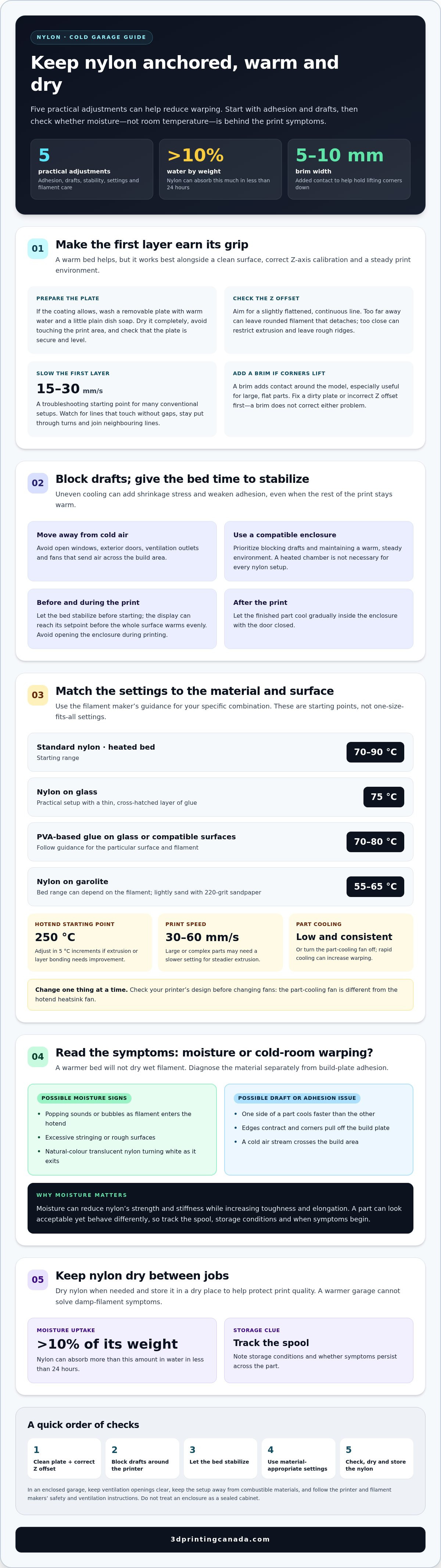
Dry filament matters as much as a warm bed. Printing nylon without warping in a cold garage comes down to five practical steps: improve first-layer adhesion, block drafts, keep the printer environment stable, use temperatures suited to the material, and dry and store the nylon properly. A brim can help hold corners down, but it won’t fix a dirty build plate or an incorrect Z offset.
If the bed is warmer but the edges still lift, the filament itself may be contributing to the problem. Nylon absorbs moisture from the air quickly, and damp filament can cause symptoms that a warmer garage won’t resolve.
This guide covers all five adjustments, with a closer look at drying and storage to help distinguish moisture issues from cold-room warping. Learn what to change first, what to watch during a print, and how to make your next nylon job more reliable.
Key Takeaways
- Get the first layer right: clean the build surface, calibrate the Z offset, and use a brim when corners start to lift.
- Keep the printer away from cold drafts and give the heated bed time to stabilize before printing.
- Use an enclosure to help maintain a warm, steady environment, and let the finished print cool gradually.
- Watch for popping, bubbles, or rough surfaces, which can point to damp filament rather than a cold room.
- Dry nylon when needed and store it in a dry place to help protect print quality between jobs.
1. Cold-room warping and first-layer adhesion
In a cold garage, nylon can cool unevenly as it leaves the nozzle. The outer edges contract while the first layers remain attached, creating shrinkage stress that can pull corners off the build plate. Nylon can warp about as much as ABS, so strong first-layer adhesion matters from the start. A warmer bed helps, but works best with a clean surface, correct Z-axis calibration, and a stable print environment.
Prepare the build plate before changing slicer settings. If its coating allows, wash a removable plate with warm water and a little plain dish soap to remove oils. Dry it completely, then avoid touching the print area. Make sure the plate is secure and level. Calibrate the Z-axis so the nozzle lays down a slightly flattened, continuous line. If the nozzle is too far away, the filament may stay rounded and detach. If it is too close, extrusion may be restricted, leaving rough ridges.
Choose a bed surface and adhesive that suit your nylon and printer. For nylon on a glass plate, a bed temperature of 75 °C with a thin, cross-hatched layer of glue is a practical setup. PVA-based glue is also used on glass and other compatible surfaces with a bed temperature of 70-80 °C. Follow the filament and printer guidance for your particular combination, and avoid assuming every coating needs the same treatment. On garolite, lightly sand the surface with 220-grit sandpaper to support adhesion.
Give the first layer time to grip. Slowing it can help the filament settle and bond before the nozzle moves on; 15-30 mm/s is a reasonable troubleshooting starting point for many conventional setups. Watch the first lines closely. They should touch without gaps, stay in place through turns, and join neighbouring lines rather than forming loose strands. Correct a poor Z offset or contaminated surface before adding more adhesive.
Add a brim when a part’s corners keep lifting. A brim approximately 5-10 mm wide creates extra contact around the model, helping hold its edges down as higher layers cool. It’s especially useful for large, flat parts, which have more area that can pull against the build surface. A brim can improve adhesion, but it won’t fix a dirty plate or incorrect Z offset. Resolve those first, then use the brim as added support for a more successful nylon print.
2. Draft reduction and stable ambient temperatures
Drafts can cool one side of a nylon part faster than the other, adding uneven shrinkage stress. Move the printer away from open windows, exterior doors, ventilation outlets, and fans. In a garage, even a small stream of cold air across the build area can weaken bed adhesion while the rest of the print stays warm.
A compatible enclosure helps block drafts and retain heat from the bed. Aim for a warm, consistent environment rather than a particular chamber temperature. Let the bed stabilize before starting: its display may reach the setpoint before the entire surface has warmed evenly, especially in a cold room. Avoid opening the enclosure during printing, then let the part cool gradually inside with the door closed.
A heated chamber isn’t necessary for every nylon setup. A compatible enclosure that blocks drafts and maintains a steady, warm environment is the practical priority. The easiest nylon to print depends on its formulation and the printer, so no single grade works best in every setup. Follow the filament maker’s temperature guidance and your printer’s enclosure instructions.
For standard nylon, a heated-bed range of 70-90 °C is a starting point, while specialty blends may call for different settings. On garolite, the recommended bed range can be 55°C - 65°C, depending on the filament. Start the hotend at 250°C and adjust in 5°C increments if extrusion or layer bonding needs improvement. Make one change at a time, so you can see whether temperature or another setting affects the result.
Keep the print speed controlled. A range of 30-60 mm/s is recommended for nylon; large or complex parts may need a slower setting for steadier extrusion. Use low, consistent part cooling or turn that fan off, since rapid cooling can increase warping. Don’t confuse the part-cooling fan with the hotend heatsink fan, which prevents heat travelling too far up the filament path. Check your printer’s design before changing either fan.
In an enclosed garage, keep the printer’s ventilation openings clear, keep the setup away from combustible materials, and follow the printer and filament manufacturers’ safety and ventilation instructions. Don’t treat an enclosure as a sealed cabinet. If temperature control, extrusion, or printer hardware remains unreliable after basic adjustments, 3D printer repair services can help address equipment faults that interfere with stable printing.
3. Nylon properties and moisture sensitivity
Nylon’s moisture sensitivity can make a cold-garage print look like a temperature problem. The filament can absorb more than 10% of its weight in water in less than 24 hours. That absorbed moisture affects extrusion, surface finish, and mechanical behaviour. A warmer bed or a fresh layer of PVA glue won’t dry wet filament, so diagnose the material separately from build-plate adhesion.
Watch and listen as the filament enters the hotend. Popping sounds, bubbles, excessive stringing, and rough surfaces can indicate moisture. A natural-colour translucent nylon spool that produces a white hue as filament exits may also be wet. These clues suggest moisture rather than insufficient room temperature. Note when symptoms begin and whether they persist across the part to help distinguish inconsistent filament from a draft or adhesion issue.
Moisture changes nylon’s properties, not just its appearance. It reduces strength and stiffness while increasing toughness and elongation. That shift can affect a finished component’s performance, even if the layers look acceptable. If a part needs consistent dimensions or mechanical behaviour, don’t judge it by surface quality alone. Track the spool, storage conditions, and print results to see whether moisture exposure is affecting repeatability.
Store nylon in a dry, dark place between prints, and limit its exposure to garage air. For a long print, place a silica desiccant bag inside the spool to help control moisture around the filament. Keep the spool away from damp floors, open containers, and changing conditions near a garage door. If the spool is sealed while cold, let it warm toward room temperature before opening. This reduces the risk of condensation when cold filament meets warmer air.
Keep drying separate from other troubleshooting changes. If you hear popping or see bubbles, address moisture before raising the bed temperature or changing the hotend setting. If corners lift but extrusion looks smooth, investigate build-plate preparation and drafts instead. A filament dryer can help manage moisture, but it can’t replace proper bed preparation or draft protection. Keep a simple record for each spool: storage, drying, visible symptoms, and print outcome. This makes recurring moisture issues easier to spot and helps guide your next step.
4. Material-appropriate printer enclosures
A compatible enclosure blocks drafts and holds heat from the bed around the print. In a cold garage, this steadier environment can reduce uneven cooling across a part. An enclosure won’t fix damp filament, poor bed preparation, or a printer fault, so treat it as one part of the setup. Keep the chamber warm and consistent, and let the print cool gradually before removing it.
Match enclosure conditions to the plastic. Nylon benefits from restrained cooling and a stable thermal environment, while PLA generally needs effective part cooling. ABS and ASA also benefit from reduced cooling and draft control. Don’t copy an ABS chamber setting directly to nylon: ABS guidance may specify 38°C to 42°C, but nylon requirements depend on the filament and printer. Follow the material and machine instructions rather than applying one chamber temperature to every spool.
Check printer compatibility before adding or closing an enclosure. Confirm that the frame, electronics, cables, and hotend can operate in the warmer environment, and keep access to ventilation openings clear. A bed temperature that suits nylon won’t guarantee an even chamber temperature; allow the build area to stabilize before starting. If the enclosure traps heat around the hotend, watch for heat travelling too far up the filament path. Keep the heatsink fan operating as designed, and don’t confuse it with the part-cooling fan.
In a garage, place the enclosed printer away from exterior doors, windows, fans, and ventilation outlets. Keep the enclosure clear of combustible materials, and follow the printer and filament manufacturers’ fire-safety and ventilation instructions. An enclosure should block drafts, not act as an improvised sealed cabinet. After printing, leave the door closed while the nylon cools gradually. Opening it immediately can expose the part to a sudden temperature change.
The cost of adding an enclosure or chamber heater depends on printer compatibility, enclosure design, and whether controlled heating is needed. An enclosure that passively retains heat from the bed is different from a setup that requires an added heater and temperature controls. Compare the required features with your printer’s design before choosing hardware, and don’t add a heater unless the machine’s instructions support that configuration.
Start with the simplest suitable setup. If drafts are the main problem, an enclosure that fits the printer may solve them without active heating. If nylon still warps after the chamber stabilizes, revisit the material settings, filament condition, and build-surface preparation instead of raising the bed temperature without a clear reason. This keeps changes focused and helps protect print quality and printer durability.
5. Drying and storing nylon filament
Drying deserves its own troubleshooting step because nylon can take up more than 10% of its weight in water in less than 24 hours. A dry garage doesn’t guarantee a dry spool, especially after repeated exposure to humid air. Moisture changes how filament melts and exits the nozzle, so a print may show bubbles, popping, stringing, or a rough surface even when the bed temperature and build surface are set correctly.
Dry the spool before adjusting several printer settings at once. One household-oven approach is to use 50-60 °C and monitor the spool to prevent overheating or warping. Check that the spool itself can tolerate the drying temperature, and keep it away from direct contact with hot surfaces. Once dry, use the filament promptly or return it to dry storage; leaving it exposed during setup gives it another chance to absorb moisture.
Make drying repeatable. Record the spool material, drying temperature, and drying time, then compare the next print’s extrusion and surface finish. If popping or bubbles disappear after drying, moisture was likely contributing to the defect. If the same corners lift while extrusion looks smooth, investigate cooling, drafts, or first-layer contact instead of drying the same spool repeatedly.
Store nylon in a sealed container with desiccant, away from damp floors and temperature swings near a garage door. For a long print, a silica desiccant bag inside the spool can help limit moisture around the filament. If a sealed spool has been stored somewhere cold, let it warm toward room temperature before opening. This reduces condensation risk when it meets warmer air. Consistent storage helps prevent one print from starting with a dry spool and the next with a damp one.
Moisture can affect a finished part’s properties as well as its appearance. It reduces nylon’s strength and stiffness while increasing toughness and elongation, which can matter for parts expected to hold dimensions or carry loads. A smooth exterior doesn’t prove the filament is dry. Compare print behaviour with the part’s intended use, and dry the spool when moisture symptoms appear.
A filament dryer can help keep material dry during a print, but it doesn’t replace bed preparation or draft protection. Separate the causes: moisture symptoms point to the spool, while lifted corners call for checking the print setup. Follow the filament maker’s guidance for suitable drying conditions. A consistent routine for drying, printing, and resealing nylon makes results easier to compare and helps prevent recurring moisture problems.
3D Printing Canada: 3D Printer Repair Services
3D Printing Canada provides 3D Printer Repair Services for printer faults that make nylon prints unreliable. If the bed won’t hold its settings, the hotend struggles to maintain temperature, or extrusion remains inconsistent after you’ve addressed filament moisture and drafts, a hardware issue may be involved. Repair can be a useful next step when repeated calibration and setup changes don’t resolve the problem.
For a separate material issue, 3D Printing Canada also offers filaments. Choosing filament suited to your printer and intended part can help you build a more consistent printing routine, alongside careful drying and storage.
Contact 3D Printing Canada to discuss printer repair or filament options for your nylon printing setup.
Build a repeatable nylon-printing routine
For printing nylon without warping in a cold garage, use each successful job as a baseline for the next. Save the slicer profile and note the spool, printer setup, and garage conditions. If a future print behaves differently, compare it with that baseline before changing several settings at once. This makes troubleshooting more deliberate and helps identify which adjustment improves the result.
Use the same approach whenever your setup changes. Moving the printer, adding an enclosure, or loading a fresh spool can change how a familiar part prints. Keep a small test part as a reference, and make one controlled change per attempt. Over time, your notes become a practical record tailored to your printer and workspace.
If equipment issues are getting in the way of that process, reach out to 3D Printing Canada. Contact 3D Printing Canada for help with your next step, and keep building with confidence.
Frequently Asked Questions
What temperatures and humidity are best for printing nylon filament?
Use the bed and nozzle temperatures recommended for your specific nylon, and keep the printer environment warm and steady. Standard nylon often uses a heated-bed range of 70-90 °C, while the right nozzle setting depends on the filament. There isn’t one humidity target that suits every setup; focus on keeping the filament dry. A spool that has absorbed moisture can print poorly even if the garage feels dry.
How does a cold garage affect nylon 3D printing and cause warping?
A cold garage can cool a print unevenly, increasing shrinkage stress as nylon solidifies. The edges may contract and pull away from the build surface, especially if cold air reaches one side of the printer. For printing nylon without warping in a cold garage, consider where drafts enter, not just the room temperature. A part that lifts on the side facing a door or vent points to uneven cooling around the print.
What enclosure temperature is recommended for printing nylon without warping?
Keep the nylon print environment warm and consistent instead of relying on a universal chamber-temperature target. The required conditions depend on the nylon formulation, printer design, and part size. Don’t automatically use an ABS chamber setting for nylon. Track whether the enclosure stays stable during the print, and follow the material and printer instructions. A stable enclosure reduces drafts and helps prevent sharp temperature changes around the part.
How can I heat a 3D printer enclosure safely in a cold garage?
Start with an enclosure compatible with your printer, then use only heating arrangements supported by the printer’s instructions. Don’t put an improvised heater inside the chamber or block the machine’s ventilation openings. Keep the printer away from combustible materials and monitor temperatures during operation. If the enclosure retains enough heat from the bed to prevent drafts, active heating may not be necessary for your setup.
Which nylon build surfaces and adhesives provide the best bed adhesion?
Choose a surface and adhesive that are compatible with both your nylon and printer. Garolite can work well, and light sanding with 220-grit sandpaper can improve its grip. For nylon on glass, PVA-based glue is used with a bed temperature of 70-80 °C; a thin, cross-hatched glue layer is another glass-plate approach. Clean oils from removable plates only when their coating permits that cleaning method.
What bed temperature, nozzle temperature, and print speed should I use for nylon?
Use the filament maker’s settings as your starting point. For standard nylon, a heated bed of 70-90 °C and a print speed of 30-60 mm/s are recommended; start the hotend at 250°C and adjust in 5°C increments. Surface choice changes the bed setting: garolite may use 55°C - 65°C, while glass with PVA glue may use 70-80 °C. Change one setting at a time.
How should nylon filament be dried and stored to prevent moisture-related print problems?
Dry nylon using a method suited to the filament and spool. A monitored household oven at 50-60 °C is one approach; prevent overheating or spool deformation. After drying, keep the filament in a sealed container with desiccant, and limit exposure during printing. If a sealed spool has been stored somewhere cold, let it warm toward room temperature before opening to reduce condensation risk. Keep a note of drying conditions for consistent results.
How can I reduce drafts and temperature fluctuations around a 3D printer?
Move the printer away from open windows, exterior doors, ventilation outlets, and fans. A compatible enclosure helps block airflow, but opening it during a print can cause a sudden temperature shift. In a cold garage, give the heated bed time to stabilize before starting: its displayed temperature doesn’t necessarily mean the whole surface is evenly warm. Keep the enclosure closed while the print cools gradually.