
What if you could stop spending your Saturday mornings wrestling with tedious manual bed leveling and actually spend that time bringing your designs to life? You've likely felt the frustration of a failed first layer or the anxiety of wondering if you'll be able to find replacement parts here in Canada when you need them most. It's a common hurdle for creators, especially when you're trying to decide if the bambu lab a1 is the right high-speed, multi-colour 3D printer for your specific creative goals.
We understand that choosing between the A1, the A1 Mini, and the P1S can feel overwhelming, especially when you're looking for the best value for your hard-earned Canadian dollars. This guide provides a detailed performance comparison to help you choose the right model for your budget with total confidence. You'll get a clear look at A1 performance and a reliable roadmap for sourcing local parts and service right here at home. We'll break down exactly how these machines stack up in 2026 so you can get back to what matters most: creating.
Key Takeaways
- Learn why the "full-auto" design of the bambu lab a1 makes it the most accessible high-speed printer for Canadian hobbyists and pros in 2026.
- Understand how 500mm/s speeds and Active Flow Compensation work together to deliver professional-grade surface finishes without manual tuning.
- Identify the specific project types and build volumes that determine whether you should choose the A1, the compact A1 Mini, or the enclosed P1S.
- Explore the multi-colour potential of the AMS lite and see how it differs from the original AMS for seamless 4-colour printing.
- Master a simple routine maintenance schedule and learn how to access expert Canadian repair services to keep your machine running at peak performance.
Why the Bambu Lab A1 is the Go-To Choice for Canadians in 2026
The 3D printing world changed when the bambu lab a1 hit the scene. It completely redefined what we expect from a "bed-slinger" design. For years, these machines were seen as budget entry points that required constant tinkering and manual calibration. The A1 flipped that script by turning the traditional moving-bed architecture into a high-performance, "full-auto" powerhouse. It offers a generous 256 x 256 x 256 mm build volume. This size is the "sweet spot" for most Canadian makers, providing enough room for everything from functional workshop tools to detailed cosplay pieces without taking up your entire desk.
Looking back at the Bambu Lab company history, it's clear their goal was to remove the technical barriers that stop people from printing. In 2026, the A1 remains the gold standard for anyone who wants results rather than a new hobby in machine repair. Having a reliable printer is only half the battle, though. You also need a steady supply of Bambu Lab accessories Canada based creators can rely on to keep their projects moving without waiting weeks for international shipping.
The "Auto-Everything" Philosophy
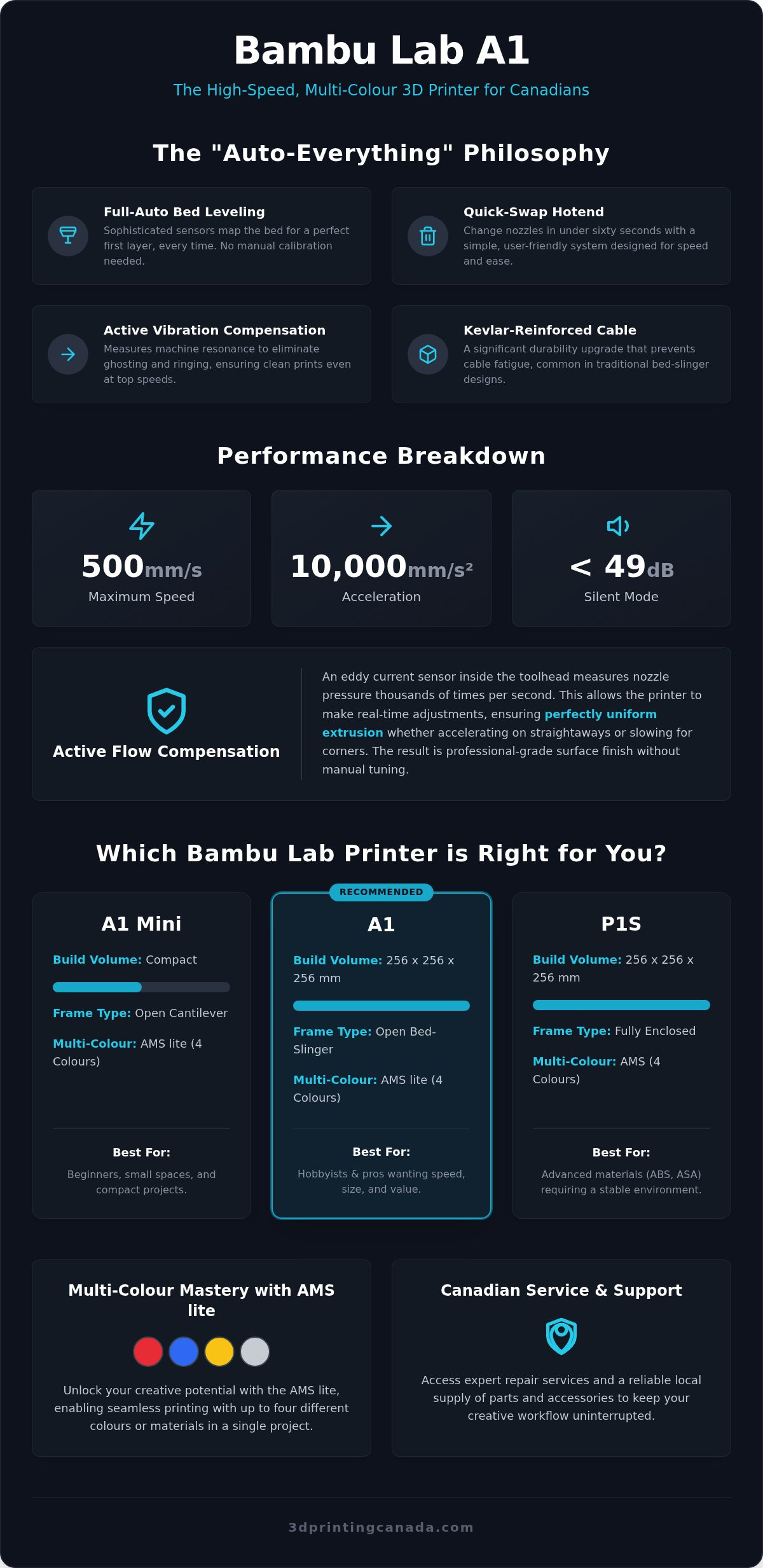
Forget the "paper method" for leveling your bed. The bambu lab a1 handles auto-bed leveling and Z-offset calibration entirely on its own. It uses sophisticated sensors to map the surface and ensure your first layer is perfect every single time. It also features active vibration compensation. This technology measures the physical resonance of the machine to prevent "ghosting" or ringing, even at high speeds. When you do need to swap a nozzle for a different material, the quick-swap hotend system makes it a sixty-second job. It's designed for ease, not frustration.
Reliability in the Canadian Workshop
Canadian workshops face unique challenges, adapting to the country's diverse environmental conditions, from dry winter air to humid summer days. The A1 is built to handle these shifts. It features a Kevlar-reinforced heatbed cable, which is a massive upgrade for long-term durability on a bed-slinger. This prevents the common "cable fatigue" seen in older designs that often led to hardware failure. If you ever run into a technical snag, you aren't on your own. 3D Printing Canada acts as your national support hub. We provide the expertise and professional repair services needed to ensure your creative flow never stops for long.
Performance Breakdown: Speed, Quality, and Noise Levels
The bambu lab a1 isn't just another bed-slinger. It's a high-performance machine that challenges the speed of much more expensive CoreXY printers. While older FDM standards often capped out at 60mm/s to maintain quality, this machine pushes boundaries without breaking a sweat. You get a top speed of 500mm/s combined with 10,000mm/s² acceleration. In real-world terms, this means you're finishing projects in a fraction of the time. A part that used to take five hours on a traditional printer now takes less than two. This efficiency changes how you prototype. You can fail fast, learn, and iterate all in one afternoon.
This speed doesn't come at the cost of aesthetics. The generational leap in print quality is massive. You'll notice smoother vertical walls and sharper corners than what was possible just a few years ago. It bridges the gap between hobbyist tinkering and professional-grade output, making it an ideal tool for anyone from casual makers to small-scale Canadian entrepreneurs.
Active Flow Compensation Technology
Traditional printers often struggle with "pressure advance" or inconsistent flow during speed changes. The A1 solves this with a high-frequency eddy current sensor located in the toolhead. This sensor measures the pressure inside the nozzle thousands of times per second. By doing this, it catches under-extrusion or over-extrusion before it ruins a layer. Active Flow Compensation is a real-time adjustment system for consistent extrusion. It ensures that whether the printer is slowing down for a corner or ramping up on a long straightaway, the plastic flow remains perfectly uniform.
Silent Printing with Motor Noise Cancellation
Most high-speed printers sound like a jet taking off, which can be a nightmare in a small apartment or a classroom. The A1 uses advanced motor noise cancellation to reduce mechanical resonance. This brings the noise floor down to just 49dB. It's roughly the volume of a quiet conversation. You can run a 24-hour print right next to your desk while you work on other tasks without getting a headache. To get the most out of this silent performance, you should browse our selection of high-quality filaments to find materials that flow perfectly at these high speeds while maintaining incredible detail.
This "whisper-quiet" operation is a game-changer for the Canadian home office. It means you don't need a dedicated soundproof room or a basement workshop just to enjoy your hobby. You can keep the printer in a common area and still hold a conversation or watch a movie without the constant whine of stepper motors in the background. It's a thoughtful design choice that makes high-performance printing truly accessible for everyone.
Comparison: Is the A1, A1 Mini, or P1S Right for Your Projects?
Finding the right printer isn't just about looking at a spec sheet. It's about matching a machine to your specific creative workflow. In the Canadian market, where budget and utility often go hand-in-hand, the bambu lab a1 ecosystem offers three distinct paths. Whether you're a hobbyist making tabletop miniatures or a professional prototyping functional parts, your choice depends on build volume, material needs, and your available workspace. You want a machine that grows with your skills without becoming a technical burden.
A1 vs A1 Mini: Size Matters
The biggest difference here is the physical space you have to play with. The A1 Mini features a 180mm³ build volume. It's compact and incredibly portable, making it the perfect choice for small apartments or dedicated miniature painting stations. However, the standard bambu lab a1 offers a 256mm³ cube. This extra room is vital for printing larger functional parts, cosplay helmets, or multi-part assemblies without needing to slice them into tiny pieces. If you plan on printing anything larger than a standard coffee mug, the full-sized A1 is usually the smarter long-term investment for your workshop. It gives you the headroom to take on bigger projects as your confidence grows.
A1 vs P1S: Open vs Enclosed
Think about the materials you want to use for your creations. The A1 is an open-frame printer, which makes it the absolute champion for PLA and PETG enthusiasts. It stays cool and provides easy access to the print bed for quick maintenance. If your projects require engineering-grade materials like ASA or ABS, you'll want to look at the bambu lab p1s. The enclosed chamber of the P1S traps heat and prevents the warping common with high-temperature filaments. This is a critical factor if your workshop is in a drafty basement or an unheated Canadian garage.
While both machines support the AMS system for multi-colour mastery, the P1S is the professional choice for those handling industrial-grade prototypes. Both models offer incredible price-to-performance ratios. However, the A1 remains the most accessible "auto-everything" gateway for most home users who primarily work with standard filaments. It delivers the same high-speed results and ease of use without the higher cost of an enclosed system. Evaluate your material needs early to avoid outgrowing your hardware too quickly.
Multi-Colour Mastery: The AMS lite Advantage
Multi-colour printing used to be a headache reserved for those with deep pockets and infinite patience. The bambu lab a1 changed that narrative by introducing the AMS lite. This system allows you to load four different filaments simultaneously, switching between them automatically during a print. Unlike the original AMS found on the P-series, which is an enclosed box, the lite version is an open-frame design. This makes it significantly easier to load and maintain because you can see exactly what's happening with your spools at all times. It's a "Plug and Play" dream for Canadian makers who want to move beyond single-colour prototypes and into the world of vibrant, professional-looking models.
While the original AMS protects filament from humidity, the AMS lite focuses on accessibility and mechanical simplicity. It's a specialized tool that fits perfectly into a home workshop or a creative studio. If you're looking for more efficiency tips to get the most out of your setup, take a look at our Bambu Lab AMS Canada guide. It breaks down everything you need to know about choosing the right multi-material system for your specific goals.
How the AMS lite Simplifies Your Workflow
The magic happens during the automatic filament loading and unloading process. When the slicer calls for a colour change, the AMS lite retracts the current strand and feeds the next one without you lifting a finger. One of the best features for long prints is "Filament Backup." If spool one runs out of PLA, the system can automatically switch to spool two if it's the same material and colour. This prevents those heartbreaking failed prints that happen when a spool finishes in the middle of the night. Canadian hobbyists also appreciate that the AMS lite uses a spindle-based grip. This design is much more forgiving with cardboard spools than the original enclosed AMS, though we still recommend checking spool balance for the smoothest possible rotation.
Choosing the Best Filaments for Multi-Colour Printing
For the best results with the bambu lab a1, stick with high-quality PLA or PETG. These materials have the most reliable flow rates and stick together beautifully during colour transitions. One common concern is "poop," which is the small amount of filament the printer purges to clear the nozzle between colours. You can drastically reduce this waste by fine-tuning your "flushing volumes" in the Bambu Studio slicer. Setting the purge amounts based on the specific colours you're using (like moving from white to black versus black to white) saves both time and money. To keep your AMS lite fed and ready for action, explore our massive inventory of filaments available for fast national shipping across Canada. We stock a huge variety of colours and materials so you can find exactly what your next project needs without the long wait times.
Maintaining Your A1 and Accessing Professional Support
Owning a high-performance machine like the bambu lab a1 is an empowering experience, but even the most advanced "auto-everything" printers require a bit of regular attention to stay in peak condition. Think of maintenance not as a chore, but as a way to protect your investment and ensure your creative flow never hits a wall. In the same way that you would check out Insurance Direct Collision Centres LTD to restore your vehicle, regular maintenance and professional support are key to keeping your 3D printer running like new. A well-maintained printer delivers consistent first layers and smooth surface finishes for years. By following a simple routine, you can prevent the most common hardware headaches before they even start. It's about being proactive so you can spend more time printing and less time troubleshooting.
Essential Maintenance Steps
Keep your machine happy by following these three fundamental steps. They don't take much time, but they make a world of difference in your daily print quality.
- Step 1: Clean the build plate. Oils from your skin can build up on the PEI surface and ruin your bed adhesion. Regularly wash your build plate with warm, soapy water (dish soap works best) and dry it with a lint-free cloth. Avoid using harsh chemicals that can strip the coating.
- Step 2: Lubricate the linear rails and lead screws. To keep the motion system of your bambu lab a1 silent and smooth, apply a small amount of multi-purpose grease to the Y-axis linear rails and the Z-axis lead screws every 2-3 months. Wipe away any old, dirty grease first to prevent buildup.
- Step 3: Update your firmware. Bambu Lab frequently releases updates that improve noise cancellation, calibration accuracy, and even add new features. Use the Bambu Handy app to check for updates regularly so you're always running the most optimized version of the software.
Beyond these steps, always keep an eye on your belt tension. If you notice "ghosting" appearing in your prints where it wasn't before, a quick adjustment to the belt tensioners can usually fix the issue. Keeping the rails clean of dust and filament debris is also vital for preventing premature wear on the bearings.
When to Seek Professional Repair Services
Sometimes, a problem goes beyond a simple DIY fix. If you hear persistent grinding noises, encounter complex electrical errors, or find that your machine fails to calibrate even after a thorough cleaning, it might be time for expert intervention. Don't risk damaging your hardware by forcing a repair you aren't comfortable with. We've seen many users feel stuck when a proprietary part fails, but you don't have to wait for international shipments or struggle through a difficult tear-down alone.
3D Printing Canada provides professional 3D printer repair services specifically for Bambu Lab equipment. Our experienced technicians understand these machines inside and out. We act as your local safety net, ensuring that professional support is just a shipment away. We also maintain an extensive inventory of genuine accessories and replacement parts right here in Canada. This means you can source what you need without the anxiety of long customs delays or high import fees. We're here to be your dependable partner, providing the human support and technical knowledge you need to keep your workshop running at full speed.
Start Your Next Creative Journey Today
The bambu lab a1 has truly democratized high-speed, multi-colour 3D printing for makers across the country. By combining an "auto-everything" setup with whisper-quiet operation and the versatile AMS lite system, it removes the technical hurdles that used to stall creative progress. Whether you choose the standard A1 for its generous build volume or the P1S for advanced material compatibility, you're investing in a machine designed for results rather than constant tinkering.
Choosing the right hardware is just the first step. Having a reliable local partner ensures your machine stays at peak performance for years to come. At 3D Printing Canada, we provide fast national shipping, an extensive inventory of accessories, and professional repair services by experienced technicians. For creators whose projects eventually require industrial-scale manufacturing or precise material cutting, CNC Cut to Size offers the professional services needed to complement your workshop and turn your biggest ideas into reality.
Ready to level up your workshop? Shop Bambu Lab Printers and Accessories at 3D Printing Canada and see the difference that professional local support makes. We can't wait to see what you'll create next!
Frequently Asked Questions
Is the Bambu Lab A1 good for beginners?
Yes, the bambu lab a1 is an exceptional choice for beginners because it eliminates the most common technical barriers. You don't have to worry about manual bed leveling or complicated nozzle offsets. The machine handles these calibrations automatically before you start a print. This "plug and play" approach lets you focus on your designs rather than struggling with hardware setup from day one.
Can the Bambu Lab A1 print multi-colour without the AMS lite?
You cannot print multi-colour automatically without the AMS lite system. While you can manually pause a print and swap filament at a specific layer height, the AMS lite is what enables the seamless four-colour transitions. If you want to create complex, multi-coloured models without manual intervention, the AMS lite is a necessary addition to your creative setup.
What is the difference between the Bambu Lab A1 and A1 Mini?
The primary difference is the build volume. The standard A1 gives you a 256 x 256 x 256 mm workspace, while the A1 Mini is restricted to a smaller 180mm cube. Beyond size, the standard bambu lab a1 is better suited for larger functional parts and cosplay items. The Mini is a great portable option for smaller miniatures where desk space is at a premium.
Does the Bambu Lab A1 require manual bed leveling?
No, the A1 does not require any manual bed leveling. It uses a fully automated system that probes the bed surface to create a detailed mesh before every print. This ensures your first layer is perfect every time without the need for thumbscrews or paper tests. It's a massive time-saver for both new users and seasoned pros who want reliable results.
Where can I get Bambu Lab repair services in Canada?
You can access expert repair services right here at 3D Printing Canada. Our technicians specialize in Bambu Lab hardware and can handle everything from complex board replacements to motion system tuning. We provide national support, so you can ship your machine to us from anywhere in Canada for professional attention and access to genuine replacement parts.
Is the Bambu Lab A1 compatible with third-party filaments?
Yes, the A1 is fully compatible with most third-party 1.75mm filaments. While you won't get the automatic RFID detection found on official spools, you can manually select the material type in the slicer. We stock a massive variety of high-quality filaments that work perfectly with this machine for everything from standard PLA to durable PETG projects.
How loud is the Bambu Lab A1 during high-speed printing?
The A1 operates at a very quiet 49dB, even when reaching its top speed of 500mm/s. This is possible because of the active motor noise cancellation technology that reduces mechanical vibration. It's quiet enough to run in a home office or a classroom without causing a distraction. This is a major advantage over older, louder FDM printers that often require a separate room.
Can I print ABS or ASA on the Bambu Lab A1?
Printing ABS or ASA is not recommended on the A1 because it lacks an enclosure. These specific materials are prone to warping and cracking if they cool too quickly or face a draft in an open-frame machine. If your projects require high-temperature engineering filaments, the enclosed P1S is the superior choice for maintaining the consistent ambient temperature those materials need.