
PLA is a practical starting point for most print-in-place articulated toys: it captures fine detail and works well for rigid, moving joints. Choose TPU when a part needs to stretch or absorb impacts, since it can flex without snapping. The best filament for articulated prints depends on whether the joint should move freely or bend under load.
It’s tempting to assume a more flexible filament will make every articulated model work better. But joint clearance, wall thickness, and printer setup matter just as much. TPU may be a poor fit when crisp details and free movement matter more than bending.
Compare PLA and TPU, learn where PETG may suit moving parts, and consider what print-in-place toys need. This guide also explains how material choice affects joint strength and movement, helping you match the filament to the model and avoid fused or fragile sections.
Key Takeaways
- Match the filament to the job: PLA suits detailed, rigid print-in-place toys, while TPU is better when parts need to flex or absorb impacts.
- Consider PETG or ABS when a model’s moving parts need different durability and movement characteristics.
- Keep joint clearance and wall thickness in mind; both affect whether articulated sections move freely or bind.
- Use the model’s intended material and print settings as a starting point, then adjust for your printer and the movement you want.
- Slow, careful TPU printing can help prevent feed problems, while PLA offers a simpler route to crisp articulated details.
How to 3D Print Articulation?
Articulated prints use connected sections that move at joints, either straight off the build plate or after assembly. Choose a filament whose flexibility and wear characteristics match the movement your model needs.
Comparing Filament Properties
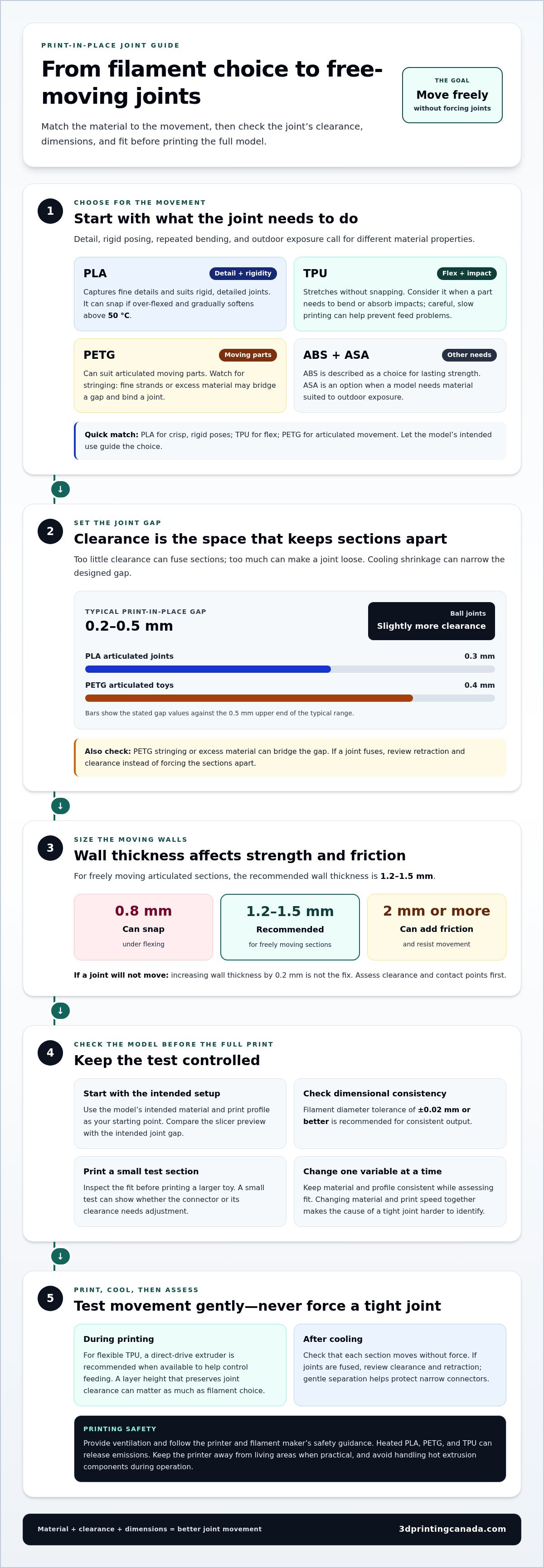
Filament properties describe how plastic responds to bending, heat, and repeated movement; they matter because each joint places different demands on the material. PLA captures detail, but gradually softens above 50 °C and can snap if over-flexed. PETG suits moving parts in articulated dragon prints. ABS is described as a choice for lasting strength, while TPU stretches without snapping. ASA is another option when a model needs a material suited to outdoor exposure.
These differences affect how a model behaves after printing. A detailed PLA toy can preserve small scales and facial features, while a TPU connector can bend repeatedly. ABS may suit a strength-focused design, and ASA may be appropriate for parts exposed to sunlight. Match the material to the model’s use, not just its appearance or surface finish.
PETG in Moving Toys
PETG can suit articulated toys and moving parts, especially when the design prioritizes durable movement over PLA’s fine-detail advantage. Its printing behaviour matters at print-in-place joints, where even a small strand of plastic can bridge a clearance and fuse sections together.
PETG stringing can leave fine threads between a dragon’s segments, and excess material may bind the joint. Start with the model’s recommended extrusion settings, then inspect a small test print before printing a larger toy. If joints fuse, review retraction and clearance instead of forcing the sections apart. Gentle separation helps protect narrow connectors.
For durability and wear, PLA works for rigid, detailed joints but can snap when over-flexed. PETG can suit moving parts in articulated dragons, while TPU stretches without snapping, making it a better fit for joints that must flex or absorb impacts. The right material still depends on the joint’s design and movement.
When printing indoors, provide ventilation and follow the printer and filament maker’s safety guidance. Heated PLA, PETG, and TPU can release emissions, so don’t treat a closed room as a suitable printing space. Keep the printer away from living areas when practical, and avoid handling hot extrusion components during operation.
Start with the model’s intended material and print profile, then assess the joints after cooling. A direct-drive extruder is recommended for flexible filament when available, as it can help control TPU as it feeds. For print-in-place designs, check that each section moves without force before judging the result. A layer height that preserves joint clearance can matter as much as filament choice.
Start by considering the intended movement. A PLA toy that mainly poses may benefit from sharp details, while a TPU component designed to bend needs flexibility. PETG can suit articulated moving parts, but stringing or fused joints may call for extrusion adjustments. ABS and ASA serve different material needs, so let the model’s purpose guide your choice.
Choosing filament for articulated joints
Articulated joints need suitable material, clearance, and dimensions to move without binding. Filament shrinkage can narrow the designed gap as a print cools, while dimensional accuracy affects whether the finished sections match the model.
Joint Clearance and Tolerances
Joint clearance is the gap between moving surfaces, and it matters because too little space can fuse sections while too much can loosen a joint. Print-in-place joints typically use gaps from 0.2 to 0.5 mm. Ball-jointed designs need slightly more clearance than other articulated shapes.
Material changes the fit: PETG articulated toys are recommended to use 0.4 mm of clearance, compared with 0.3 mm for PLA. Friction also depends on the joint’s contact area and surface finish. If surfaces rub too tightly, the joints may resist movement; if they barely engage, sections can feel loose.
Wall thickness adds another variable. Freely moving articulated sections are recommended to have 1.2-1.5 mm walls. A 0.8 mm wall can snap under flexing, while walls of 2 mm or more can create excessive friction. If a print-in-place joint won’t move, increasing wall thickness by 0.2 mm is not the fix; assess clearance and contact points first.
Joint Design and Dimensional Accuracy
Joint design determines the shape, contact points, and gap that let connected sections move, so it affects how well a filament’s dimensions translate into a working print. A ball-and-socket joint, for example, needs room around its curved surfaces to rotate without binding.
Shrinkage during cooling can make printed features smaller than their model dimensions, reducing clearance. Filament diameter consistency also affects extrusion: a tolerance of ±0.02 mm or better is recommended for consistent output. If a connector prints oversized, it can rub against its socket even when the model’s clearance appears suitable.
For a print-in-place dragon, compare the slicer preview with the model’s intended joint gap before printing. Keep the filament and profile consistent when assessing the fit. Changing material and print speed together makes it harder to identify why a joint is tight. A small test section can show whether the connector or its clearance needs adjustment.
- Rigid, detailed joints: PLA designs commonly use 0.3 mm clearance.
- PETG moving joints: Use the 0.4 mm clearance recommendation for articulated toys.
- Ball joints: Allow slightly more clearance than other print-in-place designs.
Treat clearance as a design choice, not a universal setting. Even the best filament for articulated prints needs joint geometry suited to its material, consistent extrusion, and enough space for the sections to move. Check these factors together if a print binds or feels loose.
TPU flexibility for articulated and moving prints
TPU suits articulated designs that need genuine flexibility, rather than just rotating rigid joints. Its softness, printer setup, and intended movement all affect whether it works for a functional toy or moving component.
TPU Softness and Shore Hardness
Shore hardness describes a flexible material’s resistance to indentation, helping you compare how soft different TPU filaments feel. A lower Shore hardness number indicates more flexible filament, which may suit a bending segment or impact-absorbing bumper. Firmer TPU may hold its shape more readily. Choose according to the movement the printed part needs, rather than assuming all TPU behaves alike.
TPU can stretch without snapping, making it useful for parts that flex repeatedly. A wheel or phone case, for example, can benefit from material that yields under pressure. A chain of rigid segments, by contrast, may need freely moving joints rather than a soft body. Decide whether the whole print should bend or only its separate sections should articulate.
TPU Printability and Toy Uses
TPU printability depends on controlled filament feeding and measured extrusion, because flexible material can jam when fed too quickly. A direct-drive extruder is recommended for flexible filament when available. For articulated toys, the suggested print speed is 20-30 mm/s, with an extrusion temperature of 215-230 °C.
Start with the filament maker’s profile, then print a small sample with a bend or moving segment. Check for consistent extrusion and a clean surface before printing the full model. If the filament buckles or feeds unevenly, slow the print and review the feed path. Supports can be awkward on flexible shapes, so choose an orientation that keeps important surfaces accessible.
TPU is a strong candidate for flexible toys, but it isn’t the best choice for every articulated model. A soft dragon body can bend as one piece, while a print-in-place toy needs distinct sections to move independently. In the latter design, excessive softness may make the model sag instead of holding a pose. Match the material to the intended movement.
Temperature also affects how TPU behaves during printing. Use the recommended extrusion range as a starting point, then check whether the filament forms smooth, continuous lines. Excessive speed can interrupt feeding, and inconsistent extrusion can leave weak spots where a flexible segment bends. Keep the first test simple, with a short section that demonstrates the model’s main movement.
For functional parts, consider where the force will land. A TPU bumper absorbs impact by deforming, while a flexible toy tail bends along its length. A wheel needs a surface that can compress on contact. Each example calls for a different softness and shape, so choose a Shore hardness and model geometry suited to the task.
TPU is most useful when flexibility is the goal. Use a slower profile, a compatible feed setup, and a test segment before printing the complete model. These steps help you assess whether the material will bend as intended, retain its shape, and move smoothly in the finished print.
PLA for print-in-place articulated toys
PLA is a practical choice for print-in-place toys because it captures fine details and suits rigid joints. Many models on MakerWorld and Printables are designed and tested with standard PLA. That makes it a sensible starting material for articulated dragons, especially when scales, claws, and facial features need clear definition.
PLA works best when the design’s joints rotate without needing to stretch. Print-in-place toys typically have clearance gaps from 0.2 to 0.5 mm, while the recommendation for PLA articulated toys is 0.3 mm. A correctly sized gap helps prevent neighbouring sections from fusing during printing, while preserving enough contact for the toy to hold its shape.
Start with the model’s intended settings rather than changing several variables at once. For PLA articulated dragons, the suggested nozzle temperature is 190-210 °C, with print speeds typically around 50-60 mm/s. A 0.4 mm nozzle and 0.1 mm layer height are recommended for precise print-in-place joints. The model’s own notes can guide adjustments.
- Detail: A 0.1 mm layer height improves fine features but increases print time.
- Visible stepping: Layer heights of 0.2 mm or more can show steps across joint surfaces.
- Joint fit: PLA articulated toys use a recommended 0.3 mm clearance.
- Cooling: Run the part-cooling fan at or near full strength around joint sections.
For a larger, detailed model, PLA+ may offer a useful balance. Its added toughness can help thin joint connectors withstand repeated flexing. This can matter on a large dragon with long body sections, where small connectors carry movement across several linked segments.
PLA has limits. Its flexibility is low, so joints can snap if they’re over-flexed, and the material gradually softens above 50 °C. A PLA dragon left in a hot car may warp. Choose a different material when the toy needs repeated bending or must handle heat.
Test detail and fit on a small articulated section before printing a full dragon. Keep the filament, nozzle temperature, and layer height consistent during the test. If sections fuse, inspect the joint clearance and extrusion before trying to separate them. PLA can produce crisp, moving toys when its settings suit the model’s geometry.
Printing and monitoring articulated models
Articulated models need settings that preserve joint clearance while producing clean layers. Monitor the first layer, extrusion, and movement instead of relying on the slicer preview alone.
For PLA articulated prints, use a nozzle temperature of 190-210 °C and print speed of 50-60 mm/s as starting points. TPU uses an extrusion temperature of 215-230 °C and a slower speed of 20-30 mm/s. Choose the bed temperature from the filament’s recommended profile, since adhesion needs vary with the material and print surface.
For articulated dragons, a layer height between 0.1 and 0.2 mm balances detail and print time. A 0.4 mm nozzle with a 0.1 mm layer height is recommended for precise print-in-place joints. A 0.3 mm layer height can shorten a print, but sacrifices detail on small connectors and scales.
- First layer: Set its speed to about 20 mm/s to support adhesion.
- Retraction: Start with 5-7 mm distance and 40-50 mm/s speed.
- Cooling: Run the part-cooling fan at or near full strength around joints.
- Infill: Reduce it to 10% if print-in-place joints won’t move.
Watch the first layers closely. If a dragon’s joint gaps start filling with plastic, check extrusion and cooling before the print progresses. If the first layer lifts, inspect bed adhesion and the build surface. Don’t force stuck joints while the model is warm. Let the print cool before testing movement.
Temperature stability matters during long articulated prints. Investigate printer temperature drift greater than 2 degrees during a print, since changing heat can affect extrusion consistency. Check the model’s included notes before changing the speed profile for joint sections. A setting designed for the body may not suit thin connectors.
For beginners, a small test model can reveal fit problems before a larger display dragon takes up the full build plate. After cooling, check whether each section moves, then look for stringing, weak connectors, or fused gaps. Change one setting at a time, such as retraction or print speed, to see what improves the result.
Correct settings help preserve both detail and strength, but repeated failures may point to printer hardware rather than the model. If temperature drift or inconsistent extrusion persists, book 3D printer repair services to address equipment issues affecting articulated prints.
3D Printing Canada: Bambu Lab Accessories
3D Printing Canada offers Bambu Lab Accessories, filaments, and 3D Printer Repair Services to support your articulated-print setup. Choose filament based on the movement your model needs, then match your printer settings and material to the design. If inconsistent extrusion, temperature drift, or other equipment issues keep affecting your prints, repair services can help address printer hardware problems. Bambu Lab Accessories can also support your printer setup, while a selection of filaments gives you material options for different projects. For articulated toys, bring your questions about filament choice or printer performance to your next step in planning. Visit 3D Printing Canada to learn more.
Turn your next print into a useful test
Use your next articulated model to learn how the chosen material behaves in your setup. Note the slicer profile, joint fit, and any changes you make. This gives you a practical reference for future designs, whether you’re building a display piece or a part meant for regular movement. Choosing the best filament for articulated prints is only one part of the process. A repeatable approach helps you apply what works to the next model.
If you’re planning an upgrade or troubleshooting printer performance, 3D Printing Canada offers Bambu Lab Accessories and 3D Printer Repair Services. Its 3D Printed offering is another option to explore as you continue building with 3D printing. Choose the next step that fits your project, then put your ideas into motion.
Contact 3D Printing Canada today to discuss your 3D printing needs. Keep experimenting, and enjoy seeing your next articulated design come to life.
Frequently Asked Questions
What About PETG?
PETG can work well for articulated toys whose moving parts need more toughness than fine surface detail. Its tendency to string can leave wisps between segments, and those strands may interfere with movement. If a test print has fused joints, review the slicer’s retraction and extrusion settings, then print another sample. PETG is a practical choice when the model’s design and intended movement suit its material behaviour.
What is the Best Filament for Articulated Dragons?
PLA is a strong starting choice for a detailed dragon designed to pose, since it captures fine features. For a large model with thin connectors, PLA+ offers added toughness that can help them withstand repeated flexing. PETG can suit moving parts in articulated dragons, while TPU makes sense if the body needs to bend. Match the filament to the dragon’s intended movement, connector design, and detail level.
What filament works best for articulated 3D prints with moving joints?
For many print-in-place models with rigid joints, PLA is a useful starting material because designers commonly account for its printing behaviour. PETG can suit joints intended for movement, while TPU is better for parts that must flex or absorb impacts. The best filament for articulated prints depends on whether the joint should rotate, bend, or hold a pose. Check the model’s material guidance before choosing.
What filament diameter and material properties are best for print-in-place joints?
Use the diameter your printer and slicer profile are designed for; common FDM filament diameters are 1.75 mm and 2.85 mm. Consistent diameter supports steady extrusion, with a tolerance of ±0.02 mm or better recommended. For print-in-place joints, material behaviour matters too: PLA suits rigid detail, PETG can serve moving parts, and TPU suits parts designed to stretch. Keep material and profile consistent during fit tests.
What clearance and tolerances should I use for articulated 3D print joints?
Print-in-place joints typically use clearance gaps from 0.2 to 0.5 mm, with the right fit depending on material and geometry. The recommendation for articulated PLA toys is 0.3 mm; PETG toys use 0.4 mm. Ball joints need slightly more clearance than other designs. If a test joint binds, adjust the model’s gap rather than forcing the moving parts apart after printing.
Best filament brands and prices in Canada for articulated 3D prints
PETG typically costs 20-30% more per kilogram than PLA.