
Could the cheapest spool in a filament sale be the wrong choice for your next print? A discount only helps when the material suits the job, your printer, and the way you plan to use the finished part.
With so many materials and colours to compare, it’s easy to focus on price and overlook practical details such as filament diameter and spool format. Start with your project instead: a decorative model, a functional part, and a flexible print can each call for a different material.
This guide compares PLA, PETG, TPU, and carbon-fibre PETG by print goal, then shows how to weigh sale options against your project’s needs. You’ll also find compatibility and handling checks that can help you avoid a poor fit. With 1,023 products in the Filament Sale collection, a clear shortlist makes browsing simpler. 3D Printing Canada sells filaments alongside 3D printers, scanners, and accessories, so you can compare materials and equipment in one place. Let’s find an option that fits your printer and your next idea, not just the discount.
Key Takeaways
- Begin with what the print needs to do, then narrow your material choices before considering colour or discount.
- Check your printer’s supported filament diameter and the spool details to help avoid a poor fit.
- Compare material descriptions, including standard or budget PLA, standard PETG, Canadian-made PLA+, TPU 90A, and PETG with 10% carbon fibre.
- A filament sale is easier to shop when you compare products by project purpose and material, rather than choosing by price alone.
- Use product descriptions as selection guidance, not a promise of a particular print result. Printer settings and filament handling also matter.
Shopping a filament sale: start with the print, not the discount
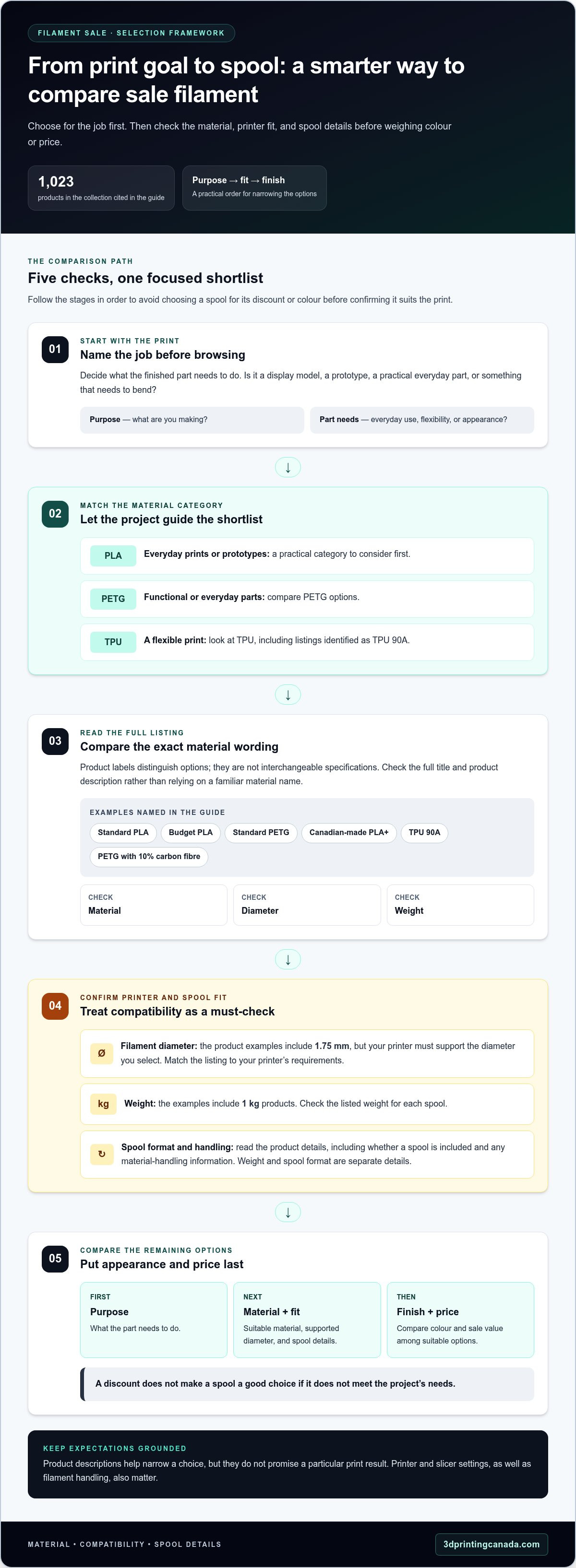
A marked-down spool can look like an easy win until it doesn’t suit the object you plan to make. Before choosing a colour or chasing a discount, picture the finished print. Is it a display model, a prototype, a practical part, or something that needs to bend? The answer helps narrow the material choices and makes a sale genuinely useful.
Filament is the plastic feedstock that filament-based FDM printers melt and lay down, layer by layer, to build an object. Different materials behave differently, so a spool that works well for one project may be a poor fit for another. Appearance matters too, but start with what the part needs to do.
The best sale filament is the one suited to the print. First identify the job, then check whether the material and spool match your printer and whether the finish suits your plan.
Match the material to what you are making
For everyday prints and prototypes, PLA is a practical place to start. PETG is another option for functional and everyday parts, while TPU is a flexible filament choice. Let the job guide your shortlist: a simple model, a part for everyday use, and a print that needs flexibility point towards different material categories.
- Everyday prints or prototypes: begin with PLA.
- Functional or everyday parts: compare PETG options.
- A flexible print: look at TPU.
Separate useful sale finds from impulse buys
Colour can catch your eye, but it won’t tell you whether the material suits the intended print. First name the purpose of the object, then compare suitable materials. A large discount doesn’t make a spool a good choice if it doesn’t meet the project’s needs.
Keep browsing focused by considering purpose first, material next, and appearance and price after that. This gives you a consistent way to compare products instead of reacting to a sale label.
Before adding a spool to your shortlist, make two practical checks. Confirm that your printer supports the filament diameter, then read the product description for material and spool details. The product examples in this guide include 1.75 mm filament, but that doesn’t mean every printer takes that diameter. Match the listed size to your printer’s requirements.
Also consider the spool format and any material-handling information in the product details. These checks can help you avoid a mismatch before the filament reaches your printer. They can’t guarantee a particular result: print outcomes depend on more than the material description.
Keep your first pass simple. Write down what you’re making, what the part needs to do, and whether flexibility or a particular appearance matters. Rule out materials that don’t fit, then compare the remaining options. The framework below helps you weigh material, printer fit, and spool details side by side.
How to compare sale filament by material, fit, and spool details
A product title can contain several useful clues, but they’re easier to compare when you use the same criteria for each spool. Start with the project, then check material, diameter, weight, and spool wording. This framework helps turn a broad filament sale into a manageable shortlist without treating a discount as a substitute for fit.
| Project goal | Material category | Product detail to check |
|---|---|---|
| Everyday prints or prototypes | PLA | Whether the title describes standard or budget PLA, plus diameter and weight |
| Functional or everyday parts | PETG | Material description, diameter, and spool format |
| A flexible print | TPU | Whether the listing identifies TPU 90A, and the stated diameter and weight |
| A specific material variant | PLA+ or carbon-fibre PETG | The full material wording, diameter, weight, and spool details |
Choose PLA, PETG, or TPU for the project
PLA is a straightforward category to consider for everyday printing and prototypes. PETG listings describe options for functional and everyday printing, while TPU 90A is a flexible option represented in the collection. Use the part’s purpose to decide which category to investigate first. These descriptions help narrow your choice, but they don’t promise a particular result for every printer or model.
Read the product title before adding a spool
Scan the full title and listing for material, diameter, weight, colour, and wording about the spool. Examples include standard PLA, budget PLA, standard PETG, Canadian-made PLA+, TPU 90A, and PETG with 10% carbon fibre. Those labels distinguish options; they aren’t interchangeable specifications. Read the listing rather than assuming a familiar material name tells you everything.
Diameter is a compatibility check, not a minor detail. The product examples here include 1.75 mm filament, but your printer must support the diameter you select. Compare the listing with your printer’s requirements before choosing a colour or adding the spool to your order.
Check weight and spool format separately. The examples include 1 kg products, but a listing’s weight and whether it includes a spool are distinct details. Read the product wording to understand what’s being sold, especially when comparing options with different packaging. Don’t assume every listing uses the same format because one example does.
Quick checklist: Match the project, material, diameter, and spool format before choosing a colour or sale option.
Your printer and slicer settings also affect how a filament performs, so treat a product description as a starting point rather than a guarantee of print success. Once you’ve made these checks, browse the Filament Sale collection with your shortlist in mind.
Standout filament sale picks for different print goals
These collection examples make a useful shortlist, not a ranking or a claim about current availability. Product names give you clues about material, colour, and listed format. Compare those details with your project and printer, then use each product listing to guide your choice.
Everyday prints and colour-focused projects
For everyday prints or prototypes, compare the standard and budget PLA examples. Their titles distinguish the product category and spool wording. Both list black colour, 1.75 mm diameter, and 1 kg weight. The white budget PLA gives you another colour option. Canadian-made PLA+ is also represented, and its product title identifies it as Canadian-made.
| Product | Material | Distinguishing detail | Suitable project consideration |
|---|---|---|---|
| Black - Standard PLA Filament - 1.75mm, 1kg | Standard PLA | Black; listed as standard PLA | Consider for everyday prints or prototypes where black PLA suits the plan. |
| Black - Budget PLA Filament (With Spool) - 1.75mm, 1kg | Budget PLA | Black; title specifies “With Spool” | Compare with standard PLA if you want to assess the budget-labelled option and its stated spool format. |
| White - Budget PLA Filament (With Spool) - 1.75mm, 1kg | Budget PLA | White; title specifies “With Spool” | Consider when white suits the appearance you want for an everyday print or prototype. |
| Black - Canadian-made PLA+ Filament - 1.75mm, 1kg | PLA+ | Identified as Canadian-made | Compare if you’re looking for the specific Canadian-made PLA+ option described in the title. |
| Black - Standard PETG Filament - 1.75mm, 1kg | Standard PETG | Black; standard PETG | Consider for functional or everyday printing, in line with the PETG product description. |
| Black - Standard TPU 90A Filament - 1.75mm, 1kg | TPU 90A | Standard TPU; flexible option | Consider when the project calls for the flexible filament type represented by this example. |
| Carbon Fiber (10%) - Standard PETG Filament - 1.75mm, 1kg | PETG with 10% carbon fibre | The title specifies 10% carbon fibre | Compare if this named material composition is relevant to your project. |
| Transparent - Standard PETG Filament - 1.75mm, 1kg | Standard PETG | Transparent appearance | Consider when the listed transparent finish is a priority for the print. |
Functional, flexible, and distinctive material options
The standard PETG example is positioned for functional and everyday printing, while TPU 90A is the flexible option represented in the collection. The other PETG listings let you compare a stated material variation and appearance: one names 10% carbon fibre, and the other is transparent. Treat each title as a starting point and match its wording to your intended use rather than assuming it describes properties that aren’t listed.
The examples share the same listed diameter and weight, but spool wording differs: the two budget PLA titles explicitly say “With Spool.” Read each full listing, especially if spool format matters to your setup. Sorting the options by print goal and visible product details helps focus your comparison on the descriptions most relevant to your next project.
Common filament sale mistakes and a quick pre-purchase check
A colour that looks perfect can still be the wrong choice for a print. The same goes for a spool that doesn’t match your printer. Before choosing a sale item, compare the material and product details with your printer’s requirements and the part’s purpose. A few quick checks can help you avoid buying filament that doesn’t fit the job.
Check printer fit and product details
Start with the diameter: compare the listing with the filament diameter your printer supports. Then check material type, spool weight, colour, and whether the title specifies that a spool is included. Some product examples list 1.75 mm diameter and 1 kg weight, but don’t assume those details apply to every listing. Use your printer’s documentation for compatibility and your slicer documentation for setup requirements.
Avoid choosing a material for the wrong job
PLA may feel like the familiar choice, but familiarity or a sale label alone doesn’t make it suitable for every print. PLA, PETG, and TPU are different material categories, not interchangeable options. Use the product description to understand how an option is presented, then match it to the project’s needs. Description details can guide selection, but they can’t guarantee a specific print outcome.
Before you select a spool, run through this checklist:
- Define the use. Note whether the part is a prototype, for everyday use, or needs flexibility.
- Match the material. Compare the intended use with the material and product description, rather than choosing by colour or discount alone.
- Confirm diameter. Make sure the listed filament diameter matches what your printer supports.
- Review the listing. Check the stated weight, colour, and spool wording so you know what the product title describes.
Colour-first shopping is tempting, especially if you have a specific look in mind. But choosing a material before checking its suitability can leave you with a spool that doesn’t serve the planned print. Don’t treat PETG as a substitute for TPU simply because both are on sale, or assume a familiar PLA option will work for every project. Let the intended use narrow the choices first, then consider appearance once the material and printer fit make sense.
Plan for handling after purchase, too. Follow any storage guidance provided with the product, and don’t assume every material has identical handling needs. Keeping the listing details with your project notes can also help you remember which material you selected.
Ready to apply these checks? Browse the filament sale collection and compare each option against your project, printer, and spool requirements before choosing.
Browse the filament sale collection and choose your next spool
You now have a practical way to narrow your options: start with what the print needs to do, then compare material and printer fit before choosing a colour or considering a sale. This keeps the discount in perspective. A lower price can be appealing, but it matters most when the filament also suits your project and setup.
Use a final checklist to narrow the collection
Before browsing, write down the key requirements for your next print. A short list makes it easier to compare product descriptions and spot a mismatch before you select a spool. Follow these steps in order:
- Set the project purpose. Decide whether you’re making a prototype, an everyday part, or a print that needs flexibility.
- Choose a material category. Use the project’s needs to narrow the options, then compare what each listing says about its material.
- Check printer fit. Match the listed filament diameter to the diameter your printer supports, and review the spool details for your setup.
- Choose appearance and format. Once the practical requirements align, compare colour and the product’s stated spool format.
With those criteria in hand, browse the Filament Sale collection and compare the product listings and descriptions against your shortlist.
Browse available sale options
A broad collection is easier to shop when you’re not trying to compare every product at once. The collection contains 1,023 products, so use your project requirements to focus on relevant material categories and product details. Read each listing rather than relying on a colour image or sale label to explain what a spool is intended for.
As you compare, keep a short note of the product title, material, listed diameter, weight, and spool wording. That gives you a simple reference when several options look similar and helps you keep their details straight as you move between listings. Base your decision on the details stated for each product and your printer’s requirements instead of assuming that one spool has the same specifications as another.
Then make the final comparison calmly. Set aside any option that doesn’t match the intended print or printer, even if its colour catches your eye. From the remaining choices, weigh the listed details against your project and select the one that fits your needs. You don’t need to choose the most unusual material or the most heavily discounted spool to make a sensible pick. The right choice is the option that fits the job you actually plan to print.
Choose filament for the print first, then make the purchase.
Make your next print a confident choice
Let your next project lead the shopping, not the other way around. Before opening a filament sale, jot down what the finished object needs to do and any printer requirements that matter. That planning gives you a useful filter as you compare options and helps you choose deliberately instead of getting sidetracked by a colour or discount.
You can also keep a brief note of the filament you select and how it works with your setup. That record gives you a helpful starting point for future projects, while leaving room to explore a different material or finish when the print calls for it. Each new spool is an opportunity to build experience and make your next decision with more confidence.
Ready to find a match for the idea on your workbench? Browse the Filament Sale collection and choose with your project in mind. Your next print starts with a smart spool choice.
Frequently Asked Questions
Can I use 1.75 mm filament in any 3D printer?
No. Your printer must be designed to feed 1.75 mm filament; the size isn’t universal across all machines. Check your printer and any external feeder specifications before buying. If you’re comparing options in a filament sale, match the listing’s diameter to those requirements. Don’t assume a spool will work just because it fits the holder: the filament also needs to pass properly through the printer’s feed path.
Does 3D printer filament expire?
Filament doesn’t have one universal expiry date, but its condition can change over time. Exposure to moisture, heat, or sunlight may affect how it prints, depending on the material and storage conditions. Keep the product’s packaging or storage guidance for reference, and store spools as directed. If an older spool behaves differently than expected, compare its condition and print behaviour with a fresh, properly stored spool before concluding that the material type is unsuitable.
Can I mix different filament brands in one print?
Sometimes, but matching brands alone doesn’t determine compatibility. For a print that uses more than one filament, consider whether the materials and required printing conditions are compatible, and whether your printer supports the necessary multi-material workflow. Even two spools labelled with the same material name may call for different slicer profiles. Start with the manufacturers’ guidance, and test a small, low-stakes model before committing to a large or detailed multi-material print.
Do I need to dry filament before printing?
Not automatically. Drying depends on the filament’s material, storage, and condition. If a spool has been left exposed to humid air or shows changes in print behaviour, consult its manufacturer’s handling instructions to decide whether drying is appropriate. Use guidance for that specific material rather than guessing at a temperature or duration. Drying isn’t a substitute for suitable storage, so protect unused filament according to its product instructions.
Can I use a different spool with my 3D printer?
Often, but check more than the filament itself. The spool must work with your printer’s holder or feeder, and its physical dimensions and winding should suit the way filament is supplied to the machine. A spool that doesn’t turn freely or feed cleanly can interrupt a print. Review your printer’s setup guidance, and make sure the filament unwinds without catching before starting a long job.
Why does filament colour look different after printing?
The colour you see on a finished print can vary from the spool or product image. Lighting, the screen used to view the listing, the model’s surface, and the direction of its layers can all affect how colour appears. A smooth face may reflect light differently from a textured one. For a colour-sensitive project, print a small sample using your intended settings and view it under the lighting where the finished piece will be displayed.
Can I print PLA and PETG on the same 3D printer?
Yes, one printer can often print both materials in separate jobs if it supports each material’s requirements. Check the printer manufacturer’s guidance and use the appropriate slicer profile for the spool you’ve loaded. Don’t assume a profile that worked for PLA will suit PETG. If you mean using both materials in one object, that’s a separate compatibility question: material bonding and printer capability can affect whether the combination works as intended.