
A faster hotend won’t make a slow printer fast on its own. A high flow hotend upgrade for high speed printing can help when the hotend is limiting how much filament your printer can melt and extrude. The motion system, extruder, firmware, and filament still need to keep pace.
If you’re unsure whether your hotend is the bottleneck, or concerned an upgrade could trade reliability and surface quality for speed, start by checking the whole setup. Flow ratings don’t tell the whole story. Compatibility and slicer settings matter just as much as the hardware.
This guide will help you spot the signs of a hotend limit, understand what an upgrade can and can’t fix, and assess what your printer and materials require. You’ll also learn how to approach compatibility and tuning methodically, so you can decide whether an upgrade fits your printing goals before changing your setup.
Key Takeaways
- Use extrusion symptoms and print results to determine whether the hotend, rather than another part of the printer, is limiting output.
- A high flow hotend upgrade for high speed printing is most useful when the rest of the printer can sustain the added demand.
- Compare keeping the stock hotend, upgrading components, and replacing the assembly based on fit, maintenance, materials, and installation needs.
- Plan compatibility checks, installation, calibration, and test prints before changing slicer settings to increase flow.
- Match your upgrade plan with suitable equipment and filaments. If hardware problems persist, consider professional printer repair services.
When Is a High-Flow Hotend Upgrade for High-Speed Printing Worthwhile?
A high-flow hotend is designed to melt and deliver more filament consistently than a standard setup. Its extra capacity can help a printer maintain extrusion when a fast profile demands more material, but it won’t increase dependable print speed on its own. A high flow hotend upgrade for high speed printing is worth considering when you’ve identified a hotend flow limit and the rest of your machine can keep pace.
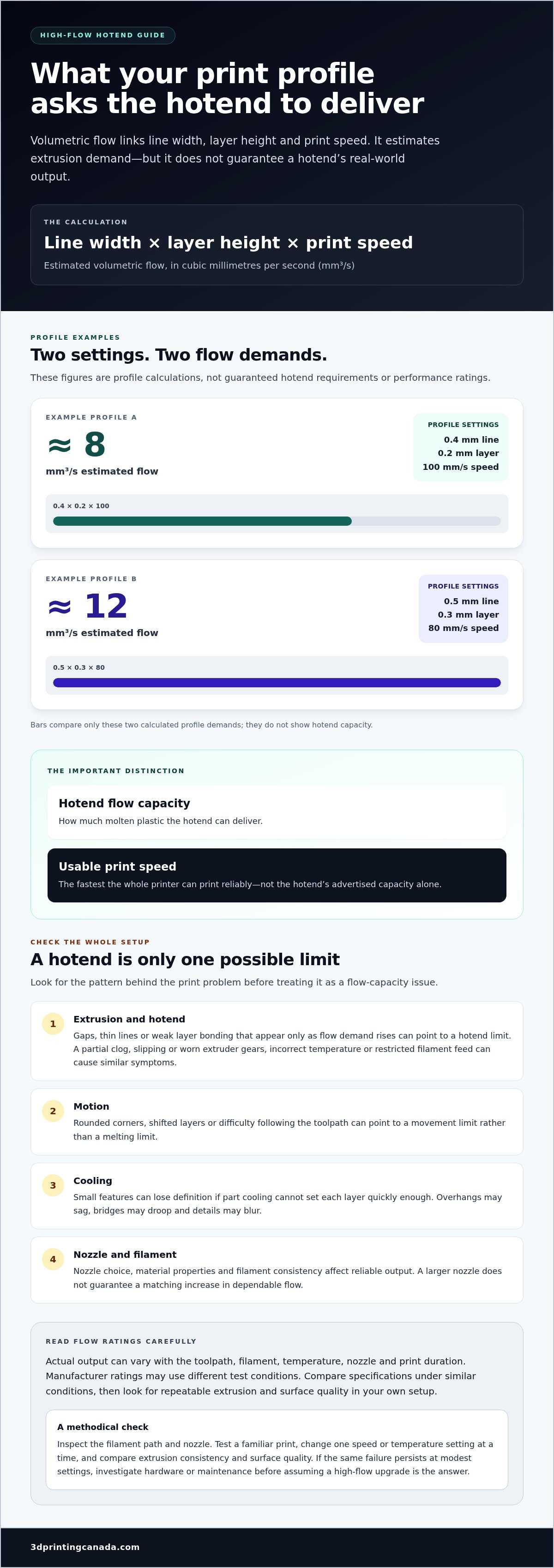
A hotend’s flow capacity is the amount of molten plastic it can deliver; a printer’s usable speed is the fastest it can print reliably across the whole system. That distinction matters: a component’s advertised capacity doesn’t guarantee your printer can sustain the same output in real prints.
What does a high-flow hotend change?
The heater block supplies heat, while the melt zone gives filament time and surface area to soften before it reaches the nozzle. Heat transfer, the design and length of that zone, and the nozzle’s internal path all affect how readily material can flow. A high-flow design aims to melt and move more plastic without losing consistent extrusion as demand rises.
Flow is commonly expressed as volumetric output in cubic millimetres per second (mm³/s). A slicer’s requested flow can be estimated by multiplying line width by layer height by print speed. For example, a 0.4 mm line, 0.2 mm layer, and 100 mm/s speed call for about 8 mm³/s. Treat this as a profile calculation, not a guaranteed hotend requirement. Actual demand varies with the toolpath, and manufacturer flow ratings may use different materials, temperatures, nozzles, and test methods. Compare specifications under similar conditions.
Even if a hotend reaches a stated flow rate under test conditions, dependable output may be lower in your printer. Filament properties, temperature, nozzle choice, and print duration all affect results. Look for repeatable extrusion in your own setup, not just the highest number on a specification sheet.
Is the hotend actually limiting your print speed?
Check what happens as speed increases. Gaps, thin lines, or weak layer bonding that appear only when the print profile demands more flow can point to a hotend limit. Similar symptoms can also come from a partial clog, worn or slipping extruder gears, incorrect temperature, or a spool that doesn’t feed freely. Inspect the filament path and nozzle, then compare several prints before buying parts.
Separate the likely constraints:
- Motion: If corners round off, layers shift, or the printer struggles to follow the toolpath, faster movement may be the problem, not melting capacity.
- Cooling: Small features can lose definition when the part cooling system can’t set each layer quickly enough.
- Nozzle and filament: A narrow nozzle, unsuitable material, or inconsistent filament can limit reliable output even with a higher-capacity hotend.
- Extrusion: If flow falters at higher demand while motion remains clean, investigate the hotend and extruder together.
Change one variable at a time. Test a familiar print, adjust one speed or temperature setting, then compare extrusion consistency and surface quality. If the same failure persists at modest settings, diagnose it as a possible hardware or maintenance issue before assuming a high-flow upgrade is the answer.
How a High-Flow Hotend Affects Extrusion, Speed, and Print Quality
Filament starts as a solid strand, pushed by the extruder through the hotend’s heat break and into the heated melt zone. There, heat softens the plastic so the extruder can press it through the nozzle and lay down a continuous bead. A high-flow design aims to keep that bead consistent when the print profile calls for more material in the same amount of time.
That demand depends on more than print speed. Layer height and line width determine how much plastic each pass needs, while nozzle size influences which widths and layer heights are practical. Increasing one or more of these settings can require the hotend to melt and deliver more material.
Usable print speed depends on the complete printer system, not the hotend alone. A hotend may supply material quickly, but the printer still needs to move accurately, cool each layer, and feed the chosen filament consistently.
Volumetric flow: the link between speed and extrusion
Volumetric flow describes how much material is deposited over time, usually expressed in cubic millimetres per second (mm³/s). A simple estimate is line width × layer height × print speed. It helps show how a slicer profile changes extrusion demand, but it isn’t a universal performance rating for every hotend or material.
Example: A profile using a 0.5 mm line width, 0.3 mm layer height, and 80 mm/s speed calls for about 12 mm³/s (0.5 × 0.3 × 80). At the same speed, a wider line or taller layer increases the amount of plastic required per second. Nozzle diameter matters because it influences workable line widths and layer heights, but switching to a larger nozzle doesn’t guarantee a matching increase in dependable output.
Why faster extrusion doesn’t automatically mean better prints
Higher material delivery can help maintain fuller, more even layers when a profile would otherwise outrun the hotend. But print quality also depends on what happens after the plastic leaves the nozzle. If cooling can’t set a bead quickly enough, overhangs may sag, bridges may droop, and small features may blur before the next pass begins.
At high demand, an unsuitable temperature or filament can contribute to uneven extrusion, while rapid movement can soften corners or reduce detail. Those issues don’t necessarily point to the hotend. Material behaviour, cooling, and motion each create separate limits, so judge a high flow hotend upgrade for high speed printing against the result you need, not speed alone.
- Large, simple parts: Wider lines and taller layers may reduce the number of passes, provided the hotend, motion system, and cooling can handle the profile.
- Detailed parts: Fine features may still require slower movement and careful cooling, even with added flow capacity.
Test a consistent model and change one setting at a time. Compare layer consistency, overhangs, bridges, and detail, not just the estimated print time. The filament you use is part of that test, so match the material to the job and your printer’s setup. Explore 3D printer filaments as you plan material choices alongside hardware changes.
Compare High-Flow Hotend Upgrade Options Before Choosing
Choose an upgrade path based on your printer, the materials you use, and the prints you want to make. A high flow hotend upgrade for high speed printing can mean anything from keeping the hardware as it is to replacing the complete assembly. Compare the practical trade-offs, not just the advertised flow rating.
Stock hotend, component upgrade, or full replacement?
If your current setup meets your print goals, keeping it stock avoids extra installation and compatibility work. A targeted change may suit a printer that needs a specific improvement, while a full assembly replacement can make sense when the existing hotend is the measured bottleneck and the new unit is designed for that printer.
Keep the stock hotend: Best for dependable everyday printing when current speeds and materials are sufficient. Fit and firmware changes are minimal, and you can focus on routine maintenance and slicer tuning. This option won’t add capacity if the hotend itself is limiting extrusion.
Upgrade selected components: A compatible nozzle or other replaceable component may address a specific need without changing the whole assembly. This can preserve the existing mounting arrangement, but parts must match the hotend, and maintenance or tuning needs may change. Check whether the change suits your material and nozzle goals.
Replace the complete assembly: This is a broader hardware change for a printer whose stock hotend can’t meet the intended workload. It may involve more installation steps, firmware adjustments, or supporting hardware. Confirm mounting, wiring, temperature sensing, cooling, and toolhead clearance before choosing this route.
Use the printer manufacturer’s documentation and the component manufacturer’s specifications to compare options. For Bambu Lab owners, the Bambu Lab accessories guide offers related upgrade context.
Check compatibility and supporting components
Compatibility means more than whether a hotend physically fits. Check the mounting pattern and available space around the toolhead, then verify electrical requirements, wiring connections, heater and temperature-sensor type, and firmware support. A mismatch in any of these areas can prevent correct installation or temperature control. Follow the printer and component manufacturers’ instructions, especially for electrical connections and temperature limits.
Consider the rest of the setup as a group. The nozzle must suit the hotend and your intended line width; the cooling system must handle the planned print speeds and features; and the extruder and filament path must feed material consistently. Materials also behave differently during heating and extrusion, so a setup that works well for one filament may need different settings for another.
A higher advertised flow rating doesn’t establish fit, usable speed, or print quality on your machine. Ratings may depend on test conditions, while real performance depends on the printer, material, nozzle, and profile working together. Before purchasing, compare manufacturer specifications for dimensions, electrical requirements, firmware needs, and printer compatibility. Choose the option that addresses a demonstrated limitation without adding changes you don’t need.
Plan the Upgrade and Tune for Reliable High-Speed Printing
A careful process makes it easier to tell whether a high flow hotend upgrade for high speed printing is delivering a real improvement. Record how your printer performs before changing hardware, follow the printer and component manufacturers’ installation and safety instructions, then tune and test in a controlled way. Change one setting at a time so you can identify what helped or caused a new problem.
- Check compatibility. Compare the hotend’s dimensions, mounting, electrical requirements, temperature sensor, firmware needs, and operating limits with your printer’s documentation. Confirm that the planned nozzle and supporting components suit the assembly.
- Install carefully. Follow the installation sequence and safety guidance for your printer and replacement component. Make sure the assembly is mounted securely and connections are seated as specified.
- Calibrate the setup. Use manufacturer-recommended temperature and operating limits. Confirm the temperature reading is stable and that the nozzle and filament path are clear before tuning print settings.
- Test in small steps. Start with a familiar filament and a known-good profile. Increase one setting, such as speed or requested flow, at a time, then inspect the result before making another change.
Installation checks before the first print
Before powering up, verify that the replacement fits the toolhead and that its heater and wiring match the printer requirements. Check that the temperature sensor is installed and operating as directed. Prepare the printer according to its manuals, then inspect the mounting and filament path for secure assembly, obstructions, or signs of leakage. If a check fails, stop and resolve it before printing rather than trying to compensate with slicer settings.
Use the manufacturer’s documentation for temperature limits and sensor behaviour, not a setting copied from another printer or hotend. Assemblies can have different requirements. Keep the installation instructions handy so you can refer to the specified checks if readings or extrusion appear abnormal.
Tune with repeatable test prints
Start with a small model you’ve printed before, using the same filament and profile. Record the settings and note the results, including extrusion consistency, surface finish, cooling on overhangs, and dimensional accuracy. This gives you a useful baseline, not just an estimated print time.
Then raise flow demand gradually by adjusting one relevant slicer setting at a time. Repeat the same test after each change, keeping the filament and other settings constant. If lines become inconsistent, fine details soften, or dimensions drift, return to the last dependable setting and investigate before pushing further. Check temperature changes against manufacturer guidance, and don’t exceed stated limits to chase speed.
Keep a simple log of baseline and post-upgrade settings, material, test model, and observed results. That record helps distinguish a repeatable gain from a one-off print. If hardware problems continue after careful checks, explore professional 3D printer repair services for support with persistent printer issues.
Get Practical Support for Your High-Flow Hotend Upgrade
Make the decision in three steps: diagnose what’s limiting your prints, verify that a proposed change suits your printer, then tune against repeatable results. A high-flow hotend isn’t automatically the right answer if motion, cooling, filament feeding, or an unresolved fault is holding the machine back. Let your print goals and measured performance guide the upgrade rather than chasing the highest advertised flow figure.
Match upgrade planning to your printing goals
Think about what you print most often. If you make larger, less detailed parts, saving time may matter more than fine surface detail. For miniature models or parts with small features, slower settings may still be better. Also weigh reliability, the materials you use, and any extra setup and maintenance an upgrade may involve. A modest, well-tested improvement is more useful than a maximum flow target your printer can’t sustain.
Plan around the complete setup: printer, hotend, nozzle, cooling, filament, and slicer profile. For broader context on the other factors involved in faster printing, explore this high-speed 3D printing guide. 3D Printing Canada’s 3D printing equipment, accessories, and filaments can support your upgrade planning. Match hardware and material choices to your printer’s documented compatibility and operating limits.
When a printer issue needs hands-on troubleshooting
Some tuning challenges are expected: a new setup may need careful adjustments to temperature, flow, or speed. Recurring under-extrusion, unstable temperature readings, repeated clogs, or faults that persist at familiar, dependable settings deserve a closer hardware assessment. Don’t keep increasing temperature or changing slicer values to mask a problem that may come from a worn, blocked, or incorrectly installed component.
Keep a short record of what you’ve tested, including the filament, profile, symptoms, and any hardware changes. That gives troubleshooting a useful starting point. If extrusion problems or other hardware issues continue after basic checks, professional 3D printer repair services are a practical option. The 3D printer repair services guide explains how repair support fits into resolving persistent printer problems.
Take the next step only when the evidence points to it: diagnose the bottleneck, check fit and specifications, then validate changes with consistent test prints. Browse 3D printing equipment, accessories, and filaments to support your upgrade plan, or explore repair support if a hardware issue remains unresolved.
Make Your Next Upgrade a Measured One
A good upgrade starts with a clear goal. Decide what you want to improve, such as throughput on larger parts, then choose a change that addresses a verified limitation in your setup. For a high flow hotend upgrade for high speed printing, success isn’t just a faster time estimate. It’s a repeatable improvement that still meets your standards for detail, reliability, and material performance.
Before you buy, note the specifications you need to match and the results you’ll use to judge the change. That simple plan can keep an upgrade focused, prevent unnecessary changes, and give you a useful baseline for future adjustments.
When you’re ready to plan your next step, explore 3D printing equipment and accessories to find resources for your printer and printing goals. Keep testing thoughtfully, trust what your own prints show, and build speed without losing sight of the quality you need.
Frequently Asked Questions
Is a high-flow hotend upgrade worth it for high-speed printing?
It can be worthwhile if your prints repeatedly show extrusion falling behind at the output you need. Compare the same job before and after the change, using the same material and part. If it finishes sooner without new defects or extra failed attempts, a high flow hotend upgrade for high speed printing may suit your needs. Judge the overall workflow, not a specification alone.
Can a high-flow hotend make any 3D printer print faster?
No. A hotend can help supply material faster, but it can’t make the printer’s frame, motors, or toolhead move more accurately. For example, a printer may extrude steadily yet still struggle with sharp direction changes or vibration at higher speeds. A hotend upgrade won’t solve those motion limits. Set a realistic target for your machine and watch for new defects as you adjust speed.
How do I know if my hotend is limiting print speed?
Look for a consistent pattern: a print works at a lower setting, then extrusion quality declines as demand rises. Before blaming the hotend, check that the filament spool turns freely and that the extruder isn’t slipping. You can also compare a short section of the same model at two settings. If the symptom appears only at higher demand, you have a useful lead for further diagnosis.
Does a high-flow hotend require a different nozzle or filament?
Not always. Requirements depend on the hotend and printer, so use the component documentation to determine which nozzles fit and follow the filament maker’s guidance for that material. A nozzle change can affect both the amount of material laid down and the level of detail. Start with a familiar filament and a nozzle suited to your intended print, then test other combinations separately.
Will a high-flow hotend improve print quality?
Not automatically. If the existing setup struggles to supply enough material, a suitable upgrade may help produce more consistent lines at the target setting. But faster printing can expose other quality issues, such as softened corners or poor detail on small features. Compare prints under the same conditions, and inspect areas that matter for your part, including fit, surface finish, and fine details.
What should I check before installing a high-flow hotend?
Check the component documentation against your printer’s requirements, including fit, electrical connections, sensor type, and firmware support. Also note any temperature limits and required setup steps. Save your existing slicer profile before making changes so you can restore a known-working configuration if needed. Keep a record of the parts installed and settings changed; that makes later troubleshooting and maintenance more straightforward.