
The lightest filament isn’t automatically the best choice for your next RC plane. With lightweight foaming PLA for rc aircraft printing, heat can activate expansion inside the nozzle, reducing a part’s weight while changing its density and print behaviour. That can help create a lighter airframe, but it doesn’t mean every printed section will be strong enough for its job.
If you’re comparing foaming PLA with standard PLA, or deciding whether a lighter wing or fuselage section will suit your build, consider the material, part design and printer settings together. A profile that works for one spool may not work for another. Test the specific filament on your printer before committing to a full set of aircraft parts.
This guide compares active and pre-expanded PLA with standard PLA, explains how expansion affects weight and printing, and sets out a practical calibration workflow. You’ll also learn what to inspect in a test print and how to choose material for individual aircraft components, rather than relying on a generic profile.
Key Takeaways
- Match filament choice to each airframe part’s job; lower mass alone doesn’t determine whether a component is suitable.
- For lightweight foaming pla for rc aircraft printing, check whether the filament foams during printing or is pre-expanded, since the type affects your workflow.
- Treat temperature, flow, print speed and part geometry as connected variables. Don’t assume one profile will suit every spool.
- Build a repeatable test-print process: follow the filament guidance, inspect a representative sample and adjust one slicer setting at a time.
- Compare the intended part, material documentation and printer workflow before choosing a spool.
What Makes Lightweight Foaming PLA Different for RC Aircraft Printing?
A lighter printed part can help reduce an aircraft’s all-up weight, but low mass is useful only if the part still meets its structural needs. A wing skin, fuselage section and servo mount face different demands. Choose material based on each component’s role, not just its weight.
Foaming PLA is PLA filament that expands through foaming behaviour, either as it’s heated and extruded or during manufacture. Expansion can lower the density of a printed part, but the result varies with filament formulation, printer settings and geometry. Treat any advertised weight reduction as a claim for that material and its stated conditions, not as a result you can expect from every spool or model.
Active foaming PLA versus pre-expanded lightweight filament
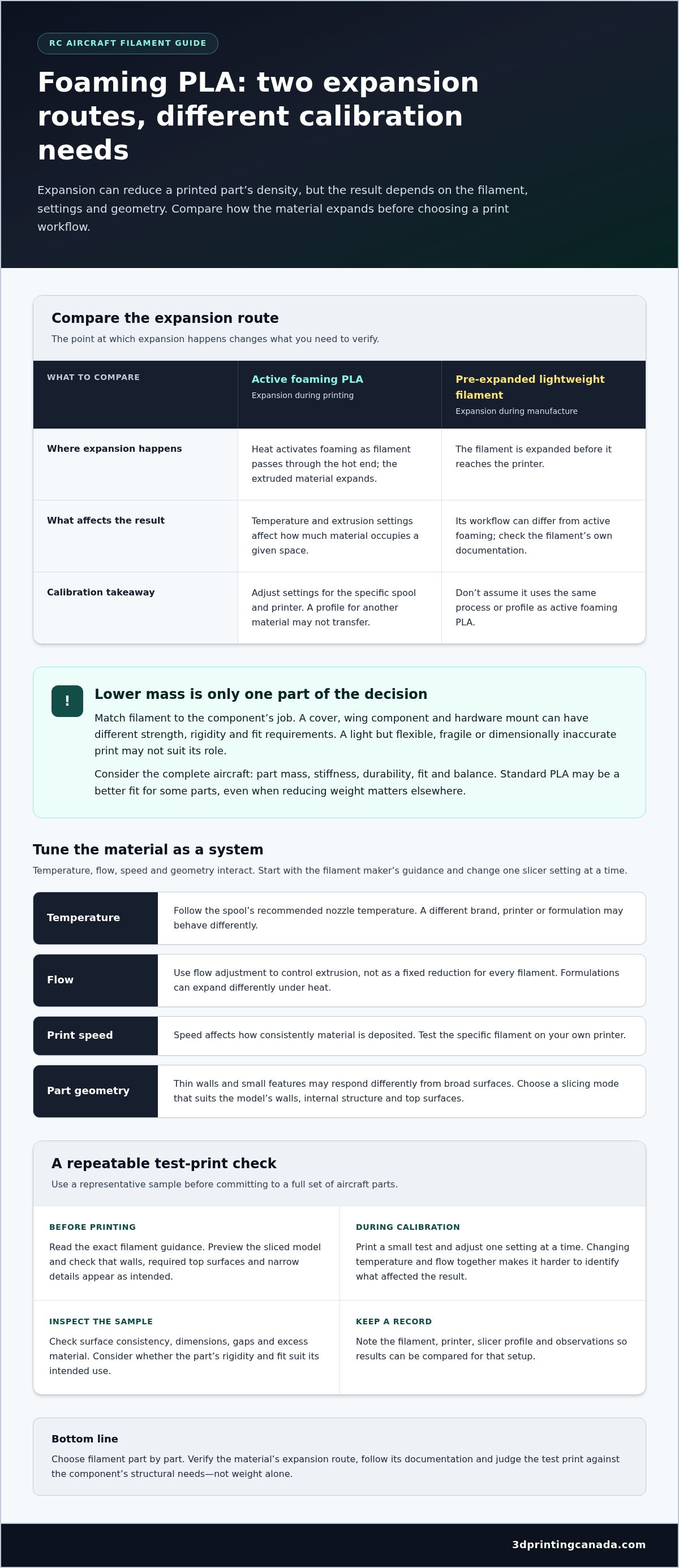
With active foaming PLA, heat activates a foaming agent as the filament passes through the hot end. The extruded material expands, so temperature and extrusion settings affect how much material occupies a given space. This makes the process adjustable, but it also means that the same model can print differently when settings change. Calibration matters.
Pre-expanded lightweight filament is expanded during manufacture, before it reaches your printer. It doesn’t rely on the same in-nozzle expansion behaviour, so its printing workflow can differ from that of an actively foaming material. Check the specific filament’s documentation instead of assuming every lightweight PLA uses the same process or profile.
Active foaming PLA expands during extrusion; factory-expanded lightweight filament gets its expansion during manufacture.
Why RC aircraft builders care about printed-part mass
Every printed component contributes to the aircraft’s all-up weight, alongside the motor, battery, electronics, adhesives and other hardware. A component’s location matters, too. Changing mass in one area can affect balance, so compare the assembled build with the model’s intended weight and balance goals instead of judging a filament by a single sample part.
Consider what each part needs to do. A non-structural cover may have different strength and rigidity requirements from a wing component or a mount that holds hardware in place. A foamed print that is light but too flexible, fragile or dimensionally inaccurate may not suit its intended role. Standard PLA may be a better fit for some parts, even when reducing weight is a priority elsewhere.
For lightweight foaming pla for rc aircraft printing, weigh the trade-offs across the complete aircraft: part mass, stiffness, durability, fit and balance. First identify the components where lower mass could support the design. Then consider whether their structural requirements leave room for a foamed material. This gives you a more useful basis for choosing filament than optimizing one printed part in isolation.
How Foaming PLA Expands, and Which Print Settings Affect the Result
Active foaming PLA changes as it passes through the hot end. Heat activates additives in the filament, producing gas that expands the extruded material. This increases its volume and lowers its density compared with a denser extrusion. The degree of expansion depends on the material and how it’s printed, so a profile for one spool or printer isn’t automatically a reliable starting point for another.
Temperature, flow, print speed and model geometry work together. A temperature change can alter foaming behaviour, while flow settings affect how much filament the slicer asks the printer to extrude. Speed influences how consistently material is deposited, and thin walls or small features may respond differently from broad surfaces. Start with the filament maker’s instructions, then calibrate for your own setup.
Temperature, flow, and speed: tune the material as a system
Follow the exact spool documentation for the recommended nozzle temperature and profile. Don’t assume a temperature used for another brand, printer or foaming formulation will give the same result. Start with the maker’s guidance, print a small test and change one setting at a time. If you adjust temperature and flow together, it’s harder to tell which change affected the result.
Use flow adjustment to control extrusion, not as a fixed percentage reduction for every filament. A setting that looks right on one machine may leave another print weak or overfilled. The same flow setting can produce different results across filaments because each formulation expands differently under heat. Record the filament, printer, slicer profile and observations for every test, including surface consistency, dimensions, gaps and excess material.
Choose a model and slicing mode that suit the airframe part
Spiral-vase mode prints a continuous wall and can suit a model designed around a single, uninterrupted shell. It isn’t a shortcut for every aircraft part: components that require multiple walls, internal structure or closed top surfaces may need a different approach. Choose the mode that matches the model’s geometry and intended use instead of forcing a profile onto a part it wasn’t designed for.
Wall count, layer height and shell design all affect material use and support. More walls may change both mass and rigidity; a thinner shell may use less material but leave less structure. Preview the sliced model before printing. Check that walls appear where expected, top surfaces are present when the design requires them, and the toolpath hasn’t left gaps around narrow details.
For lightweight foaming pla for rc aircraft printing, calibrate the material and inspect the sliced geometry together. A profile developed for a particular printer platform is a reference, not a universal recipe. If you’re comparing filament characteristics for your project, explore the broader filament selection alongside the chosen material’s documentation.
Foaming PLA or Standard PLA: Which Fits Your RC Aircraft Build?
Choose material for the part’s job, not the filament label. Foaming PLA may help reduce printed mass when the design and print process suit it; standard PLA offers a more familiar extrusion workflow for many builders. Neither is automatically the better choice for an entire aircraft. Compare the exact filament documentation with the component’s requirements before deciding.
| Factor | Foaming PLA | Standard PLA |
|---|---|---|
| Weight potential | Expansion may lower printed-part density. The result depends on the filament, settings and geometry. | Doesn’t rely on foaming during printing, so material use follows the selected model and slicing settings. |
| Tuning effort | Active foaming calls for material-specific calibration and test prints. | Often suits a familiar PLA workflow, though settings still need to match the spool and printer. |
| Extrusion behaviour | Expansion can change how deposited material fills a path, so assess the finished print. | Extrusion doesn’t depend on an active foaming process, which can make it easier to anticipate in a familiar setup. |
| Potential part role | Consider where lower mass is a design priority and the part’s geometry and requirements allow it. | Consider where a conventional workflow or the material’s documented properties suit the part. |
Use the table to narrow your options, not to assume a material will perform the same in every design. Compare manufacturer-stated properties for the specific filament, including strength information and any stated test conditions. Don’t transfer a weight or performance claim from one product to another, or treat it as a guaranteed result for your model.
When lightweight foaming PLA is worth considering
Consider foaming PLA for a component where lower printed mass supports the design and the geometry can be printed reliably with that material. Active foaming is a better fit if you’re prepared to follow the maker’s profile, calibrate your printer and inspect test parts before moving on to the aircraft component. Review material-specific documentation before comparing expected weight or performance; a claimed result applies to its stated material and conditions, not every build.
When standard PLA may be the simpler fit
Standard PLA can be a practical choice for early prototypes, straightforward geometry or a build where you want to use a familiar extrusion process. That doesn’t mean it’s stronger in every part or design. Wall layout, orientation, print quality and the component’s job all matter. Check the spool’s documented properties and assess the finished part against its intended requirements.
Decision rule: Choose the material whose documented properties and print workflow fit the part’s function. Prioritize lower mass only when the design can accommodate the material and you can validate the result.
For lightweight foaming pla for rc aircraft printing, make the decision component by component. An aircraft can use different materials for different parts, provided each choice fits the design and the complete build’s priorities.
A Practical Test-Print Workflow for Foaming PLA RC Parts
A successful calibration is more than finding a setting that produces a clean-looking sample. The test should show whether the filament, printer and model geometry work together for the part’s intended role. Follow the filament maker’s guidance, then use small, controlled tests to evaluate your setup before printing a complete airframe component.
Calibrate with a small, representative test print
Choose a compact test that reflects the part you plan to make. If it has a thin wall, curved surface or narrow feature, include similar geometry in the sample. A simple cube can help you assess extrusion, but it may not reveal how the material behaves on the aircraft part’s specific shapes.
- Confirm the material guidance. Note whether the filament is actively foaming or factory-expanded, and start with the manufacturer’s recommendations for your exact spool.
- Prepare a small test. Use a model with wall and feature types representative of the intended part. Keep the printer and slicer setup consistent.
- Inspect the result. Check wall continuity, surface quality, layer bonding, dimensions and visible defects such as gaps, blobs or inconsistent extrusion. Compare the sample with the model’s intended geometry.
- Adjust one variable. If the result needs work, change one slicer setting at a time, then print and inspect another sample. This makes it easier to connect a change with its effect.
- Record and repeat. Log filament identity, printer, nozzle, slicer profile, changed setting and observations. Repeat until the test produces consistent extrusion and the geometry your part requires.
Keep your notes with the profile. They’ll help you reproduce a useful result and distinguish a material issue from a change in printer or settings. Don’t scale up based on appearance alone; a smooth-looking sample may still have weak layer bonding or dimensions that prevent a proper fit.
Check the assembled airframe before flying
After printing, inspect the part and how it fits the airframe. Look over joints and thin walls for damage or separation, confirm adjoining parts seat as intended, and move each control surface through its range to check for binding. Assemble the aircraft with its motor, battery and electronics, then check the centre of gravity against the model’s design guidance. A light component can still affect balance if it changes mass distribution.
Before flight, inspect the complete aircraft on the ground and address any fit, movement or balance concerns. Experienced builders can then proceed with cautious, progressive flight testing, checking the model’s response before expanding the test. For lightweight foaming pla for rc aircraft printing, validation doesn’t end at the printer: the assembled aircraft must also meet the design’s fit and balance needs.
Ready to compare materials for your next calibration? Explore filament options for your project and choose a spool whose documentation supports your test plan.
Choose Filament and Printing Support for Your RC Aircraft Project
Choose a spool by matching its material behaviour and documentation to the aircraft part and your printer workflow. A product claim or downloaded profile is a starting point, not a substitute for checking how the filament performs on your machine. Comparing the details first can help you avoid choosing on a weight claim alone.
What to compare before choosing a spool
Use this checklist to compare options for lightweight foaming PLA for RC aircraft printing:
- Intended part: Identify the component and what it needs to do. Its geometry and structural requirements should guide whether foaming behaviour is suitable.
- Foaming type: Check whether expansion occurs during printing or during filament manufacture. The distinction affects the workflow and calibration approach.
- Manufacturer documentation: Review the recommended settings and any stated material properties or test conditions. Treat weight-reduction figures as claims specific to that product and its conditions, not guaranteed results for every model.
- Printer workflow: Compare the filament guidance with your printer, nozzle and slicer. A profile made for a different machine or material may not transfer as-is.
- Test-print capacity: Plan to run and inspect small samples before committing to aircraft parts. Allow time to record results and refine the profile.
For wider context on choosing materials for different projects, the 3D printer filament buyer’s guide can help you compare filament characteristics beyond this aircraft-specific use. 3D Printing Canada offers more than 800 filament varieties, giving makers a broad selection to explore as they compare materials and plan their projects.
Get practical help moving from profile to successful print
Printer and spool details make troubleshooting more useful. When discussing a material or print challenge with the support team, bring the filament identity, printer and nozzle details, slicer profile, model or part geometry, and test-print notes. Include what changed between attempts and what you observed, such as inconsistent walls, rough surfaces or dimensional differences. That practical context helps the team understand the issue without assuming one setting will solve every problem.
3D Printing Canada’s team provides in-house technical support and 3D printer repair services. Bring your printer and material questions to a team with practical 3D printing knowledge, and use its guidance alongside the manufacturer’s documentation and your test results. The goal is a considered material choice and a repeatable workflow, not a promised result from a generic profile.
Once you’ve narrowed down the material and planned your test, explore 3D printing supplies for your project.
Make Your Next Airframe a Better-Informed Build
Your next step doesn’t have to be a full aircraft print. Choose one component where a different filament could suit the design, then use a small, documented trial to see how it performs in your own workflow. That gives you useful evidence for future builds and helps turn lightweight foaming pla for rc aircraft printing from a promising idea into a considered material choice.
Material decisions are easier with practical knowledge behind them. 3D Printing Canada has served more than 100,000 customers across Canada and has been in business for more than 10 years. Bring your project questions as you compare options and plan your next test.
Explore 3D printing supplies and get help from real experts. Keep testing thoughtfully, trust what your own prints show, and enjoy building an aircraft that reflects your goals.
Frequently Asked Questions
What is lightweight foaming PLA for RC aircraft printing?
It’s PLA filament formulated to create a lower-density print through expansion, either as it’s extruded or before it reaches the printer. For an RC build, the key question is how the specific spool behaves in the part you’re making. Check its documentation and test a small sample; the term “lightweight PLA” alone doesn’t tell you the print settings, final mass or suitability for a particular airframe component.
How much lighter can foaming PLA make an RC aircraft part?
There isn’t one reliable weight reduction for every part. Filament formulation, settings, model geometry and the manufacturer’s test method all influence the result. For a fair comparison, print the same model using each material with the intended profiles, then weigh the finished parts on the same scale. Treat advertised reductions as product-specific claims, and use your measured part weight when estimating the assembled aircraft’s mass.
Is foaming PLA stronger than standard PLA for RC planes?
Not as a general rule. Foaming changes the printed material’s density, and the finished part’s performance also depends on design, print orientation, settings and layer bonding. A material data sheet can help you compare documented properties, but it may not predict how a thin, curved aircraft component will behave. Assess a representative print against the part’s requirements rather than relying on a broad strength ranking.
Can I use lightweight foaming PLA with any 3D printer?
Don’t assume every printer can process every foaming PLA. Compare the spool’s requirements with your printer’s supported materials, hot-end capabilities and extrusion setup. Also consider whether your slicer lets you control the settings the filament maker recommends. If the machine can’t reach or maintain the required conditions, or the material guidance doesn’t suit its workflow, the result may not match the intended print behaviour.
Do I need special slicer settings for foaming PLA?
Often, yes, particularly with active foaming filament. Start with the manufacturer’s profile or recommendations for that exact material, then check the sliced preview for the model. Confirm that the selected wall and shell structure appears as intended, especially around openings and narrow features. A downloaded profile can be a useful reference, but it may need adjustment for a different printer, spool or model.
What happens if foaming PLA prints too light or unevenly?
A part that’s unexpectedly light or uneven may have inconsistent expansion or extrusion, leaving its surfaces, dimensions or walls different from the design. Don’t install it in a flight-critical role based on appearance alone. Compare its weight and geometry with your test sample, inspect for gaps and weak-looking areas, and revisit the material guidance before changing settings. Reprint and reassess if the part doesn’t meet its requirements.
Can I use foaming PLA for every part of an RC aircraft?
No single filament needs to suit every component. A design may call for different material choices depending on a part’s loads, fit, stiffness and position in the aircraft. For example, a non-structural cover and a hardware mount have different jobs. Follow the model’s design guidance, assess each component against its own requirements, and verify the complete build’s assembly and balance before flying.