
The optical endstop vs mechanical microswitch accuracy comparison isn’t a simple win for one sensor: optical endstops detect interrupted light without contact, while microswitches trigger through physical movement. Reports from tested microswitches put repeatability around 0.02-0.05 mm, but the result depends on the switch, mounting and setup. Both methods can home a printer consistently when their sensing and mechanical details are suited to the machine.
When replacing an endstop or troubleshooting inconsistent homing, it’s natural to focus on the sensor’s stated accuracy. But the trigger mechanism matters too: sensor movement, signal noise, switch bounce and mechanical wear can all affect where an axis stops from one homing cycle to the next.
This guide compares how optical endstops and microswitches work, explains what repeatability figures do and don’t tell you, and shows how installation and wear affect real-world results. Use it to choose an endstop that suits your printer and to narrow down the cause when homing is inconsistent.
Key Takeaways
- Compare how each endstop triggers: optical sensors respond to interrupted light, while microswitches require physical movement.
- Use repeatability, not a headline accuracy claim alone, to judge how consistently an endstop returns an axis to its home position.
- Factor in switch quality, mounting and mechanical wear, which can affect how reliably a microswitch trips over time.
- For optical sensors, pay attention to alignment, signal behaviour and dust, as these can influence detection.
- Match the endstop to your printer’s setup and homing needs rather than assuming one sensing method is always more accurate.
Contactless sensing and sensor displacement
An optical endstop detects an axis position without the printhead pressing a switch. Its repeatability depends on the light path, sensor geometry and electrical signal, not simply on its contactless design.
Contactless Sensing
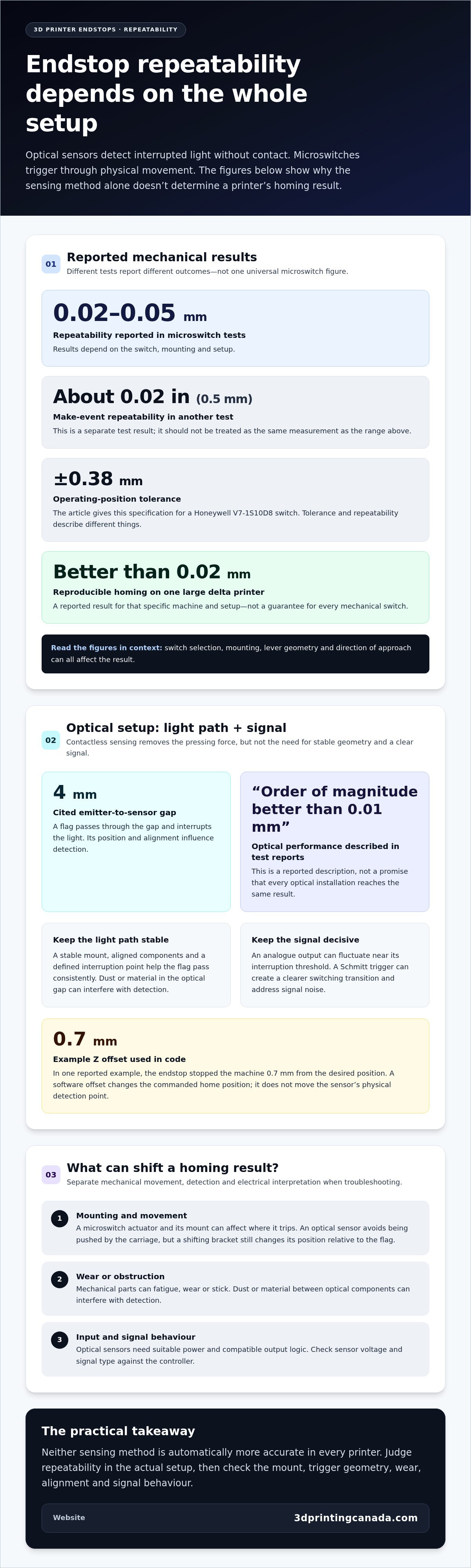
Contactless sensing means an endstop detects an object without the object touching or moving its sensor. An infrared emitter sends light towards a receiver, and an interrupting flag changes the receiver’s signal. Since the printhead doesn’t press a lever, the sensor itself isn’t pushed out of position during homing. That removes one source of movement from the sensing process. Reports from tests described optical performance as an order of magnitude better than 0.01 mm.
Sensor Displacement
Sensor displacement is physical movement of the endstop during triggering, and a contactless optical sensor avoids that movement. One cited optical setup used a 4 mm gap between its emitter and sensor. The flag passing through that space interrupts the beam, so its alignment and position affect detection. This doesn’t make every optical setup equally repeatable: mounting and signal behaviour still influence when the printer registers the interruption.
A microswitch works differently: the moving carriage presses its actuator, which transfers force to the switch mechanism. An optical endstop receives no such pressing force, so the printhead itself doesn’t displace the sensor. This can matter for a Z-axis setup where the homing target needs to stay fixed across repeated approaches. The optical sensor still needs a stable mount, since a shifting bracket changes its position relative to the flag.
Distance also shapes the optical signal. In the cited estimate, the emitter and receiver were separated by 4 mm; changing their spacing or alignment can change how the receiver responds when a flag enters the gap. A thin, rigid strip provides a defined interruption point as it passes between the components. A loose or flexible flag can shift its position, so contactless sensing alone can’t correct poor geometry.
Electrical interpretation matters too. An optical sensor’s continuous analogue output can fluctuate near the interruption threshold, and a direct connection to a digital input can cause noise or arbitrary triggering. A Schmitt trigger circuit adds positive feedback to create a clearer switching transition. That addresses signal interpretation, not mechanical offset: one reported homing example used a 0.7 mm Z offset in code when the endstop stopped the machine 0.7 mm from its desired position.
Keep the causes distinct when diagnosing a homing result. A stable light path and fixed sensor mount address optical alignment; a defined input transition addresses electrical noise. A software offset, such as the reported 0.7 mm example, changes the commanded home position rather than the sensor’s physical detection point. Separating these factors helps explain why avoiding contact can reduce sensor displacement without making every optical endstop installation identical.
Mechanical endstop precision and wear
Microswitches use physical contacts, while optical units need compatible power and signal logic. Check voltage compatibility against both the sensor and controller. Neither type is inherently safer: consider switch wear or sticking, optical contamination, and what happens if an endstop fails.
Precision and Wear
Mechanical endstop precision describes how consistently a switch signals at the same position, while wear can change that response over time. That matters because a printer may home differently as the switch’s spring arm or internal parts fatigue. Microswitch tests reported repeatability around 0.02-0.05 mm, but another test found a make-event repeatability of about 0.02 inches (0.5 mm).
Those results show why a single figure doesn’t describe every installation. A Honeywell V7-1S10D8 switch has an operating-position tolerance of ±0.38 mm, while mechanical switches on one large delta printer produced homing results reproducible to better than 0.02 mm. Switch selection, mounting and the direction of approach all shape the result. A lever also changes how force reaches the switch, so its geometry matters.
Wear is another variable. A mechanical switch’s spring arm and internal parts can fatigue, wear, stick or stop triggering. A sticking switch may keep its input active after the carriage moves away; a failed trigger may let the axis travel past its intended home point. Inspect the actuator and confirm that the input changes during a homing test.
Reliability and Failure Modes
Endstop reliability means consistently signalling an axis limit. It matters because a missed signal can let the printhead or heatbed travel too far. The failure modes differ: mechanical parts can fatigue or stick, while dust or material trapped between optical components can interfere with detection. On a CNC machine, debris in the optical gap can block detection; on a printer, a worn switch can miss a homing event.
No endstop type is automatically safer. Risk depends on the machine’s movement, sensor placement and response to failure. Endstops at both minimum and maximum positions on each axis can reduce the risk of printhead or heatbed crashes. For a CNC setup, consider whether cutting material could lodge between optical components. On either machine, a failed or misaligned sensor can leave travel unchecked.
Wiring also affects reliable operation. A microswitch provides a contact that the controller reads as an input; an optical sensor needs suitable power and compatible output logic. Match the sensor’s voltage and signal type to the controller rather than assuming all endstop connectors work alike. Incorrect input configuration can cause missed or false triggers even when the switch itself works normally.
If a printer’s mechanical endstop sticks, misses homing, or behaves inconsistently, 3D printer repair services can help address the hardware issue. For a machine that homes reliably, note the switch’s position and input behaviour as a baseline. Changes in actuator movement or trigger response can reveal wear before a missed home becomes a collision.
Mechanical switch endstop operation
A mechanical endstop changes its electrical state when an axis presses its actuator. The trigger position, release behaviour and contact bounce all shape the signal received by the controller.
Mechanical Switch Operation
A mechanical endstop uses a moving actuator to open or close electrical contacts when the carriage reaches it. The controller reads that change as the axis limit. A lever switch transfers carriage pressure to its internal contacts, while a switch without a lever is pressed more directly. The actuator’s travel and mounting determine how the contact point relates to the machine’s home position.
During homing, the controller moves an axis towards the switch and monitors its input. When the contact changes state, the controller stops or backs the axis away, depending on its configuration. As pressure releases, the switch returns to its resting state. The distinction between activation and release matters: the position where a contact closes may differ from where it opens again.
Trigger Variation and Bounce
Trigger-point variation is a change in the position where a switch changes state. Hysteresis is the difference between its activation and release positions. Both can affect the home position, while contact bounce can cause several rapid, unpredictable state changes during one press. Unless the controller filters those changes, it may interpret them as multiple triggers.
One mechanical-switch test reported break-event repeatability of about 0.005 inches (0.13 mm). That figure describes the tested switch and setup, not every microswitch. A separate make-event result can differ because the contacts close on one movement and reopen on another. Comparing both directions helps explain why a printer may stop consistently while approaching, yet show a different release point.
Switch bounce occurs when contacts briefly touch and separate instead of settling into one clean state. Its timing is unpredictable, so the controller may see a burst of transitions rather than one clear signal. Software filtering or electrical conditioning can suppress brief changes, but filtering also affects when the controller accepts the trigger. During a homing test, observe the input as the switch is pressed and released.
Switch quality also affects how reliably and consistently a mechanical endstop trips. To check, approach the same switch from the same direction and compare the reported stopping position across repeated homing cycles. If results vary, inspect actuator travel, mounting rigidity and contact behaviour before changing the home offset. This helps separate switch operation from calibration and pinpoint whether variation comes from the mechanism or controller response.
Optical endstop accuracy claims
Accuracy claims describe different things: how close the trigger position is to a target, and how repeatable it is across homing cycles. Compare both, and check the sensor, mounting and test conditions behind each figure.
Repeatability and Positioning Tolerances
Repeatability measures how closely an endstop returns to the same trigger point; positioning tolerance describes its possible deviation. This distinction matters when a datasheet figure sounds more precise than the printer’s actual homing results. A TCST2103-based optical endstop datasheet curve was reported as ±0.5 mm, while another optical Z-axis test returned the bed to 0.00 mm in 8 out of 10 homing attempts and 0.01 mm in the other 2.
Those examples aren’t interchangeable specifications: one is a datasheet curve, the other a result from a particular printer and test. Microswitch results also vary by switch and setup, so compare repeatability measurements made under similar conditions. A switch-test graph was cited with 0.0015 mm repeatability, while five bed-probing runs showed a maximum variance of 0.06 mm.
For repeatable homing, mount the sensor firmly and align its sensing gap with a thin, rigid flag. Keep the flag’s path consistent, then test repeated approaches from the same direction. Distinguish the endstop’s trigger point from the machine’s final position: a software offset can correct a fixed positioning difference, but it can’t improve inconsistent triggering.
Environmental Effects on Accuracy
Environmental effects are changes in sensing conditions around the optical components, and they matter because the receiver responds to light. Dust can obstruct the beam, ambient light can interfere with detection, vibration can shift sensor alignment, and temperature can affect operation. Optical and microswitch tests were reported across 10C to 40C; other optical endstops reportedly worked inside a 50C printer enclosure.
Reported figures reflect specific test conditions, not a universal tolerance for all optical models. Dust in the optical gap can weaken the light reaching the receiver, while vibration can shift a bracket relative to its flag. Keep components clean, secure the mount and consider the operating environment when interpreting homing results.
A practical comparison records the trigger position across repeated homing cycles, then checks whether the results change after cleaning or securing the mount. If a printer repeats consistently but homes slightly away from its target, it has a positioning offset. Scattered results point instead to trigger variation, alignment or environmental interference. Accuracy claims are useful only when the test method reflects the machine’s actual setup.
Optical endstop detection by light interruption
An optical endstop detects an axis limit when a moving object interrupts infrared light between an emitter and receiver. The sensor turns that change into an electrical signal for the controller. Unlike a contact switch, it relies on a clear optical path and a flag passing through the sensor gap. The flag’s shape and alignment are part of the detection geometry, not just mounting details.
A typical optical endstop uses two LEDs: an infrared emitter and receiver. A thin, rigid, solid strip attached to the moving assembly passes between them. When the strip blocks the beam, the receiver’s output changes and the controller registers the limit. A flexible flag can bend or wobble, shifting the interruption point. A stable strip helps keep the trigger point tied to the same physical position.
Light strength changes with distance. One estimate describes intensity falling with the square of distance, so moving the emitter farther from the receiver can weaken the signal quickly. A typical endstop illuminator LED is described as operating at 1.2 V and drawing 0.05 A, for 0.06 W. Its light cone is estimated at about 30 degrees, which helps explain why alignment and spacing affect how much light reaches the receiver.
The receiver’s transition also depends on how its signal is interpreted. One estimate put the photosensor’s detection range across its full current range at about 0.1 mm. If the output changes gradually, a digital input may register noise or arbitrary triggers near its switching threshold. A Schmitt trigger circuit adds positive feedback, producing a clearer transition as the flag enters or leaves the beam. It improves signal conditioning, not the sensor’s physical alignment.
Keep the optical gap clear. Dust can reduce the light reaching the receiver, while material trapped between sensor components can prevent reliable detection, particularly in CNC environments. Troubleshooting can be challenging because it may not be clear which component is causing the problem. Check the emitter, receiver, flag path and controller input separately. A misaligned strip and a weak electrical signal can cause similar homing faults.
For repeatable detection, secure the sensor and flag, preserve their alignment, and keep debris out of the beam path. If an optical endstop fault is disrupting printer homing, get help with printer endstop issues through repair support.
Mount a thin, rigid, solid strip on the printhead so it passes through the gap between the infrared components. A nearby Schmitt trigger adds positive feedback. Dust can interfere with optical switches over time.
3D Printing Canada: Bambu Lab Accessories
3D Printing Canada offers Bambu Lab Accessories and 3D Printer Repair Services for different printer needs. If an endstop fault is disrupting homing, repair services are a relevant next step for addressing printer hardware issues. If your printer is running well and you’re exploring compatible add-ons, Bambu Lab Accessories may be relevant to your setup.
Choose based on the problem in front of you: a persistent trigger fault calls for attention to the printer’s hardware, while an accessory purchase supports a different goal. 3D Printing Canada also offers 3D Printeda and 3D Scanners for readers with other 3D printing or scanning needs.
For help with a printer issue or to explore Bambu Lab Accessories, contact 3D Printing Canada or visit 3dprintingcanada.com.
Set a clear target for your next print
Before changing an endstop, decide what a successful home position means for your printer and the work it needs to do. To compare optical endstop vs mechanical microswitch accuracy, track whether the machine returns consistently to that target, rather than relying on an impressive-looking sensor specification. Keep a brief record of homing behaviour after adjustments so you have a practical reference if the issue returns.
If the next step involves printer hardware, 3D Printing Canada offers 3D Printer Repair Services. For other project needs, it also offers Bambu Lab Accessories and 3D Printeda. Choose the path that matches your setup, whether you’re resolving a persistent machine issue or planning what to make next.
Contact 3D Printing Canada to discuss your printer needs. A thoughtful diagnosis can turn homing uncertainty into a more confident next print.
Frequently Asked Questions
How accurate and repeatable are optical endstops compared with mechanical microswitches?
Either type can provide consistent homing, but results depend on the sensor, installation and controller setup. In an optical-endstop-versus-mechanical-microswitch accuracy comparison, separate trigger consistency from the machine’s final position. A printer may trigger repeatedly yet still need its home position calibrated. Compare repeated homing results on the same axis under the same approach conditions, rather than relying on one specification.
How do microswitch wear, contact degradation, and actuation force affect accuracy over time?
Wear can make a microswitch trigger inconsistently, stick or stop changing its electrical state reliably. A fatigued spring arm may change how the actuator feels and moves; worn contacts can also produce an unreliable input. If the carriage barely presses the switch, its mounting position and actuator travel may leave the trigger unreliable. Watch for a changed click or inconsistent controller input, then inspect the switch and mount before adjusting homing offsets.
What are the advantages and disadvantages of optical endstops versus microswitches for 3D printers and CNC machines?
Optical endstops avoid contact wear but need a clear sensing path, stable alignment and compatible signal handling. Microswitches are simple to actuate, but their moving parts and contacts can wear or stick. In a dusty CNC setup, debris near an optical sensor is a concern; in a frequently homed printer, switch wear may matter more. Choose based on the machine’s environment, controller input and maintenance needs, then test homing consistency.