
A puncture or hole is a clear reason to replace your FEP film, but damage can be less obvious. Key resin vat release film replacement indications include cured resin debris, deep scratches, persistent cloudiness, or resin on the LCD screen after you remove the vat. A scratch alone does not always require replacement if it has not punctured the film.
It is easy to focus on a failed print and overlook what the release film is showing you. A close inspection can help catch damage before it causes a leak or another print problem. Check the film whenever you clean the vat.
This guide explains how resin debris, punctures, scratches, holes, and cloudiness can signal that your FEP film needs attention. You will learn how to distinguish a surface mark from damage that calls for replacement, and what to do if you suspect a leak but cannot see a hole. The aim is to help you make a practical decision before your next print.
Key Takeaways
- Look for resin debris and residue, especially on the LCD screen after removing the vat, as possible clues that the film is damaged.
- Replace film with deep scratches, punctures, or holes, which can allow resin to leak.
- Don’t treat every scratch as a reason to replace the film; assess whether it has penetrated the surface.
- If damage isn’t visible, a small amount of isopropyl alcohol in the vat can help reveal a leak.
- Reduce peeling-force stress by tilting models and slowing the printer’s Z lift speed.
1. What Signs Indicate That You Need to Replace Your FEP Film?
Resin residue on the LCD screen after removing the vat can point to damaged release film. Debris, a puncture, a hole, deep scratches, or cloudy areas also warrant inspection. Check the film and screen before starting another print, as a leak can spread beyond the vat.
Print settings affect the peeling force as each layer separates from the film. A model with a broad cross-section can create more resistance during lifting than a smaller part. Tilting the model can reduce that force, while slowing the printer’s Z lift speed can make separation less abrupt. If prints repeatedly stick to the film, review the orientation and lift settings as well as the film’s condition.
Replace damaged vat release film rather than patching it. A puncture or hole can let liquid resin escape, and a patch cannot restore a reliable, continuous surface.
Replacement film prices in Canada depend on the material, dimensions, and printer model. FEP and PFA are different film types, so match the replacement to your vat rather than choosing by price alone.
Replace FEP, nFEP, or PFA film when inspection shows damage or wear that affects its surface. The material type alone does not determine a fixed replacement schedule.
There is no universal print-hour or cycle interval for every vat. Resin type, print settings, model shape, cleaning, and peeling forces all affect film wear, so use its visible condition to decide.
To inspect and replace film safely, remove the vat, empty and clean it, then examine the film under good light. After a failed print or before changing resins, clean the vat and film to remove impurities. If cured resin is on the LCD, soften it with isopropyl alcohol at a concentration of at least 95%, then gently lift it with a plastic spatula. Avoid sharp metal tools, which can damage the screen’s polarized film. A screen protector can help shield the LCD from resin leaks.
If you cannot see a hole, put a small amount of isopropyl alcohol in the empty vat and check for leakage. Dry the vat before installing replacement film. Follow the printer manufacturer’s instructions for film tension and assembly, as uneven tension can affect printing.
Use the film type and thickness specified for your exact printer and vat. Check the model documentation before ordering, as film dimensions and mounting requirements vary. FEP, nFEP, and PFA are not interchangeable by name alone; the replacement must fit the vat’s design.
Remove cured resin from an LCD gently. Use a plastic spatula rather than a sharp metal tool to protect the polarized film.
2. Resin debris and film punctures
Resin debris in the vat can be more than leftover mess. A cured flake from a failed print may get trapped between the build plate and release film during the next job, potentially marking or puncturing the film. Before pouring resin back into the vat, inspect both the film and resin for solid fragments. A clean vat is easier to assess than one clouded by debris.
Check for a leak as well as visible damage. A pinhole can be difficult to spot, but resin residue on the LCD screen after removing the vat may indicate damaged film. Look for fresh, sticky residue on the vat’s underside and LCD surface. Do not mistake resin spilled during handling for proof of a puncture; trace the residue to its source before deciding what happened.
Use a careful inspection sequence after a failed print:
- Remove the vat and look for cured fragments or a detached piece of the failed model.
- Inspect the film under good light, moving the vat to view the surface from different angles.
- Check for resin residue beneath the vat and on the LCD screen.
- Clean the vat and film before changing resins, so remaining impurities don’t carry into the next batch.
If you cannot see a hole, a small amount of isopropyl alcohol in the resin vat can help reveal a leak. Watch for liquid escaping beneath the vat, then empty and dry the vat before using it again. This test can reveal a leak but does not identify every cause of a failed print. Check the film for the damaged area before putting the vat back in the printer.
Do not keep printing if you suspect a puncture. Leaking resin can reach the LCD, and debris may hide the damaged spot during inspection. A screen protector can help prevent leaking resin from contaminating the LCD, but it cannot repair damaged film. Carefully remove loose debris without pressing fragments against the film.
Clean the vat and release film after print failures, and before switching resin types. Those steps remove impurities that could otherwise remain in the vat. If resin appears on the screen, gently soften cured residue with isopropyl alcohol of at least 95% concentration. Use a plastic spatula, not a sharp metal tool, to avoid damaging the screen’s polarized film.
If recurring printer faults make the source of a leak difficult to isolate, 3D printer repair services can help address equipment issues.
3. Scratches, punctures, holes, and cloudy film
A scratch does not automatically mean you need to replace resin vat film. If it has not punctured the surface, the film may still be usable. Inspect it under good light, then tilt the empty vat to view the mark from several angles. A surface line can look deeper from one direction, so examine its edges before deciding.
Deep scratches are different: they can weaken the film and create a path for resin to escape. Replace film with a puncture or hole because resin can leak through. Do not test questionable damage by starting another print. Remove the vat and check for leakage before putting it back into use.
Cloudiness calls for a closer look. A cloudy patch can make it harder to see debris or damage through the film. Clean the vat and film after a failed print, then inspect the surface again. If the cloudiness remains, check whether it is a surface deposit or a change in the film itself. Look for pits, rough areas, or marks that reflect light differently.
Use this inspection sequence to distinguish a harmless-looking mark from a warning that the film needs replacement:
- Clean the vat and remove resin residue that could hide the film’s surface.
- View scratches from different angles, checking whether they remain shallow or appear deep.
- Look closely for punctures, holes, or cloudy areas that persist after cleaning.
A scratch without a puncture does not necessarily mean the film needs replacing. Treat a deep scratch, puncture, or hole as a leak risk. If the film’s condition is unclear, check for resin beneath the vat before printing. A small amount of isopropyl alcohol in the vat can help reveal a leak when damage is not visible. Empty and dry the vat afterward.
Keep the distinction practical: surface appearance matters, but a break through the film is the decisive warning. Cloudiness alone does not prove there is a hole, and a shallow scratch alone does not prove the film has failed. Clean first, inspect the same area from more than one angle, and look for damage that goes through the film. If you find a hole or puncture, replace the film rather than trying to cover it.
After inspection, remove resin debris before refilling the vat. A cured fragment can interfere with the next print and make the film harder to assess. A clean surface gives you a clearer view of scratches, cloudy patches, and punctures before the next job.
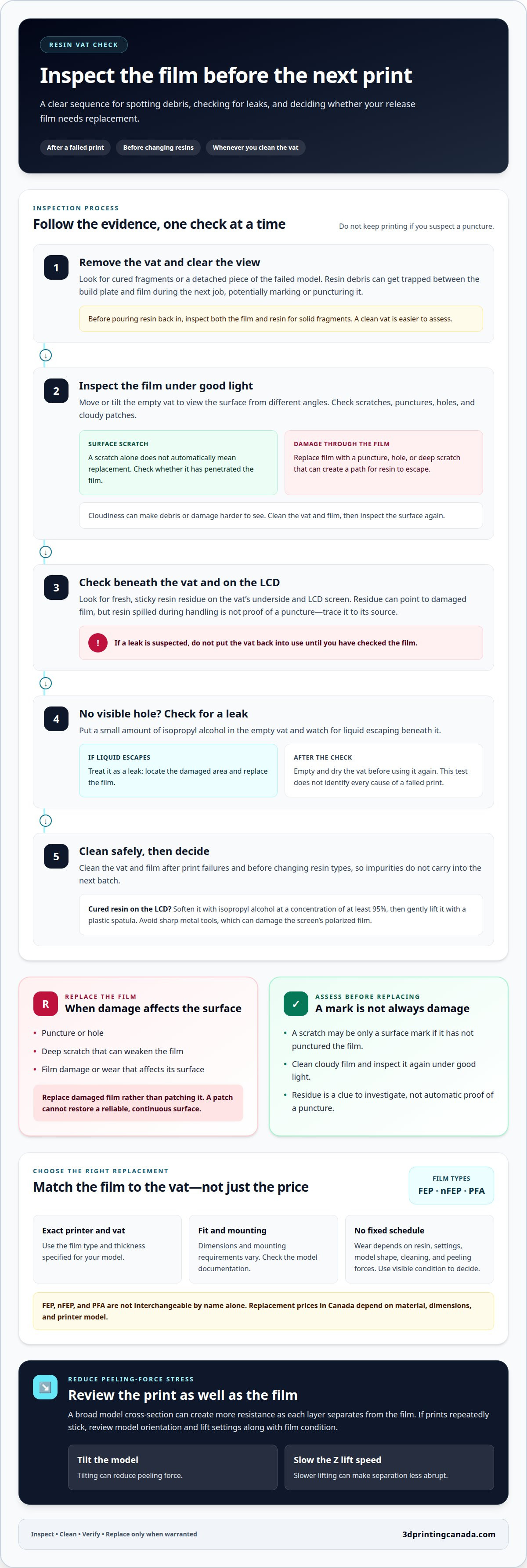
4. Signs that a resin vat release film needs replacement
Use the film’s condition, not a set number of prints, to decide whether it needs replacing. A visible hole or puncture is a clear warning because resin can leak through. Deep scratches also warrant replacement, while a shallow scratch without a puncture does not automatically mean the film has failed.
Start with a clean, empty vat. Resin debris can hide a flaw or make a mark harder to judge, so remove impurities after a failed print and before changing resins. Inspect the film under good light, then tilt the vat to view the same area from different angles. Look for a break in the surface, not just a line that appears prominent from one viewpoint.
Cloudiness is a reason to inspect more closely, not proof by itself that the film has a hole. Clean the film and check whether the cloudy area remains. Then look for deep scratches, punctures, or holes there. If you suspect a leak but cannot see damage, a small amount of isopropyl alcohol in the vat can help reveal escaping liquid. Empty and dry the vat afterward.
Resin on the LCD screen after removing the vat is another warning sign. It may indicate damaged film, so inspect the vat and screen before printing again. Cured resin on the LCD should be softened gently with isopropyl alcohol of at least 95% concentration. Use a plastic spatula to lift it; a sharp metal tool can damage the screen’s polarized film. A screen protector can help prevent a leak from contaminating the LCD, but it doesn’t repair the film.
When handling resin or replacing film, keep the vat steady, avoid spills, and follow the resin and printer manufacturers’ handling and assembly instructions. Clean the work area and vat carefully to prevent debris from transferring back onto the film.
Use these findings to guide the decision:
- Replace the film: a puncture, hole, or deep scratch is present, or resin is leaking.
- Inspect further: the film looks cloudy, or residue appears on the LCD after removing the vat.
- Don’t replace based on the mark alone: a scratch without a puncture doesn’t necessarily mean the film needs replacing.
After inspection, remove resin debris before refilling the vat. Do not resume printing if the film has a hole or puncture. Install the correct replacement film for the vat according to the printer’s assembly instructions, then inspect the installed surface before adding resin.
5. How can I tell whether failed prints are caused by worn release film or another problem?
Start with physical evidence, not the failed model alone. A puncture, hole, deep scratch, or resin residue beneath the vat points to possible film damage. Without these clues, a failed print does not prove the film is worn. Inspect the empty vat and note where the print failed before changing settings or replacing parts.
Look for a pattern across print jobs. If failures occur in the same part of the build area, inspect that section of film for marks, debris, or cloudiness. If different models fail in different places, check the vat for cured fragments and resin impurities. Clean the vat after a failure, then inspect it again under good light.
Compare the failed print with its orientation and shape. A broad, flat model can create more peeling force than a smaller or tilted model. If the film has no puncture and there is no sign of leakage, review the model orientation and printer’s Z lift speed. Change one setting at a time to see whether the failure pattern changes.
Use this order to narrow down the cause:
- Remove the vat and inspect the film for punctures, holes, and deep scratches.
- Check beneath the vat and around the LCD for resin residue.
- Clean away cured debris, then inspect the film again.
- Review the failed model’s orientation and print settings before trying another print.
A leak test can help if the film looks intact but resin appears beneath the vat. A small amount of isopropyl alcohol in the vat can reveal escaping liquid. Empty and dry the vat afterward. If the test shows a leak, do not treat the problem as a print-setting issue. Replace damaged film before printing again.
If inspection finds no damage or leakage, look beyond the film. Check for cured debris in the vat, contaminated resin, and whether the same failure occurs after cleaning. One failed print cannot identify the cause on its own. Comparing the vat’s condition, failure location, and settings gives you a more useful diagnosis.
Persistent failures or recurring equipment faults may need hands-on troubleshooting. Book 3D printer repair services to have printer issues assessed and repaired.
Treat visible film damage as a stronger warning than an isolated print failure. Replace resin vat release film with deep scratches, punctures, or holes because it may leak resin. If the film appears intact, consider the failure location and whether problems recur, along with the vat inspection, before deciding what to check next. After cleaning or replacing parts, reassess the vat before printing again.
3D Printing Canada: Bambu Lab Accessories
3D Printing Canada offers Bambu Lab Accessories and 3D Printer Repair Services for different 3D printing needs. Bambu Lab accessories are relevant when you’re looking for equipment and accessories for a Bambu Lab printer, while repair services are the practical next step if printer faults continue after you’ve inspected the vat film and addressed visible damage.
For this resin vat issue, focus on the repair option if failed prints persist or the printer’s behaviour suggests a broader equipment problem. The service is for printer repair, not a substitute for replacing film with a puncture or hole. Match the solution to the fault, and keep your next troubleshooting step straightforward.
Contact 3D Printing Canada or visit 3dprintingcanada.com to learn more.
Keep your next print on track
Make film inspection part of your routine before printing, not just after a failure. Knowing the signs that your resin vat release film needs replacing helps you decide when to pause and inspect your setup. A consistent check gives you a clearer starting point for your next project.
Use resin vat release film replacement indications as a practical guide, then consider whether recurring problems point to a wider equipment issue. Careful troubleshooting helps you choose a sensible next step without replacing parts unnecessarily.
Keep learning, inspect carefully, and get back to making with confidence.
Frequently Asked Questions
What Signs Indicate That You Need to Replace Your FEP Film?
Replace FEP film if inspection reveals a hole, puncture, or deep scratch. Resin beneath the vat or on the LCD screen after removing the vat is another reason to investigate for a leak. Before deciding, clean the vat and inspect the film from different angles. A shallow scratch alone does not necessarily mean replacement is needed; look for damage through the film or evidence of escaping resin.
Why Did Your FEP Film Get Damaged?
Peeling force can stress the film during printing, especially when a model’s shape and orientation create resistance as layers separate. Cured resin debris left in the vat can also get trapped between the build plate and film during a later print. Reduce these risks by cleaning the vat after failed prints, removing impurities before changing resins, considering tilted model orientations, and slowing the printer’s Z lift speed.
What Are the Signs That a Resin 3D Printer Vat Release Film Needs Replacement?
Look for a hole, puncture, deep scratch, or resin leaking beneath the vat. Resin residue on the LCD after removing the vat can also point to film damage. Cloudiness is a reason to clean and inspect the film, but it does not prove a leak by itself. If the film looks intact, check for escaping liquid with a small amount of isopropyl alcohol in the vat, then empty and dry it.
How Do Scratches, Cloudiness, Dents, or Holes Affect FEP or PFA Release Film Performance?
A hole or puncture can let resin escape, so replace film with this damage. A deep scratch can also create a leak risk, while a shallow scratch alone does not necessarily require replacement. Cloudiness can make inspection harder; clean the film and look for damage that remains. A dent calls for a closer check of the surface and fit, but decide whether it includes a crease, puncture, or other visible damage before replacing the film.
What thickness and type of replacement film does my resin printer require?
Use the film type and thickness specified for your exact printer and vat. Check the model documentation, as FEP, nFEP, and PFA are not interchangeable by name alone.