
The plate with the strongest grip isn’t always the one that makes printing easiest. Choosing between a textured pei sheet vs smooth pei plate can affect first-layer adhesion, the appearance of the print’s underside, and how easily the part releases.
If you’ve seen conflicting advice about which surface works best, you’re not alone. The right choice depends on what you print and what you want from the finished part, not just a general recommendation. Smooth PEI can leave a more uniform, glossy-looking bottom, while textured PEI can transfer a pattern and may make removal easier for some materials. That trade-off matters if a print sticks too firmly or its underside needs a particular appearance.
This guide compares finish, adhesion, material compatibility, and care to help you choose a surface for your actual print needs. You’ll also learn what to check when a first layer fails, how to follow plate-specific guidance, and how to remove prints without risking damage to the part or plate.
Key Takeaways
- In the textured pei sheet vs smooth pei plate comparison, choose based on the underside you want: a more uniform face or a transferred texture.
- Assess adhesion and release alongside plate condition, filament, and first-layer setup. A failed first layer doesn’t automatically mean the surface is wrong.
- Compare PLA, PETG, TPU, and ABS or ASA by both finish and release needs. Treat material guidance as specific to the plate you plan to use.
- Before choosing a surface, confirm your printer supports the plate. Then consider the materials you print and the visual or functional needs of the part.
- For consistent results, keep oils off the plate, check it for damage, and follow the manufacturer’s cleaning and print-release instructions.
Textured PEI Sheet vs. Smooth PEI Plate: What Is the Difference?
PEI stands for polyetherimide, a thermoplastic used as a build-surface material on some 3D printer plates. The term describes the material, not its finish: PEI surfaces can be smooth or textured. Some plates use a PEI coating on a flexible sheet, so check the plate’s construction and instructions instead of assuming that every PEI surface is the same. For background on the material, see Polyetherimide (PEI).
In the textured pei sheet vs smooth pei plate comparison, the clearest difference is what each surface can transfer to the first layer. A smooth face can leave a more uniform-looking underside; a textured face may imprint a pattern. Neither finish is universally better. Adhesion and release also depend on the specific plate, filament, printer settings, and print conditions, so follow the plate manufacturer’s guidance.
What does a textured PEI sheet do to a print’s underside?
The side of the print that touches a textured sheet may pick up its surface pattern. This can suit functional parts where a patterned underside is acceptable, or prints where you prefer not to have a smooth, glossy-looking face. Results vary by plate and print setup, so don’t expect every textured sheet to produce the same pattern or appearance.
What finish does a smooth PEI plate create?
A smooth PEI plate can produce a more even-looking underside, which may suit a part with a visible base or a face that needs to meet another surface. The result still depends on the plate and first-layer quality, so “smooth” doesn’t guarantee a flawless finish. A smooth contact face also doesn’t, by itself, guarantee that the whole part is flat or dimensionally accurate.
Choose based on the part’s needs, not the finish label alone. If the underside will be visible, decide whether you want it to look more uniform or carry a pattern. If it needs to mate with another component, consider how the contact face needs to function, then confirm that your printer supports the plate.
Surface choice is only one part of print setup. A first layer that fails to stick doesn’t automatically mean the finish is unsuitable, and strong adhesion doesn’t necessarily mean removal will be easy. Check the recommended settings and material guidance for your exact plate before changing temperatures, applying a release agent, or removing a print.
How Smooth and Textured PEI Affect Adhesion, Release, and Print Quality
Adhesion isn’t a simple contest between smooth and textured surfaces. The result depends on the plate’s condition, the filament, the first-layer setup, and the printer profile. If a print lifts at the corners, check for a dirty surface or setup issue before assuming the finish is wrong. If a part won’t release, it may be adhering too firmly, and forcing it off could damage the plate.
Which PEI finish gives better first-layer adhesion?
Neither finish wins in every situation. The nozzle gap affects how well the first layer contacts the plate, while fingerprints or residue can interfere with adhesion. Filament condition and material-specific settings matter too. Start with the printer profile for the exact plate. If you need to troubleshoot, change one variable at a time so you can tell whether the adjustment helped.
Can a PEI plate affect print removal or part quality?
Yes. Material, part footprint, cooling, and the plate maker’s release instructions can all affect removal. A large contact area may be harder to separate than a small part, while the surface can change the appearance of the side that touched it. Let the plate cool if the manufacturer recommends it, and don’t pry aggressively or use tools the plate maker hasn’t approved.
Use this comparison as a starting point, not a guarantee. Plate coatings and manufacturer instructions vary.
| Finish | Typical use considerations | Maintenance cautions |
|---|---|---|
| Smooth PEI | Consider it when you want a more uniform-looking contact face. Strong adhesion can make release guidance especially important for some materials. | Keep oils and residue off the surface. Use only manufacturer-approved cleaning and release methods. |
| Textured PEI | Consider it when a patterned contact face suits the part. The pattern and adhesion behaviour vary by plate. | Avoid abrasive or unapproved cleaning methods that could change the surface. |
For a textured pei sheet vs smooth pei plate decision, diagnose the print before swapping surfaces. Check for fingerprints, confirm the plate-specific profile, and inspect the first layer. If adhesion is poor, change one setup factor and test again. If removal is difficult, stop before levering the part off and consult the plate instructions.
Once you know which surface characteristics matter for your prints, you can browse 3D printer accessories and check that any plate you consider suits your printer.
Textured vs. Smooth PEI: Which Plate Suits PLA, PETG, and Other Filaments?
Match the plate to both the material and the finish you want. A surface that gives PLA the underside appearance you prefer may not be the easiest choice for releasing PETG or flexible TPU. Use the table as a starting point, then check your printer’s approved build-plate profile and the plate manufacturer’s instructions for the exact material.
| Filament | Finish preference | Adhesion and release considerations |
|---|---|---|
| PLA | Smooth PEI can suit parts where you want a more uniform-looking underside. Textured PEI transfers a pattern that may work well for functional parts. | Either may work, depending on the plate and setup. Confirm the profile and first-layer guidance for your printer. |
| PETG | Choose based on whether a smooth or patterned contact face suits the part. | PETG can bond too strongly to some smooth PEI plates. Check the maker’s release instructions before printing or removing a part. |
| TPU | Decide whether you prefer a uniform-looking underside or a transferred texture. | Flexible filament can have different adhesion and release needs. Verify that the material, plate, and printer profile are approved together. |
| ABS or ASA | Let the required underside appearance guide the finish choice. | These materials can have different requirements from PLA. Check the material and plate guidance, including any printer or enclosure requirements. |
Is textured or smooth PEI better for PLA and PETG?
For PLA, start with the contact face. Smooth PEI may suit a more even appearance, while a textured surface is an option when a patterned underside is acceptable. Then check first-layer reliability using the plate-specific profile. PETG calls for extra care: some smooth PEI plates can hold it too firmly. Don’t assume the same removal approach works across plates. Follow the manufacturer’s instructions instead of applying a release agent or changing settings by guesswork.
What should you check for TPU, ABS, and ASA?
TPU’s flexibility can make release behaviour especially relevant, while ABS and ASA may have different print-condition needs from PLA. Neither PEI finish is automatically suitable for every formulation or machine. Before printing, confirm the filament’s requirements, whether your printer and plate support it, and whether an enclosure or specific approved profile is needed.
The practical takeaway from the textured pei sheet vs smooth pei plate decision is to separate the finish you want from the adhesion and release behaviour you need. The manufacturer’s guidance and your printer’s approved build-plate profile should guide the choice.
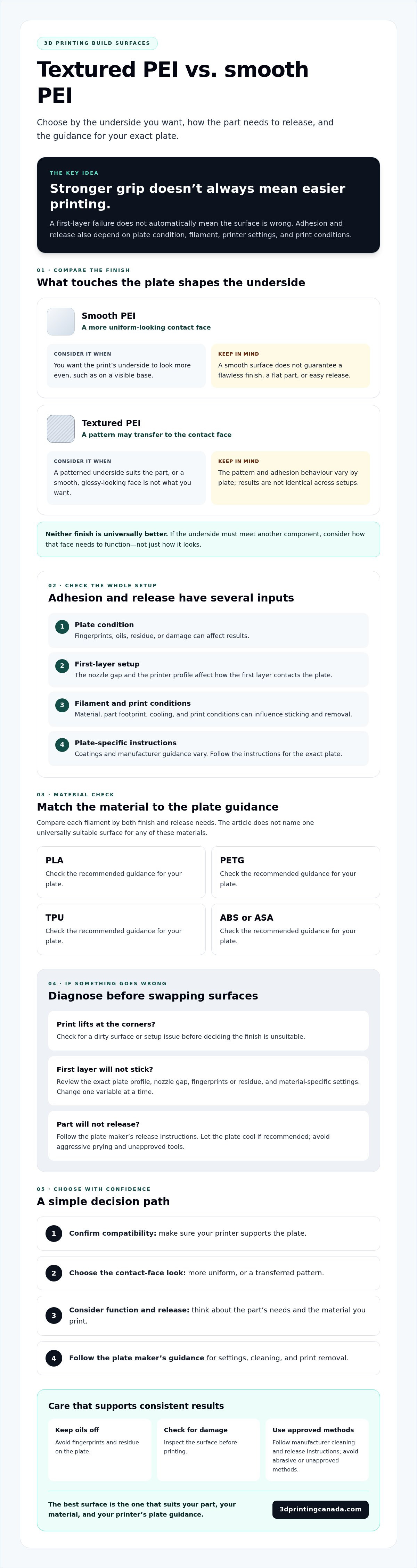
How to Choose Between a Textured PEI Sheet and Smooth PEI Plate
Make the choice in order, ruling out compatibility issues before comparing finishes. The textured pei sheet vs smooth pei plate decision should start with your printer and the parts you make, not a general claim that one surface works better for everyone.
- Identify your printer. Note the exact model and build-plate system.
- Confirm plate support. Check the printer maker’s compatibility guidance, including plate size and approved profiles.
- Choose your material. Confirm that both the printer and specific plate support it.
- Prioritize the contact face. Decide whether the part needs a smoother-looking underside or can use a transferred pattern.
Before buying another plate, identify the problem you’re trying to solve. Are parts lifting, sticking too firmly, or showing inconsistent first layers? Check the surface condition and plate-specific setup first. A different finish won’t necessarily fix a problem caused by contamination, settings, or an unsupported material.
Which PEI plate is better for detailed or functional parts?
Start with the face that touches the plate. A visible base may look better with a smoother contact face, while a patterned underside may be acceptable on a functional bracket. For a mating face, consider how its finish could affect fit and contact. Account for geometry too: a broad first-layer area can behave differently from a small footprint, regardless of finish. Test an unfamiliar combination with a small part before committing to a long print.
Should you keep both smooth and textured PEI surfaces?
Two surfaces can be useful if you regularly switch between projects that call for different underside finishes or material-specific plate guidance. But a second plate isn’t essential for every printer owner. If most of your prints use similar materials and don’t need different contact-face finishes, one compatible surface may meet your needs. Consider storage, plate changes, and how often you’ll use each option before adding another.
Use this framework to narrow your choice, then verify the exact plate’s compatibility and instructions before ordering. To compare options for your setup, browse 3D printer accessories and confirm current availability and printer compatibility for any plate you’re considering.
Care for Your PEI Plate and Choose Your Next Step
A clean, undamaged plate helps you get more consistent results, but the right care depends on its coating and manufacturer. Follow the instructions for your specific plate rather than relying on a cleaning method recommended for a different PEI surface. If print results change unexpectedly, check the plate and your setup before assuming you need a replacement.
How do you clean and maintain a PEI build surface?
- Use approved cleaning methods. Check the plate maker’s instructions for suitable cleaners and cleaning frequency. Avoid unapproved chemicals, solvents, and abrasives that could harm the surface.
- Keep oils off the plate. Handle the print area by its edges where practical, and avoid touching the build surface with your fingers.
- Inspect the surface. Look for residue, wear, or visible damage if adhesion changes. Don’t sand or repair a coating unless the manufacturer specifically recommends it.
- Troubleshoot before changing plates. Check cleanliness, first-layer setup, filament condition, and whether the correct plate profile is selected.
For removal, follow the plate maker’s release guidance. Don’t force a stuck print off with an unapproved tool; aggressive prying can damage the part or surface. The same care applies to the textured pei sheet vs smooth pei plate decision, even though cleaning and release instructions may differ between specific plates.
What should you check before buying a replacement plate?
Confirm your exact printer model, plate dimensions, mounting method, and supported build-plate profile. Then check the plate manufacturer’s material compatibility, cleaning instructions, and print-release guidance. A similar-looking plate isn’t automatically compatible, and advice for one surface may not apply to another.
If you’re considering accessories for a Bambu Lab printer, the Bambu Lab accessories guide can be a useful place to continue your research. Verify current availability and exact printer compatibility before choosing a particular plate.
To compare accessories for your setup, explore current 3D printing accessories and check the details against your printer and print requirements.
Choose the Surface That Fits Your Next Print
The best choice in the textured pei sheet vs smooth pei plate comparison comes down to your printer, material, and the contact face your part needs. A smooth surface can suit a more uniform-looking underside, while a textured one can add a pattern. Neither guarantees better adhesion or easier removal, so check your printer’s approved plate profile and the manufacturer’s care instructions.
If prints aren’t behaving as expected, inspect the plate and review cleanliness, first-layer setup, and filament condition before replacing anything. Check compatibility first, then choose the finish that suits your projects.
3D Printing Canada carries 3D printing hardware and materials, including Bambu Lab accessories, and offers professional 3D printer repair services. Browse the current selection and confirm exact compatibility before choosing an accessory.
Explore 3D printing accessories and check which options suit your printer and print requirements.
Frequently Asked Questions
Is a textured PEI sheet better than a smooth PEI plate?
Neither surface is better for every printer, material, or part. In the textured pei sheet vs smooth pei plate choice, consider the underside finish you want, how the filament adheres, and how easily the print releases. Textured PEI can leave a patterned, matte contact face, while smooth PEI can create a more uniform-looking underside. Check your printer’s approved plate profile and the manufacturer’s guidance before deciding.
Can you print PLA on a textured PEI sheet?
Yes, PLA can be printed on some textured PEI sheets, but confirm that your specific sheet and printer support it. Textured PEI may leave a pattern on the print’s underside, which can suit functional parts or prints where that face isn’t prominent. If the first layer doesn’t adhere reliably, check plate cleanliness and the plate-specific profile before assuming the surface is unsuitable.
Can PETG stick too strongly to a smooth PEI plate?
Yes, PETG can bond too strongly to some smooth PEI plates, making removal difficult and potentially damaging the surface if you force the print off. The risk depends on the particular plate and setup, so check its manufacturer’s instructions before printing PETG. Follow the specified release guidance, and don’t pry aggressively or apply a release agent unless the plate maker recommends it.
Which PEI plate gives a smoother bottom surface?
A smooth PEI plate can produce a more uniform-looking underside than a textured plate, which may transfer a pattern to the first layer. The result also depends on the plate itself and first-layer quality, so “smooth” doesn’t guarantee a flawless finish. If the bottom face will be visible or needs to contact another part, check a test print before choosing a surface for a larger project.
How do you clean a textured PEI sheet or smooth PEI plate?
Follow the cleaning instructions for your exact plate, because approved methods can differ. Keep fingerprints, oils, and residue off the surface, and handle the plate by its edges when practical. Use only recommended cleaners and materials, and avoid unapproved abrasives or chemicals. If adhesion changes, inspect the surface for residue, wear, or damage before adjusting print settings or replacing the plate.
Can you use the same print settings for smooth and textured PEI?
Not necessarily. Your printer may use different approved profiles for smooth and textured plates, and first-layer settings can affect adhesion. Select the profile that matches the installed plate and confirm that it supports your filament. Avoid copying settings from another plate without checking the manufacturer’s guidance. If you need to troubleshoot, change one setting at a time so you can identify what improves the result.
What should you check before buying a replacement PEI plate?
Confirm your exact printer model, plate dimensions, mounting method, and support for the plate’s profile or recognition system. Then check the plate maker’s material compatibility, cleaning instructions, and print-release guidance. Don’t assume that a similar-looking plate will fit or work with your printer. If you’re considering a specific plate, verify its current availability and exact compatibility before purchasing.