
Large-format dual extrusion 3D printing for continuous production
The UltiMaker S5 Pro Bundle is a large-format 3D printing system designed to increase uptime, simplify material handling, and make professional printing more manageable in workplaces, studios, and education settings. It combines the proven UltiMaker S5 platform with the Air Manager, Materials Station, and UltiMaker Essentials to support more versatile, around-the-clock production.
The UltiMaker S5 is the largest printer in the UltiMaker family and is built for consistent reliability, dependable performance, and easy operation. Swappable print cores expand material capability, automatic advanced active bed levelling helps maximise first-layer success before every print job, and the full-colour touchscreen keeps machine control straightforward and responsive.
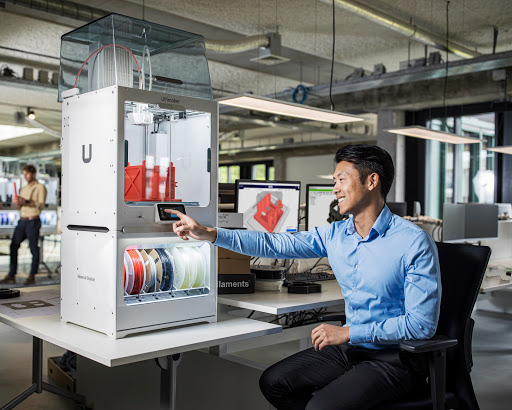
The UltiMaker S5 Pro Bundle can be used safely and conveniently in business environments.
Air control and enclosed printing for better material performance
The UltiMaker Air Manager adds intelligent airflow management and a more enclosed printing environment to the UltiMaker S5. The accessory helps contain temperatures, fumes, and airborne ultrafine particles while also helping keep curious hands and foreign objects out of the printer.
An E10 EPA filter mounted behind a controlled fan captures up to 95% of ultrafine particles emitted during the 3D printing process. The fan communicates directly with the printer so air control settings are matched to the material being used.
The UltiMaker S5 also monitors filter use, records service needs, and prompts users when the EPA filter needs replacement. Setup is straightforward: update the printer firmware to the latest version, install the Air Manager according to the instructions, and the accessory is automatically detected and ready to use.
Adding the Air Manager creates a fully enclosed and temperature-controlled build chamber. That added control helps reduce lifting, delaminating, and warping when printing more demanding materials.
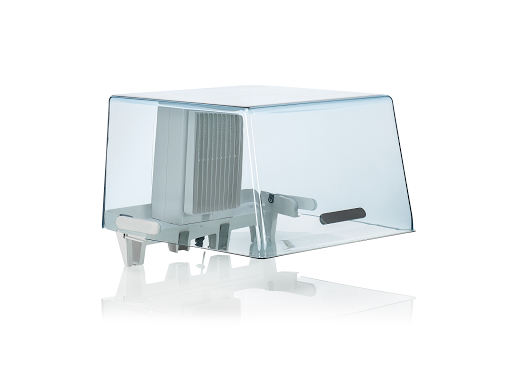
The UltiMaker Air Manager covers the top opening of the UltiMaker S5 and helps remove up to 95% of ultrafine particles emitted during 3D printing.
Automatic filament handling for longer unattended runs
The UltiMaker Materials Station is designed to reduce manual filament changes and keep production moving. Its humidity-controlled, front-facing bay stores up to 6 filament spools and supports efficient, reliable material management for longer print schedules.
- Automatic and assisted loading to either printhead
- Abrasion-resistant dual drive gears for feeding a wide range of filament types
- Flow sensors to detect jams and run-outs
- NFC material recognition for UltiMaker-branded filaments
- Support for third-party filaments up to 1 kg
When filament runs out on either printhead, even during an active job, the Materials Station can detect the event, load the next spool, and communicate with the printer so printing resumes where it stopped. That capability helps unlock true 24/7 production potential while reducing operator intervention.
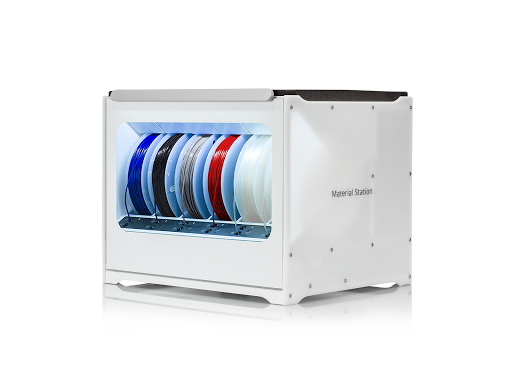
The UltiMaker Materials Station stores up to 6 spools of filament to help maximise printer uptime.
Core printer features that support reliable professional use
The UltiMaker S5 was developed in response to the need for a large-format dual extrusion digital fabrication machine that suits both professional and hobbyist use while still fitting on a desktop or workbench. Two glass front doors help control airflow, and the 4.7” full-colour LED touchscreen provides direct access to printer operation.
The printer also includes an improved filament feed system and dual filament flow sensors. If filament runs out at either nozzle, the print job can resume from where it left off. The heated build plate and advanced active bed levelling contribute to dependable first layers, fewer interruptions, and more consistent print results.
Extruder components are machined from hardened steel, making the system better suited to abrasive filaments. That design pairs well with the UltiMaker Print Core CC for applications that require more wear-resistant material handling.
Software and workflow tools included with UltiMaker Essentials
UltiMaker Essentials extends the hardware with workflow and user-management tools for more controlled printer operation. The package includes UltiMaker Cura Enterprise, e-learning designed to help users and teams reach the Associate level, and multi-user setup options that can help restrict unwanted access to the printer.
Together, the printer, accessories, and software ecosystem create a more complete production platform for professional 3D printing with reliable print quality and day-to-day usability.
Where the UltiMaker S5 Pro Bundle fits best
- Office and studio prototyping: Large-format dual extrusion, material flexibility, and simplified operation support repeated design iterations.
- Small-batch production: The Materials Station and automatic spool switching help reduce downtime during longer jobs.
- Engineering and functional printing: Hardened steel extruder components and support for more demanding materials suit tougher applications.
- Education and shared workspaces: Enclosed airflow management, user controls, and guided software tools help support safer, more structured access.
- Unattended printing workflows: Active bed levelling, filament run-out handling, and environmental control help improve confidence during extended print schedules.
Technical specifications
| Printer type | Large-format dual extrusion 3D printer |
| Touchscreen | 4.7" full-colour LED touchscreen |
| Air filtration | E10 EPA filter captures up to 95% of ultrafine particles emitted during 3D printing |
| Materials Station capacity | Up to 6 filament spools |
| Supported third-party spool size | Up to 1 kg |
Will it work with my printer?
Frequently asked
Reviews
What our customers are saying
No reviews yet — be the first to leave one.
Electrical Safety & Certifications
Learn more about Canadian electrical standards, certification types, and what they mean for you.
UltiMaker S5 Pro Bundle
All orders are shipped from Canada. Duties, taxes, and tariffs may apply.