
An all-metal hotend isn’t automatically an upgrade. If you’re comparing an all-metal hotend vs ptfe lined hotend, the right choice depends on what you print and how your printer is designed, not simply on which option handles higher temperatures.
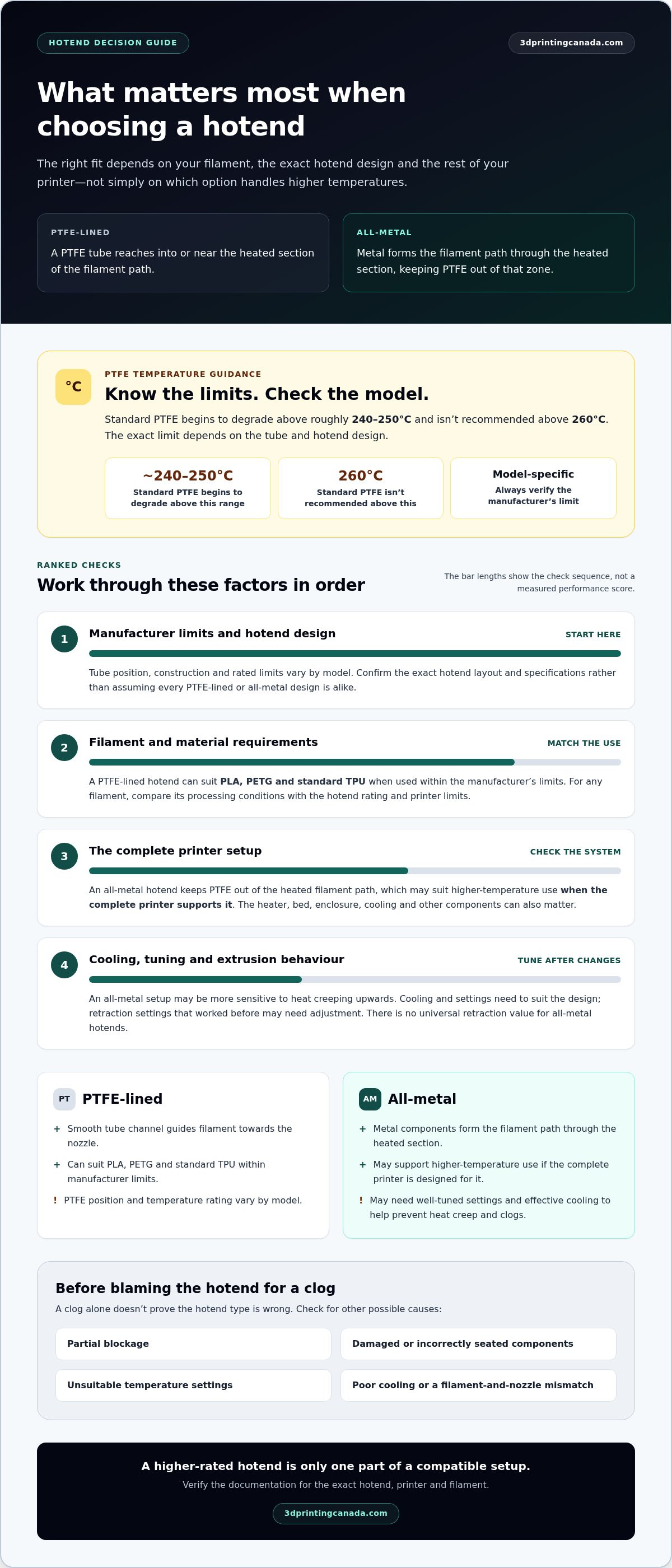
A PTFE-lined hotend can suit PLA, PETG and standard TPU when used within the manufacturer’s limits. Standard PTFE begins to degrade above roughly 240-250°C and isn’t recommended above 260°C, but the exact limit depends on the tube and hotend design. An all-metal hotend keeps PTFE out of the heated filament path, which can make it suitable for higher-temperature use when the complete printer supports it. It may also need well-tuned settings and effective cooling to help prevent heat creep and clogs.
This guide explains the difference between the two designs, compares temperature limits, material compatibility and maintenance, and shows how to match a hotend to your printing habits. You’ll also learn what to check for printer compatibility and how to investigate wear or a clog before deciding whether an upgrade makes sense.
Key Takeaways
- See how PTFE tube placement changes the filament path and what that means for hotend design.
- Compare the all-metal hotend vs ptfe lined hotend using model-specific limits, tuning needs and practical use cases.
- Learn why a hotend alone may not be enough for high-temperature materials, and what other parts of the printer setup matter.
- Use an ordered checklist to identify your current hotend, define your needs and verify fit before installing replacement parts.
- Prioritize documented compatibility and material requirements when considering hotends and printer accessories.
All-Metal Hotend vs PTFE-Lined Hotend: What Is the Difference?
The difference is where the PTFE tube ends in the filament path. In a PTFE-lined hotend, a tube guides filament through part of the hotend and may extend into or close to the heated section. In an all-metal hotend, metal components form the filament path through the heated section, keeping PTFE out of that zone.
This distinction matters because the hotend guides solid filament towards the nozzle and heats it until it can be extruded. The names describe the internal path, not the whole printer. “All-metal” doesn’t mean every printer component is metal or that the machine has no PTFE elsewhere.
How a PTFE-lined hotend guides filament
The PTFE liner creates a smooth channel for filament as it travels towards the nozzle. Depending on the design, the tube may run through much of the hotend or stop before the nozzle, with other components completing the path. Its position, construction and rated limits vary by model, so don’t assume every PTFE-lined hotend has the same layout or temperature rating.
A hotend liner is different from a Bowden tube. A Bowden tube guides filament from a remotely mounted extruder towards the hotend. It may also be made of PTFE, but it sits elsewhere in the feed path. A printer can have a Bowden tube and a separate PTFE liner inside its hotend, or use a different arrangement. Identify which tube you’re looking at before diagnosing wear or planning a replacement.
What changes in an all-metal hotend
An all-metal hotend uses a metal heat break to separate the cooler upper part of the assembly from the heated block below. The heat break helps limit heat travelling upwards, while the filament passes through the hotend’s metal pathway to the nozzle without a PTFE liner in the heated section. The exact internal shape and materials still vary by model.
A PTFE-lined hotend uses a tube that reaches into or near the hot zone; an all-metal hotend keeps PTFE out of the heated filament path and uses metal components through that section.
So, the all-metal hotend vs ptfe lined hotend comparison is about internal construction, not a simple metal-versus-plastic label for the printer. An all-metal hotend may still sit in a printer with PTFE tubing elsewhere, while a PTFE-lined design can include metal parts such as a heater block and nozzle. Focus on where the liner sits and how filament travels through the hotend. Then check the exact hotend documentation to confirm its layout and limits.
How Hotend Design Affects Heat, Materials, and Print Behaviour
The hotend affects how filament is heated and guided, but it doesn’t determine print results on its own. Temperature limits and material compatibility depend on the specific hotend and printer, as well as the filament and the rest of the setup. A higher-rated hotend may open up options, but it can’t compensate for a printer that isn’t designed to meet a material’s requirements.
Temperature limits and material compatibility
Hotend temperature limits are model-specific, so check the manufacturer’s documentation rather than relying on a universal threshold. A PTFE-lined design’s rated limit depends on where its tube sits and the materials used. An all-metal design avoids PTFE in the heated filament path, but that alone doesn’t establish a safe operating temperature or guarantee compatibility.
PLA, PETG, ABS and nylon have different printing requirements. Their names don’t automatically confirm compatibility with either hotend type. Before choosing a filament, compare its recommended processing conditions with the hotend rating and the printer’s documented limits. The heater, bed, enclosure, cooling and other components may also affect whether the full setup is suitable.
Higher-temperature materials can require more than a hotend that reaches the necessary nozzle temperature. The printer must be designed to operate under the relevant conditions, and the material’s requirements must be met. Verify compatibility against the documentation for the exact hotend, printer and filament you plan to use.
Why an all-metal setup can need different tuning
Changing the heat break and filament path can change how a hotend responds to heat. An all-metal setup may be more sensitive to heat creeping upwards from the heated zone, particularly if cooling or operating conditions aren’t well matched. Filament that softens too early can expand in the path and contribute to a jam. The risk depends on the printer’s design, cooling performance and settings, not simply the hotend label.
Retraction settings may also need adjustment after a hotend change. Retraction pulls filament back during travel moves, and settings that worked with one design may contribute to inconsistent extrusion or clogs with another. There’s no universal retraction value for all-metal hotends. Follow the hotend or printer maker’s guidance, then make controlled changes and assess the results rather than changing several variables at once.
A clog doesn’t prove that a hotend type is wrong. Check for other possible causes, including a partial blockage, damaged or incorrectly seated components, unsuitable temperature settings, poor cooling, or a mismatch between filament and nozzle. If extrusion problems persist, 3D printer repair support can help diagnose the setup.
In the all-metal hotend vs ptfe lined hotend comparison, assess the complete system: documented ratings, material needs, cooling and tuning. Confirm the manufacturer’s specifications before changing parts or printing outside the setup’s stated limits.
All-Metal vs PTFE-Lined Hotend: Compare the Real-World Trade-Offs
Neither design is right for every printer. The practical choice depends on the configuration your printer supports, the materials you plan to use and whether you’re prepared to adjust settings after a change. Use the comparison below to separate built-in design differences from results that depend on the full machine.
| Comparison point | PTFE-lined hotend | All-metal hotend | What depends on the setup |
|---|---|---|---|
| PTFE in the hot zone | The liner extends into or near the heated section, depending on the design. | PTFE is kept out of the heated filament path. | Exact placement and construction vary by hotend model. |
| Temperature limits | Set by the specific liner, hotend and printer specifications. | Set by the hotend and the printer’s other limits. | Check manufacturer documentation; design type alone doesn’t establish a safe operating limit. |
| Tuning and maintenance | Follow the maker’s instructions for inspection, replacement and settings. | Retraction or cooling adjustments may be needed, depending on the printer. | Wear, cooling, filament and assembly all affect results. |
| Possible use case | A printer designed around this configuration and materials within its documented limits. | A compatible system with a documented need for the hotend’s capabilities. | Material requirements and the complete printer setup must align. |
When a PTFE-lined hotend may be the practical choice
If your printer was designed and tested around a PTFE-lined hotend, keeping that configuration can be sensible, especially when your usual materials fit the manufacturer’s guidance. A familiar, supported setup also gives you a reference point for routine maintenance and troubleshooting. Check the liner’s condition and follow the printer maker’s replacement instructions rather than assuming an upgrade is necessary.
When an all-metal hotend may be worth considering
Consider an all-metal design when a documented material requirement calls for it and your printer supports the change. Confirm more than the hotend’s rating: the printer’s other components and operating conditions must suit the material too. After installation, assess cooling and tune settings according to manufacturer guidance. An upgrade may expand your options, but it doesn’t guarantee better print quality or prevent clogs.
Use the all-metal hotend vs ptfe lined hotend comparison to decide whether a change solves a real need. If your current hotend handles your planned materials within its documented limits, staying with the supported configuration may be simpler. If it doesn’t, verify compatibility across the full system before replacing parts. Base the decision on your printer’s design and actual printing plans, not on the assumption that one hotend type is always superior.
How to Choose or Upgrade a Hotend Without Creating New Problems
A hotend change should solve a defined need, not introduce guesswork. First decide whether you’re planning to print materials that require a different setup or trying to fix a problem with your current one. A clog or inconsistent extrusion doesn’t automatically mean you need an all-metal hotend. Work through these checks before buying parts or taking the printer apart.
- Identify the hotend you have. Check the printer documentation and inspect the existing assembly only as the manufacturer recommends. Record the hotend type and relevant part details so you can compare against the correct configuration.
- Define the reason for changing it. For a material upgrade, compare the material’s requirements with the documented limits of your hotend and printer. For a printing fault, investigate symptoms such as a partial blockage, irregular extrusion or repeated jams first. These can have several causes, so replacing the hotend may not solve the problem.
- Verify the fit and system requirements. Read both printer and hotend manufacturer documentation before buying or installing parts. Check mounting, heater, thermistor, firmware and nozzle details. Similar-looking hotends aren’t necessarily mechanically or electrically interchangeable.
- Plan installation and tuning. Follow the hotend maker’s installation and temperature-control instructions. After a hardware change, inspect the assembly and calibrate as directed before relying on it for longer prints.
Check printer compatibility before replacing parts
Compatibility goes beyond whether a hotend fits into the toolhead. The heater and thermistor must suit the printer’s control system, and firmware settings may need to match the installed hardware. Nozzle details also matter because they affect the filament path and must suit the hotend. Don’t infer compatibility from a shared shape or general hotend category. Use the documentation for the exact printer and part, and avoid operating the printer outside the manufacturer’s instructions.
Plan for installation, calibration, and troubleshooting
Once installed, treat the first prints as a chance to observe the new setup. Follow the manufacturer’s guidance for temperature control and calibration, then watch for uneven extrusion, unexpected clogging or unstable temperatures. Change one setting at a time so you can identify what affects the result. If a fault persists or involves complex hardware, the 3D printer repair services guide explains how professional repair support can help.
The all-metal hotend vs ptfe lined hotend decision is only one part of an upgrade plan. Match the hotend to a documented need, verify the complete fit, and keep troubleshooting separate from material ambitions. Explore hotends and printer accessories as you consider parts for your setup.
Find Hotend Parts and Expert 3D Printer Support in Canada
The right choice in the all-metal hotend vs ptfe lined hotend comparison comes down to documented compatibility and the materials you plan to print. An upgrade trend isn’t a reason on its own to replace a working part. Start with your printer’s design and manufacturer guidance, then choose parts or troubleshooting support based on a clear need.
Choose parts that fit your actual printer setup
Use your printer model and its documented requirements as the starting point for any hotend or accessory decision. Check the manufacturer’s specifications for fit, electrical requirements and operating limits, and compare those details with the part documentation before buying or installing anything. A hotend category or a similar-looking component doesn’t establish compatibility with your machine.
3D Printing Canada carries hotends and printer accessories. If you’re researching related components for a Bambu Lab printer, the Bambu Lab accessories guide can help you explore accessory considerations. Use the documentation for your exact printer and part to guide your selection, rather than assuming that any particular hotend will fit or support a specific material.
Get help when a hotend issue persists
If you’re dealing with repeated clogs, inconsistent extrusion or another unresolved hardware fault, replacing the hotend without diagnosing the problem may not address its cause. A repair assessment can help distinguish a hotend issue from problems elsewhere in the printer. 3D Printing Canada’s in-house technicians provide printer repair and warranty service for customers across Canada.
That support can help whether you’re troubleshooting an existing setup or dealing with a fault after a hardware change. Keep notes on the symptoms, recent adjustments and parts involved. Clear details make it easier to assess what the printer is doing and choose a practical next step.
Choose parts for your printer’s documented fit and your actual material requirements, not simply because an upgrade sounds like a performance boost. Explore hotends and printer accessories, or get repair support from a team that works with 3D printers every day.
Make Your Next Hotend Decision with Confidence
Before your next upgrade, write down what you want to print, which printer you use and what its documentation allows. That gives you a clear reference and helps you avoid choosing parts based on trends or assumptions. It also makes it easier to compare options as your projects evolve.
The all-metal hotend vs ptfe lined hotend choice doesn’t need to be rushed. Let your printing goals guide the decision, and plan any changes so you can learn from the results. Each thoughtful adjustment can build your confidence and help you get more from your printer.
Ready to take the next step? Explore 3D printer parts and get expert support as you plan your setup.
Frequently Asked Questions
Is an all-metal hotend always better than a PTFE-lined hotend?
No. In the all-metal hotend vs ptfe lined hotend decision, the best fit depends on your printer’s intended configuration and the materials you use. An all-metal option may suit a documented need, while the original design may be the sensible choice for everyday printing. An upgrade doesn’t automatically improve print quality. Check the manufacturer’s specifications and consider whether you’re prepared to tune and monitor the printer after a change.
Can I replace a PTFE-lined hotend with an all-metal one on any 3D printer?
No. Compatibility depends on the printer and replacement part. Before buying, compare the documentation for mounting, heater, thermistor and firmware requirements, along with the hotend manufacturer’s installation guidance. Two hotends can look similar yet differ in mounting points or electrical needs. Check the documentation for your exact printer and part before making a change.
How hot can a PTFE-lined hotend safely print?
There isn’t one safe temperature that applies to every PTFE-lined hotend. The tube’s material and position, the hotend’s construction and the printer’s specifications all matter. Two hotends that both use PTFE may have different documented limits. Look up the exact model’s rating and stay within the printer manufacturer’s instructions. Don’t base a temperature decision on a broad online rule of thumb or another user’s setup.
What happens if I use a PTFE-lined hotend above its rated temperature?
Operating any component beyond its specified limit can damage parts and create safety concerns. The exact consequences depend on the component and conditions, so don’t assume one temperature or outcome applies to every hotend. Stop printing outside the documented rating and follow the printer and hotend manufacturers’ instructions. If you suspect damage, notice a persistent fault or aren’t sure how to assess the assembly, seek qualified repair help before using it again.
Does an all-metal hotend need different retraction settings?
Possibly, but there’s no universal retraction value for every all-metal setup. A change can affect how filament responds during travel moves, and the result also depends on the extruder, filament and printer configuration. Start with the hotend or printer maker’s guidance. After installation, adjust settings carefully and test with a small print, changing one variable at a time. Don’t copy another printer’s profile without checking whether its hardware and filament match yours.
Can a PTFE-lined hotend print nylon or other higher-temperature materials?
It depends on the exact hotend’s documented rating, the printer’s design and the material manufacturer’s requirements. The material name alone doesn’t establish compatibility. Before loading nylon or another higher-temperature filament, check the limits for the hotend, heater, printer and any other components involved. If one part falls outside the material’s requirements, the complete setup may not be suitable. Follow the manufacturers’ instructions rather than relying on a general material list.
Could heat creep or clogs happen with either hotend type?
Yes. Either design can experience clogs or heat-related extrusion problems, and the cause may lie elsewhere in the printer. A blockage might involve the nozzle, filament condition, cooling, settings or assembly. Check the manufacturer’s troubleshooting guidance and examine the full filament path before swapping hotend types. Note when the problem occurs and what changed beforehand. Those clues can help narrow the cause without treating an upgrade as a guaranteed fix.