
Your 3D printer isn't actually broken; it's just being held hostage by a tangled mess of "spaghetti" that was supposed to be a flexible gasket. We've all felt that specific frustration of watching a twelve-hour print fail because the filament decided to wrap itself around the extruder gear instead of flowing through the nozzle. It's a common hurdle for many makers, but it doesn't have to be your reality. Mastering the TPU filament Canada offers requires a strategic mix of the right hardware setup and a bit of patience with your slicer settings.
We agree that flexible materials are notoriously finicky, especially when Canadian humidity levels start to fluctuate and ruin your surface finish. This guide promises to turn those failed print headaches into a thing of the past. You'll learn exactly how to select the right Shore hardness for your project, calibrate your retraction to eliminate messy stringing, and keep your spools bone-dry. We're diving into the latest 2026 updates for OrcaSlicer and PrusaSlicer 2.9.6, ensuring you have the technical edge to produce durable, functional parts on your very first try.
Key Takeaways
- Master the Shore hardness scale to correctly identify when to use semi-flexible 95A versus ultra-squishy 60A for your functional parts.
- Identify why direct-drive extruders provide the necessary control to prevent the "pushed string" effect that causes most TPU jams.
- Optimize your 2026 slicer profiles with specific speed and retraction settings tailored for the best TPU filament Canada has to offer.
- Learn how to effectively troubleshoot common issues like stringing and under-extrusion using simple post-processing and hardware checks.
What is TPU Filament and Why Use it for Your Projects?
Think of TPU as the bridge between rigid plastics and soft rubbers. It is a Thermoplastic Polyurethane that brings high abrasion resistance and incredible elasticity to your build plate. While older TPE filaments often felt like trying to print with a wet noodle, TPU provides the structural integrity needed for successful extrusion without sacrificing flexibility. If you are looking for the most reliable TPU filament Canada has to offer, you are likely looking for a material that can handle real-world abuse.
It is essentially unbreakable in functional applications. It resists chemical breakdown from oils and greases, which is a massive win for anyone printing automotive parts or workshop tools. Unlike PLA, which can snap under pressure, TPU deforms and then returns to its original shape. It is the ultimate problem-solver for parts that need to survive more than just sitting on a shelf. It offers a level of durability that makes it the preferred choice over older flexible filaments.
The Unique Benefits of Thermoplastic Polyurethane
One of the standout features of TPU is its incredible vibration dampening. If you are building drone frames or machinery mounts, this material absorbs energy that would otherwise rattle your hardware to pieces. It also boasts superior layer adhesion. The layers don't just sit on top of each other; they fuse together so tightly that delamination is almost impossible under normal stress.
For those of us dealing with the Canadian climate, TPU is a game-changer. Standard filaments often become brittle and crack when temperatures drop below freezing. TPU maintains its high impact strength even in winter conditions. This makes it the ideal choice for outdoor gear, like custom snowshoe clips or protective covers for trail cameras, that won't fail the moment the frost hits. It stays flexible while other materials turn into glass.
Common Applications: From Gaskets to Cosplay
The versatility of TPU filament Canada users have access to today means it fits into almost any project category. Industrially, it is the standard for custom seals, grommets, and protective plugs that need to create an airtight or watertight fit. Since it can withstand repeated compression, it is perfect for functional gaskets that rigid materials simply cannot replicate.
- Consumer Goods: Print your own custom phone cases, comfortable watch bands, or even flexible shoe insoles designed for your specific arch.
- Prototyping: Create functional "living hinges" and joints that can bend thousands of times without showing signs of fatigue or tearing.
- Robotics: Design soft-touch grippers or protective bumpers that prevent damage during collisions.
Whether you are a hobbyist making a durable wallet or a professional engineer testing a new industrial valve, TPU provides a level of durability that other filaments cannot match. It is the material you reach for when the job requires "tough" and "flexible" in the same sentence. It transforms your printer from a toy-maker into a serious production tool.
Deciphering Shore Hardness: Which TPU Flexibility is Right for You?
Understanding the Shore A scale is the first step toward a successful print. This scale measures the hardness of flexible materials, ranging from 0 to 100. For 3D printing, you'll mostly encounter values between 60A and 95A. The higher the number, the more rigid the material. Picking the wrong hardness doesn't just affect the part's function; it can lead to immediate hardware jams if your printer isn't equipped to handle "noodle-like" filaments. Think of the Shore rating as your roadmap for printer settings and hardware requirements.
There's a direct trade-off between softness and ease of printing. While ultra-soft filaments offer incredible stretch, they are prone to buckling in the extruder. If you are just starting, stick with higher Shore ratings before moving to specialized, softer options. If you aren't sure which flexibility suits your project, you can browse the full range of TPU filament Canada stocks to compare specifications and find the right fit for your extruder setup. Choosing the right colour and hardness early on will save you hours of troubleshooting later.
Don't forget that your slicer settings significantly alter the final "squish" of your object. A part printed with 95A TPU and low infill, perhaps around 10 percent, can actually feel softer and more compressible than an 85A part with 100 percent infill. Use more walls to increase structural stiffness or reduce them to make a part more compliant. This allows you to "tune" the hardness of your part without having to swap out the entire spool of filament, giving you more versatility with a single roll of TPU filament Canada makers use for functional prototypes.
Shore 95A: The Beginner-Friendly Gold Standard
This is the beginner-friendly gold standard for a reason. If you can print PLA, you can likely print 95A with just a few minor adjustments. It feels similar to a hard rubber mallet or the tread on a shopping cart wheel. Because it's relatively stiff, it works well with most modern Bowden and direct-drive printers. It provides enough resistance to be pushed through the filament path without folding over itself, making it the most reliable entry point for your first flexible projects.
Shore 85A and Below: Reaching Ultra-Flexibility
When your project requires maximum stretch and compliance, like a rubber band or a pencil eraser, 85A is the way to go. These filaments are significantly more "noodle-like" and require a very tight filament path. You'll almost certainly need a direct-drive extruder to print these successfully. Without a constrained path, the filament will buckle and wrap around your drive gears the moment it hits the slightest resistance. Reaching this level of ultra-flexibility requires precise calibration, but the results are unmatched for high-performance seals and high-stretch components.
Preparing Your Hardware: Direct Drive vs. Bowden Extruders
Printing with flexible materials is often compared to trying to push a wet piece of string through a long straw. In a Bowden setup, the distance between the extruder gear and the nozzle creates plenty of room for the filament to bend, compress, and eventually tangle. This is why direct-drive systems, which place the extruder directly on top of the hotend, are the preferred choice for anyone using the TPU filament Canada offers for high-performance parts. By shortening the distance the filament travels, you eliminate the space where most failures occur.
If you are running a Bowden printer, you don't necessarily need to swap your hardware, but you do need to be more meticulous. Ensure your PTFE tube is cut perfectly square and sits flush against the nozzle. Any tiny gap will allow the flexible material to expand and cause a jam. You should also maintain a perfectly clean nozzle. Any residual back-pressure from a partial clog or old filament will force the TPU to "bird-nest" inside your extruder housing, stopping your print in its tracks.
Optimizing Your Extruder Path
A constrained filament path is your best defence against "bird-nesting" jams. This means the filament should have no room to escape between the drive gears and the entry to the hotend. While PTFE-lined hotends are often more forgiving for beginners because they offer less friction, all-metal hotends are better for high-temperature TPU blends. Just be mindful that all-metal setups require tighter retraction control to prevent heat creep. If you find yourself facing a catastrophic jam that you can't clear yourself, our expert team provides 3D printer repair services Canada makers rely on for extruder rebuilds and hardware tuning.
TPU and the Bambu Lab AMS: What You Need to Know
Bambu Lab machines like the X1C and P1S have revolutionized high-speed printing, but the Automatic Material System (AMS) has a significant limitation. You should generally avoid using standard TPU in the AMS. The material is too soft for the internal rollers and creates excessive friction in the long internal tubes, which leads to failed loads or snapped filament. For the best results, mount your spool on the external holder and feed it directly into the toolhead.
When you are printing at the higher speeds these machines are capable of, your nozzle takes a beating. We recommend looking into Bambu Lab accessories Canada for hardened steel nozzle upgrades. These components handle the pressure of high-speed extrusion much better than standard brass, ensuring your TPU filament Canada projects maintain consistent layer lines even during long, complex print jobs. Keeping your hardware optimized ensures that your flexible prints come out looking professional every time.
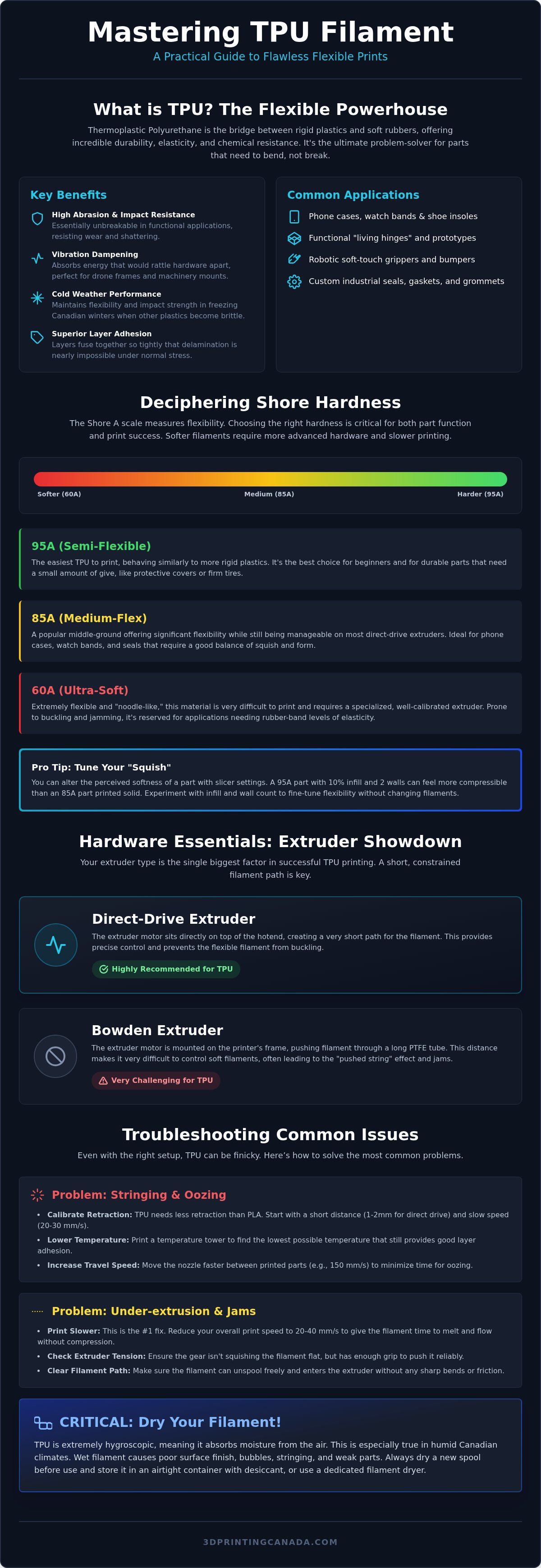
Step-by-Step Guide: Calibrating Your Slicer for Flawless TPU
Getting your slicer settings right is what separates a successful, functional part from a tangled mess of plastic. While modern slicers like OrcaSlicer and PrusaSlicer 2.9.6 come with decent defaults, you need to fine-tune them for the specific TPU filament Canada weather conditions demand. Follow these five steps to dial in your profile for consistent results.
- Slow down your speed: Set your print speed between 20 and 30mm/s. High speeds create inconsistent pressure in the nozzle, which leads to the filament buckling. Keeping it slow ensures the extruder can maintain a steady flow without the material stretching or compressing too much.
- Minimize retraction: Retraction is often the enemy of flexible prints. Set your retraction distance to "less is more," ideally between 0.5mm and 2mm for direct-drive machines. If your retraction is too high, the soft filament will be pulled out of the melt zone and likely wrap itself around your drive gears.
- Increase flow rate: Because TPU is elastic, it can sometimes under-extrude. Increase your flow rate or extrusion multiplier to 1.05 or 1.1. This ensures that your walls are solid and there are no structural gaps in your flexible parts.
- Manage bed temperature: Keep your bed between 50°C and 60°C. TPU has excellent natural adhesion, so you don't need excessive heat to keep it stuck down.
- Tune your cooling: Use 100 percent fan speed for bridges and overhangs to prevent sagging. For the rest of the print, a moderate fan speed helps maintain strong layer bonding while keeping the surface finish clean.
If you want to skip the trial and error, you can shop our full selection of flexible filaments and check out our community-tested profiles for the most popular Canadian brands.
The Secret to Success: Dry Your Filament
TPU is highly hygroscopic, meaning it absorbs moisture from the air like a sponge. If you hear popping sounds at the nozzle or see excessive stringing and bubbles in your print walls, your filament is wet. This is a common issue in humid Canadian summers. To fix this, use a dedicated filament dryer or a heated print bed at 55°C for at least six hours before you start. Dry filament is the single most important factor for a professional surface finish.
Bed Adhesion and Part Removal
One common mistake is assuming TPU needs help sticking to the bed. In reality, it often sticks too well, especially to PEI surfaces. To prevent tearing your build plate or your part, use a glue stick as a release agent. It creates a thin barrier that allows you to pop the print off once the bed cools. For large parts, let the bed reach room temperature and use a thin spatula to gently lift the edges rather than pulling from the top.
Troubleshooting and Post-Processing Your TPU Prints
Once your print is finished, you'll quickly realize that TPU requires a different approach than rigid plastics. You can't simply sand down a rough edge or snap off supports with ease. Because the material is rubbery, traditional post-processing tools like sandpaper often just rough up the surface instead of smoothing it. Success with the TPU filament Canada makers strive for involves a mix of smart slicer moves and careful manual cleanup.
One often-overlooked issue is spool friction. TPU has a naturally "grippy" surface. If your spool holder doesn't rotate freely, the extruder has to work twice as hard to pull the material. This tension can lead to under-extrusion or, in extreme cases, the printer being pulled right off the table. Check your spool tension regularly and consider using a ball-bearing spool holder to keep things moving smoothly. Once you're done, store your filament in an airtight container with plenty of desiccant. Leaving it out for even a single day in a humid environment can ruin the quality of your next project.
Solving the Stringing Puzzle
You probably won't eliminate stringing entirely on soft TPU, but you can hide it. Use the "Combing" setting in your slicer to keep the nozzle over already-printed areas during travel moves. Another effective trick is "Avoid Crossing Perimeters," which forces the nozzle to stay within the boundaries of the part. This keeps the "ooze" inside the infill where nobody can see it. These small adjustments make a massive difference in the final look of your part.
For the remaining "hairs" on the surface, a quick pass with a heat gun works wonders. Don't linger too long, or you'll melt the fine details of your print. A steady hand and a very sharp hobby knife or flush cutters are your best friends for removing larger blobs or stubborn support structures. Take your time; the material is tough, so rushing the cleanup can lead to accidental tears in your finished part. It's better to trim slowly than to ruin a twelve-hour print.
Where to Buy the Best TPU Filament in Canada
Finding high-quality TPU filament Canada is easier when you shop local. At 3D Printing Canada, we stock a massive variety of colours and Shore ratings, from beginner-friendly 95A to specialized ultra-flex 85A. Buying from a domestic source means your filament spends less time in transit and arrives fresher and drier than spools shipped from overseas. It also means you have access to a team that understands the specific challenges of printing in our climate.
If you've run into a hardware snag or need help choosing the right flexibility for a specific industrial gasket, don't hesitate to contact our experts. We're here to help you dial in your settings and ensure your flexible prints are a success on the very first try. Whether you're a hobbyist or a professional, we have the tools and the knowledge to support your creative journey.
Ready to Print Professional Flexible Parts?
Mastering flexible materials doesn't have to be a guessing game. By selecting the right Shore hardness for your project and dialing in your slicer for slow, consistent extrusion, you've already won half the battle. Remember to keep your filament bone-dry and your extruder path as constrained as possible to avoid the dreaded jams. These small adjustments transform a frustrating hobby into a reliable production process for functional, unbreakable parts.
Finding the right TPU filament Canada makers trust is the final step in your journey. Whether you need an ultra-squishy 85A or a beginner-friendly 95A, we have the stock to keep your machines running. We provide fast national shipping and offer expert technical support from real makers who print with these materials every day. Shop the best selection of TPU filament in Canada and start creating durable components that can survive anything the Canadian climate throws at them. We can't wait to see your next successful build.
Frequently Asked Questions
Is TPU filament harder to print than PLA?
Yes, TPU is generally more challenging than PLA because of its inherent flexibility. While PLA is rigid and forgiving, TPU can buckle or tangle if your settings aren't perfectly dialed in. You'll need to slow down your print speeds and manage retraction settings carefully to avoid jams. However, once you understand how to control the filament path, printing the high-quality TPU filament Canada makers use becomes a repeatable and rewarding process for any skill level.
Can I print TPU on a Bowden tube printer like the Ender 3?
You can definitely print TPU on a Bowden printer, but it's best to stick with stiffer blends like Shore 95A. The long PTFE tube in an Ender 3 creates friction that makes ultra-soft filaments difficult to extrude consistently. To succeed, cut your PTFE tube perfectly square and use a very slow print speed, typically around 20mm/s. This minimizes the chance of the filament folding over itself inside the extruder housing during the print job.
Why is my TPU filament popping and bubbling during printing?
Popping and bubbling are classic signs that your filament has absorbed moisture from the air. TPU is highly hygroscopic, meaning it acts like a sponge for humidity. When the wet filament hits the hot nozzle, the water turns into steam, creating those audible pops and visible surface defects. To fix this, use a dedicated filament dryer or a heated bed for several hours. Keeping your TPU filament Canada stock in airtight containers is essential.
Do I need a special nozzle to print TPU filament?
A standard brass nozzle works perfectly fine for most TPU projects since the material isn't abrasive like carbon fibre or glow-in-the-dark filaments. However, if you're using high-speed TPU blends on a modern machine, a hardened steel nozzle can provide better thermal stability. The most important factor isn't the nozzle material, but ensuring it's completely clean. Any internal clogs will create back-pressure that leads to immediate jams in your flexible filament path.
Is TPU filament food safe for kitchen applications?
Most TPU filaments are not considered food safe. While the base material might be non-toxic, the dyes and additives used during manufacturing often aren't rated for food contact. Additionally, FDM printing creates tiny ridges between layers where bacteria can easily grow and hide. Even if the spool is labelled as "FDA compliant," the porous nature of the printed part makes it difficult to sanitize properly for repeated use in a kitchen environment.
Can I use TPU in the Bambu Lab AMS system?
You should avoid using standard TPU in the Bambu Lab AMS. The material is too soft and "grippy" for the internal drive gears and long tubes, which often leads to failed loads or stuck filament. For the best results, bypass the AMS entirely and use the external spool holder. This provides a much more direct path to the toolhead, which is necessary for the flexible materials commonly found in the TPU filament Canada market.
How do I remove TPU prints from a PEI sheet without damaging it?
TPU sticks incredibly well to PEI, sometimes so well that it can tear the coating right off the build plate. To prevent this, always apply a thin layer of glue stick or a specialized release agent before you start. This creates a sacrificial barrier between the part and the bed. Once the print is finished, let the bed cool completely to room temperature. You can then gently use a thin spatula to lift the edges.
What is the best temperature for printing TPU?
Most TPU blends print best between 220°C and 240°C, though you should always check the manufacturer's specific recommendations on the spool. A higher temperature generally improves layer adhesion, which is vital for functional flexible parts. If you see excessive stringing, try lowering the temperature in 5-degree increments. Balancing heat and speed is the key to achieving a clean surface finish without sacrificing the structural integrity of your finished 3D printed components.